

編輯:關於 Android 程式設計
在 Android 頂層源碼目錄執行 make 編譯完成後,會產生 out/target/product/xxx 這個目錄,裡頭就有我們需要的 boot.img、system.img 等產物。
其中 boot.img 由 kernel 與 out/target/product/xxx/root(廣義的 ramdisk)打包而成,也就是說:boot.img = kernel + ramdisk.img。
Android 的編譯框架把許多固定路徑定義成宏:
out/target/product/xxx → PRODUCT_OUTout/target/product/xxx/system → TARGET_OUTout/target/product/xxx/root → TARGET_ROOT_OUT,主要由 system/core/rootdir 複製而來而 bootloader、kernel、system 各自的編譯規則,都寫在 build/core/Makefile 裡。
打包的核心參數彙整在 INTERNAL_BOOTIMAGE_ARGS:
INTERNAL_BOOTIMAGE_ARGS := \
    --kernel $(INSTALLED_KERNEL_TARGET) \
    --ramdisk $(INSTALLED_RAMDISK_TARGET)
除此之外,還包含三項由板級設定檔提供的資訊:
1. 額外的核心命令列(cmdline),來自 BOARD_KERNEL_CMDLINE:
BOARD_KERNEL_CMDLINE := $(strip $(BOARD_KERNEL_CMDLINE))
ifdef BOARD_KERNEL_CMDLINE
    INTERNAL_BOOTIMAGE_ARGS += --cmdline "$(BOARD_KERNEL_CMDLINE)"
#endif
定義處在 device/telechips/tcc88xx-common/BoardConfigCommon.mk:
BOARD_KERNEL_CMDLINE := console=ttyTCC, 115200n8
2. 核心載入基位址,來自 BOARD_KERNEL_BASE:
BOARD_KERNEL_BASE := $(strip $(BOARD_KERNEL_BASE))
ifdef BOARD_KERNEL_BASE
    INTERNAL_BOOTIMAGE_ARGS += --base $(BOARD_KERNEL_BASE)
endif
同一份 BoardConfigCommon.mk 中定義:
BOARD_KERNEL_BASE := 0x40000000
3. 映像的頁面大小,來自 BOARD_KERNEL_PAGESIZE:
BOARD_KERNEL_PAGESIZE := $(strip $(BOARD_KERNEL_PAGESIZE))
ifdef BOARD_KERNEL_PAGESIZE
    INTERNAL_BOOTIMAGE_ARGS += --pagesize $(BOARD_KERNEL_PAGESIZE)
endif
定義處在 device/telechips/tcc8800/BoardConfig.mk:
BOARD_KERNEL_PAGESIZE := 8192
INSTALLED_BOOTIMAGE_TARGET := $(PRODUCT_OUT)/boot.img

$(INSTALLED_BOOTIMAGE_TARGET) : $(MKBOOTIMG) $(INTERNAL_BOOTIMAGE_FILES)
    $(hide) $(MKBOOTIMG) $(INTERNAL_BOOTIMAGE_ARGS) --output $@
把上面的變數代入,實際呼叫的參數就是:
--kernel out/target/product/tcc8800/kernel
--ramdisk out/target/product/tcc8800/ramdisk.img
--cmdline console=ttyTCC,115200n8
--base 0x40000000 --pagesize 8192
要知道最終格式,得看 MKBOOTIMG 這個工具,也就是 out/host/linux-x86/bin/mkbootimg,它由 system/core/mkbootimg 工程編出。其 mkbootimg.c 的寫檔邏輯大致如下:
// 資訊頭
if (write(fd, &hdr, sizeof(hdr)) != sizeof(hdr)) goto fail;
if (write_padding(fd, pagesize, sizeof(hdr))) goto fail;

// 核心
if (write(fd, &kernel_data, hdr.kernel_size) != hdr.kernel_size) goto fail;
if (write_padding(fd, pagesize, hdr.kernel_size)) goto fail;

// 檔案系統
if (write(fd, &ramdisk_data, hdr.ramdisk_size) != hdr.ramdisk_size) goto fail;
if (write_padding(fd, pagesize, hdr.ramdisk_size)) goto fail;
可見 boot.img 由三段構成:標頭資訊、核心資料、ramdisk 檔案系統資料;各段之間未對齊到 page 大小的部分,會以 0 填補(可對照 write_padding 的實作)。
標頭的結構定義在 system/core/mkbootimg/bootimg.h:
struct boot_img_hdr
{
    unsigned char magic[BOOT_MAGIC_SIZE];
    unsigned kernel_size;
    unsigned kernel_addr;
    unsigned ramdisk_size;
    unsigned ramdisk_addr;
    unsigned second_size;
    unsigned second_addr;
    unsigned tags_addr;
    unsigned page_size;
    unsigned unused[2];
    unsigned char name[BOOT_NAME_SIZE];
    unsigned char cmdline[BOOT_ARGS_SIZE];
    unsigned id[8]; // 存放時間戳、校驗和、SHA 等
};
各欄位含義相當直白:magic 用於識別映像、各 size/addr 描述載入位置與大小、page_size 對應前面設定的 BOARD_KERNEL_PAGESIZE、name 與 cmdline 承載識別資訊與核心參數、id 則存放完整性驗證資料。理解這份結構後,就能自己動手拆解或重打包 boot.img 了——這也是自訂 ROM 的第一步。
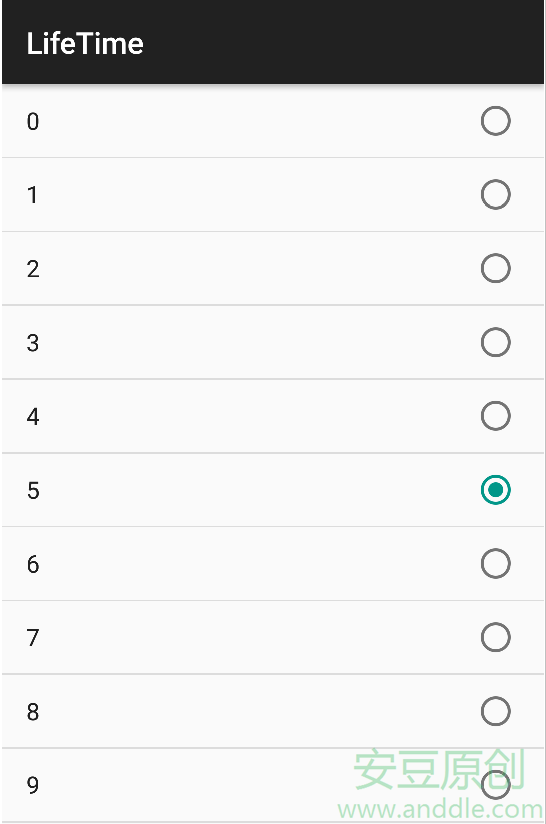 布局與控件(八):ListView 選擇模式 ChoiceMode 完整解析(下)
9.4 ListView 的 Choice Mode ListView 本身就內建了單選與多選能力:單選模式下它會記住唯一被選中的那一列,多選模式下則會記住所有被勾選的列
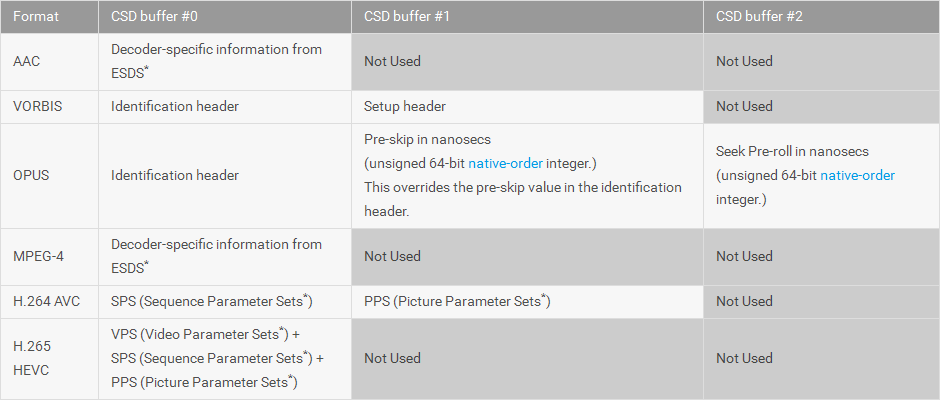 Android 多媒體核心:MediaCodec 中文 API 完整解析
MediaCodec 是 Android 系統對外暴露底層媒體編解碼器(Encoder / Decoder)的存取入口。它並不是一個孤立存在的元件,而是整個 Androi
 Android 多媒體:六步完成 MediaRecorder 錄音功能
MediaRecorder 是 Android 常見的錄音元件。使用前要先理解其生命週期,才能避免狀態錯誤。 權限與參數 需要加入 RECORD_AUDIO 與 WRI
 Android Master Key 漏洞解析:成因、風險與修復概念
Android Master Key 漏洞,官方編號 ANDROID-8219321,是早期 Android 簽名驗證機制中的重大安全問題。它讓攻擊者有機會在 APK