

編輯:關於 Android 程式設計
xUtils 是一個把 Android 常見瑣事一次打包的工具集。它源自 Afinal 框架並做了大量重構:支援大檔案上傳、涵蓋更完整的 HTTP 請求方法、ORM 更靈活,事件註解也不受混淆影響。最低相容到 Android 2.2(API Level 8)。
com.lidroid.xutils.view.annotation.event 套件。使用 xUtils 至少需要網路與外部儲存空間權限:
<uses-permission android:name="android.permission.INTERNET" />
<uses-permission android:name="android.permission.WRITE_EXTERNAL_STORAGE" />
混淆時三件事要做:加入 Android 預設的 ${sdk.dir}/tools/proguard/proguard-android.txt;保留註解類型 -keep class * extends java.lang.annotation.Annotation { *; };對使用 DbUtils 持久化的實體類別不要混淆,或者明確標註 @Table(name=xxx)、@Id(column=xxx)、@Column(column=xxx)、@Foreign(column=xxx, foreign=xxx)。
DbUtils db = DbUtils.create(this);

User user = new User();  // 實體必須有 id 屬性,或有 @Id 標註的屬性
user.setEmail("wyouflf@qq.com");
user.setName("wyouflf");
db.save(user);           // 使用 saveBindingId 時會回填實體的 id

// 依 id 查詢
Parent entity = db.findById(Parent.class, parent.getId());

// 依型別查全部
List<Parent> list = db.findAll(Parent.class);

// IS NULL
Parent p1 = db.findFirst(Selector.from(Parent.class).where("name", "=", null));

// IS NOT NULL
Parent p2 = db.findFirst(Selector.from(Parent.class).where("name", "!=", null));

// WHERE id < 54 AND (age > 20 OR age < 30) ORDER BY id LIMIT pageSize OFFSET pageOffset
List<Parent> list = db.findAll(Selector.from(Parent.class)
        .where("id", "<", 54)
        .and(WhereBuilder.b("age", ">", 20).or("age", "<", 30))
        .orderBy("id")
        .limit(pageSize)
        .offset(pageSize * pageIndex));

// op 為 in 時,最後一個參數必須是陣列或 Iterable(例如 List)
Parent test = db.findFirst(Selector.from(Parent.class).where("id", "in", new int[]{1, 2, 3}));

// op 為 between 時同理
Parent test2 = db.findFirst(Selector.from(Parent.class).where("id", "between", new String[]{"1", "5"});

// 只取部分欄位
DbModel model = db.findDbModelAll(Selector.from(Parent.class).select("name"));

// 自訂 SQL
List<DbModel> models = db.findDbModelAll(sql);
db.execNonQuery(sql);
// xUtils 的 view 註解要求必須提供 id,以確保混淆不受影響
@ViewInject(R.id.textView)
TextView textView;

// 以 id 綁定事件,不受混淆影響;支援一次綁多個 id
@OnClick(R.id.test_button)
public void testButtonClick(View v) {
    // 方法簽章必須與介面定義一致
}

// 在 Activity 中注入
@Override
public void onCreate(Bundle savedInstanceState) {
    super.onCreate(savedInstanceState);
    setContentView(R.layout.main);
    ViewUtils.inject(this);   // 注入 view 與事件
    textView.setText("some text...");
}

// 在 Fragment 中注入
@Override
public View onCreateView(LayoutInflater inflater, ViewGroup container, Bundle savedInstanceState) {
    View view = inflater.inflate(R.layout.bitmap_fragment, container, false);
    ViewUtils.inject(this, view);
    return view;
}

// 其他多載:inject(View)、inject(Activity)、inject(PreferenceActivity) 等
HttpUtils http = new HttpUtils();
http.send(HttpRequest.HttpMethod.GET, "https://www.lidroid.com",
    new RequestCallBack<String>() {
        @Override
        public void onLoading(long total, long current, boolean isUploading) {
            testTextView.setText(current + "/" + total);
        }

        @Override
        public void onSuccess(ResponseInfo<String> responseInfo) {
            textView.setText(responseInfo.result);
        }

        @Override
        public void onFailure(HttpException error, String msg) {
        }
    });
RequestParams params = new RequestParams();
params.addHeader("name", "value");
params.addQueryStringParameter("name", "value");
// 只有字串參數時預設使用 BodyParamsEntity(application/x-www-form-urlencoded)
params.addBodyParameter("name", "value");
// 加入檔案參數後改用 MultipartEntity(multipart/form-data)
params.addBodyParameter("file", new File(path));
// 也可自訂:params.setBodyEntity(new StringEntity(jsonStr, charset));

HttpUtils http = new HttpUtils();
http.send(HttpRequest.HttpMethod.POST, uploadUrl, params,
    new RequestCallBack<String>() {
        @Override
        public void onLoading(long total, long current, boolean isUploading) {
            testTextView.setText(isUploading
                    ? "upload: " + current + "/" + total
                    : "reply: " + current + "/" + total);
        }

        @Override
        public void onSuccess(ResponseInfo<String> responseInfo) {
            testTextView.setText("reply: " + responseInfo.result);
        }

        @Override
        public void onFailure(HttpException error, String msg) {
            testTextView.setText(error.getExceptionCode() + " : " + msg);
        }
    });
HttpUtils http = new HttpUtils();
HttpHandler handler = http.download(
        "https://apache.dataguru.cn/httpcomponents/httpclient/source/httpcomponents-client-4.2.5-src.zip",
        "/sdcard/httpcomponents-client-4.2.5-src.zip",
        true,  // 目標檔已存在時接續下載;伺服器不支援 Range 則重新下載
        true,  // 若回應中有檔名,下載完成後自動重新命名
        new RequestCallBack<File>() {
            @Override
            public void onLoading(long total, long current, boolean isUploading) {
                testTextView.setText(current + "/" + total);
            }

            @Override
            public void onSuccess(ResponseInfo<File> responseInfo) {
                testTextView.setText("downloaded: " + responseInfo.result.getPath());
            }

            @Override
            public void onFailure(HttpException error, String msg) {
                testTextView.setText(msg);
            }
        });

// 隨時停止
handler.cancel();
BitmapUtils bitmapUtils = new BitmapUtils(this);

// 網路圖片
bitmapUtils.display(testImageView, "https://bbs.lidroid.com/static/image/common/logo.png");

// 本地圖片(絕對路徑,以 / 開頭)
bitmapUtils.display(testImageView, "/sdcard/test.jpg");

// assets 中的圖片(以 assets 開頭)
bitmapUtils.display(testImageView, "assets/img/wallpaper.jpg");

// ListView 等容器中,可暫停捲動期間的載入
listView.setOnScrollListener(new PauseOnScrollListener(bitmapUtils, false, true));

// 日誌:自動帶上 className.methodName(L:lineNumber) 的 TAG
LogUtils.d("wyouflf");
xUtils 的價值在「少寫樣板程式碼」:註解取代 findViewById、Selector 取代字串拼接 SQL、BitmapUtils 取代整套圖片快取。它特別適合快速開發與中小型專案。
但也要清楚它的位置:xUtils 已多年未實質更新,DbUtils 沒有編譯期檢查,欄位打錯只會在執行期爆掉;而現在 Android 官方已有 Room(ORM)、ViewBinding(取代 findViewById)、Glide/Coil(圖片)、OkHttp/Retrofit(網路),每一項都更完善且持續維護。新專案建議以官方方案為主;維護老專案時,上面這些用法與混淆注意事項仍然照樣適用。
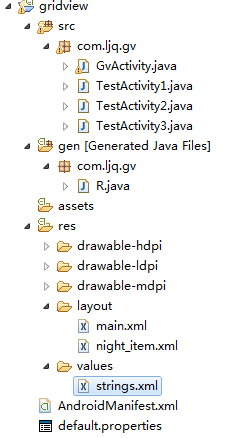 Android GridView 用法解析
GridView 基本概念 GridView 是可滾動的二維網格檢視,常用來顯示多張圖片或九宮格功能。 版面配置 <GridView xmlns:android=h
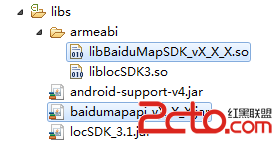 百度地圖 Android SDK 快速入門:打造你的第一個地圖應用
想快速把百度地圖能力帶進 Android 應用,最合適的起點就是先跑通一個最小可用的地圖頁面。本文以「Hello Baidu Map」為例,說明如何從開發包導入、密鑰配置
 Android 密碼顯示與隱藏功能實例
密碼輸入框的顯示與隱藏是常見的表單功能。Android 中可透過切換 TransformationMethod,讓密碼在明文與掩碼之間切換,提升輸入便利性。 佈局設計
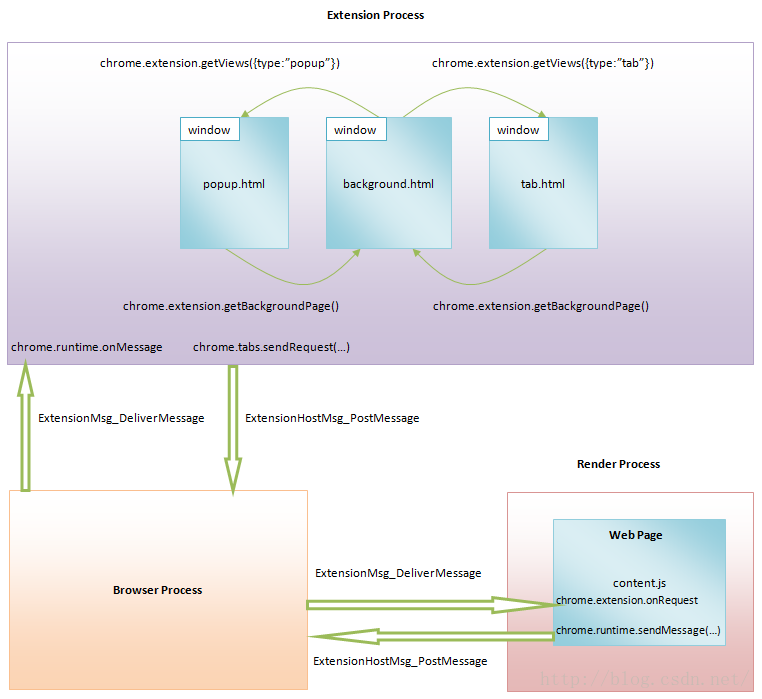 Chromium 擴展(Extension)通信機制深度分析
Chromium 的 Extension 由 Page 與 Content Script 組成。若把 Extension 看作一個 App,那麼 Page 與 Conte