

編輯:關於 Android 程式設計
在 Android 中,有些資料(如通訊錄、音訊、視訊檔等)需要供多個應用程式共用。為了更好地對外提供資料,系統提供了 ContentProvider 機制,讓我們可以存取這類資料。例如許多音樂播放器的掃描功能,其實就用到了 ContentProvider(當然也有播放器是自己實作更底層的功能)。這樣做的好處是統一管理:當新增了某個音訊檔,底層會主動通知 ContentProvider,應用程式在存取時便能取得最新的資料。
Android 也允許我們定義自己的 ContentProvider,只要繼承它的基底類別並實作下列方法即可:
public boolean onCreate()                       // 建立 ContentProvider 時呼叫
public Cursor query(Uri, String[], String, String[], String)  // 查詢指定 Uri,回傳 Cursor
public Uri insert(Uri, ContentValues)           // 依指定 Uri 新增資料
public int update(Uri, ContentValues, String, String[])       // 更新指定 Uri 的資料
public int delete(Uri, String, String[])        // 依 Uri 刪除資料
public String getType(Uri)                      // 回傳指定 Uri 資料的 MIME 類型
其中 getType() 的 MIME 字串規則為:若資料屬於集合類型,應以 vnd.android.cursor.dir/ 開頭,例如 content://contacts/p1 對應 "vnd.android.cursor.dir/p1";若屬於非集合類型,則以 vnd.android.cursor.item/ 開頭,例如 content://contacts/student/100 對應 "vnd.android.cursor.item/student"。
一個標準的 Uri 為 content://authority/path,可分為三部分:
(1) content://:這是 ContentProvider 規定的協議前綴,就像 https:// 代表 HTTP 協議一樣。
(2) authorities:它在所在的 Android 系統中必須唯一,因為系統正是靠它來決定要存取哪一個 ContentProvider,道理與網路上的網址必須唯一相同。
(3) path:資源路徑。
由此可見,ContentProvider 雖也能實現跨進程通訊,但它適用的情境主要與數據庫相關,偶爾也可能是文字檔或 XML 等儲存方式。
若只是定義一個 ContentProvider 而無人取用,是沒有意義的——它必須被其他應用(進程)讀取才有價值。與 ContentProvider 相對應,使用 ContentResolver 的相關方法如下:
getContentResolver()  // Context 提供,用於取得 ContentResolver 物件
insert(Uri uri, ContentValues values)       // 向對應 Provider 插入資料
update(Uri uri, ContentValues values, String where, String[] selectionArgs)  // 更新
query(Uri uri, String[] projection, String selection, String[] selectionArgs, String sortOrder)  // 查詢
delete(Uri uri, String where, String[] selectionArgs)       // 刪除
為了確定一個 ContentProvider 實際能處理哪些 Uri,並判斷各方法中 Uri 參數所操作的資料,Android 提供了 UriMatcher 工具類,主要有兩個方法:
(1) void addURI(String authority, String path, String code):向 UriMatcher 註冊 Uri,其中 authority 與 path 組合成一個 Uri,code 代表該 Uri 對應的識別碼。
(2) int match(Uri uri):依先前註冊的 Uri 判斷指定 Uri 對應的識別碼,若找不到匹配則回傳 -1。
首先是常量的定義:
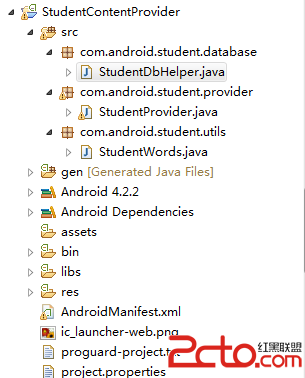
package com.android.student.utils;
import android.net.Uri;
public class StudentWords {
    // 注意 Manifest 中的 authorities 屬性要與此處保持一致
    public static final String AUTHORITY = "com.android.student.provider";
    public static final Uri STUDENT_WITH_ID_URI = Uri.parse("content://" + AUTHORITY + "/student");
    public static final Uri STUDENT_URI = Uri.parse("content://" + AUTHORITY + "/student");
    public static final String TABLE_NAME = "student";
    public static final String ID = "id";
    public static final String NAME = "name";
    public static final String SCORE = "score";
    public static final String ADDR = "address";
}
接著是數據庫輔助類:
public class StudentDbHelper extends SQLiteOpenHelper {
    private Context context;
    public StudentDbHelper(Context context, String name, int version) {
        super(context, name, null, version);
        this.context = context;
    }
    @Override
    public void onCreate(SQLiteDatabase db) {
        String createSQL = "create table " + StudentWords.TABLE_NAME + "("
                + StudentWords.ID + " integer primary key autoincrement,"
                + StudentWords.NAME + " varchar,"
                + StudentWords.SCORE + " integer,"
                + StudentWords.ADDR + " varchar)";
        db.execSQL(createSQL);
    }
    @Override
    public void onUpgrade(SQLiteDatabase db, int oldVersion, int newVersion) {
        Toast.makeText(context, "newVersion:" + newVersion + " will replace oldVersion:" + oldVersion,
                Toast.LENGTH_LONG).show();
    }
}
最後是 ContentProvider 的定義:
package com.android.student.provider;
import com.android.student.database.StudentDbHelper;
import android.content.ContentProvider;
import android.content.ContentUris;
import android.content.ContentValues;
import android.content.UriMatcher;
import android.database.Cursor;
import android.database.sqlite.SQLiteDatabase;
import android.net.Uri;
import com.android.student.utils.StudentWords;
public class StudentProvider extends ContentProvider {
    private static UriMatcher matcher = new UriMatcher(UriMatcher.NO_MATCH);
    private static final int STUDENT_WITH_ID = 1;
    private static final int STUDENT = 2;
    private StudentDbHelper dbHelper;
    static {
        // 其中的 # 為通配符,代表任意數字
        matcher.addURI(StudentWords.AUTHORITY, "student/#", STUDENT_WITH_ID);
        matcher.addURI(StudentWords.AUTHORITY, "student", STUDENT);
    }
    @Override
    public boolean onCreate() {
        dbHelper = new StudentDbHelper(this.getContext(), "student.db3", 1);
        return true;
    }
    @Override
    public String getType(Uri uri) {
        switch (matcher.match(uri)) {
            case STUDENT_WITH_ID:
                return "vnd.android.cursor.item/com.android.student";
            case STUDENT:
                return "vnd.android.cursor.dir/com.android.student";
            default:
                throw new IllegalArgumentException("Unknown Uri:" + uri);
        }
    }
    // 把單一 selection 組合成含 id 的複合篩選條件
    private String getComplexSelection(Uri uri, String selection) {
        long id = ContentUris.parseId(uri);
        String complexSelection = StudentWords.ID + "=" + id;
        if (selection != null && !"".equals(selection)) {
            complexSelection += " and " + selection;
        }
        return complexSelection;
    }
    @Override
    public int delete(Uri uri, String selection, String[] selectionArgs) {
        SQLiteDatabase db = dbHelper.getReadableDatabase();
        int num = 0;
        switch (matcher.match(uri)) {
            case STUDENT_WITH_ID:
                num = db.delete(StudentWords.TABLE_NAME, getComplexSelection(uri, selection), selectionArgs);
                break;
            case STUDENT:
                num = db.delete(StudentWords.TABLE_NAME, selection, selectionArgs);
                break;
            default:
                throw new IllegalArgumentException("Unknown Uri:" + uri);
        }
        getContext().getContentResolver().notifyChange(uri, null);
        return num;
    }
    @Override
    public Uri insert(Uri uri, ContentValues values) {
        SQLiteDatabase db = dbHelper.getReadableDatabase();
        switch (matcher.match(uri)) {
            case STUDENT_WITH_ID:
            case STUDENT:
                long rowId = db.insert(StudentWords.TABLE_NAME, StudentWords.ID, values);
                if (rowId > 0) {
                    Uri studentUri = ContentUris.withAppendedId(uri, rowId);
                    getContext().getContentResolver().notifyChange(studentUri, null);
                    return studentUri;
                }
                break;
            default:
                throw new IllegalArgumentException("Unknow Uri:" + uri);
        }
        return null;
    }
    // 注意其中的 projection 其實就是 columns,即欄位名陣列
    @Override
    public Cursor query(Uri uri, String[] projection, String selection, String[] selectionArgs, String sortOrder) {
        SQLiteDatabase db = dbHelper.getReadableDatabase();
        switch (matcher.match(uri)) {
            case STUDENT_WITH_ID:
                return db.query(StudentWords.TABLE_NAME, projection,
                        getComplexSelection(uri, selection), selectionArgs, null, null, sortOrder);
            case STUDENT:
                return db.query(StudentWords.TABLE_NAME, projection, selection, selectionArgs, null, null, sortOrder);
            default:
                throw new IllegalArgumentException("Unknow Uri" + uri);
        }
    }
    @Override
    public int update(Uri uri, ContentValues values, String selection, String[] selectionArgs) {
        SQLiteDatabase db = dbHelper.getWritableDatabase();
        int num = 0;
        switch (matcher.match(uri)) {
            case STUDENT_WITH_ID:
                num = db.update(StudentWords.TABLE_NAME, values, getComplexSelection(uri, selection), selectionArgs);
                break;
            case STUDENT:
                num = db.update(StudentWords.TABLE_NAME, values, selection, selectionArgs);
                break;
            default:
                throw new IllegalArgumentException("Unknow Uri:" + uri);
        }
        getContext().getContentResolver().notifyChange(uri, null);
        return num;
    }
}
別忘了在 Manifest 中加入 ContentProvider 的宣告:
<provider
    android:name="com.android.student.provider.StudentProvider"
    android:authorities="com.android.student.provider"
    android:exported="true"/>
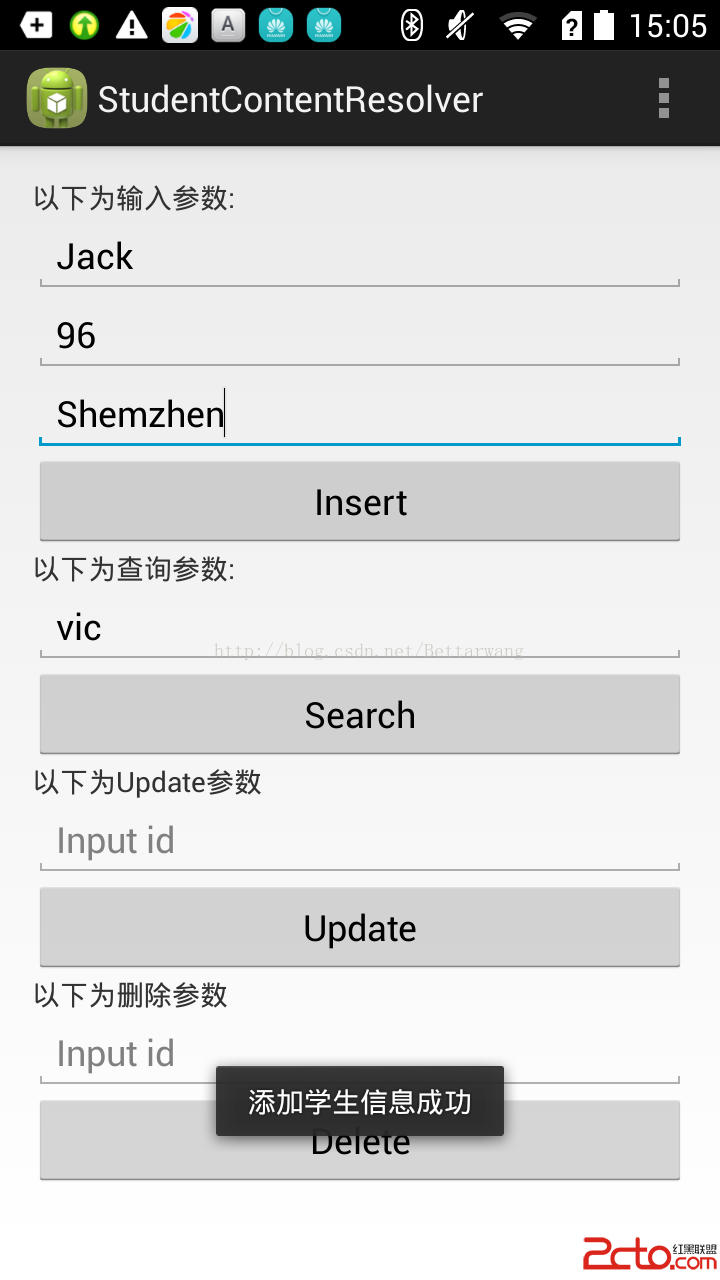
呼叫端透過 getContentResolver() 取得 ContentResolver,再進行 CRUD。以下為 MainActivity 的核心片段:
private void insert() {
    ContentValues values = new ContentValues();
    values.put(StudentWords.NAME, nameET.getText().toString());
    values.put(StudentWords.SCORE, new Integer(scoreET.getText().toString()));
    values.put(StudentWords.ADDR, addressET.getText().toString());
    contentResolver.insert(StudentWords.STUDENT_URI, values);
    Toast.makeText(getBaseContext(), "添加學生信息成功", Toast.LENGTH_SHORT).show();
}
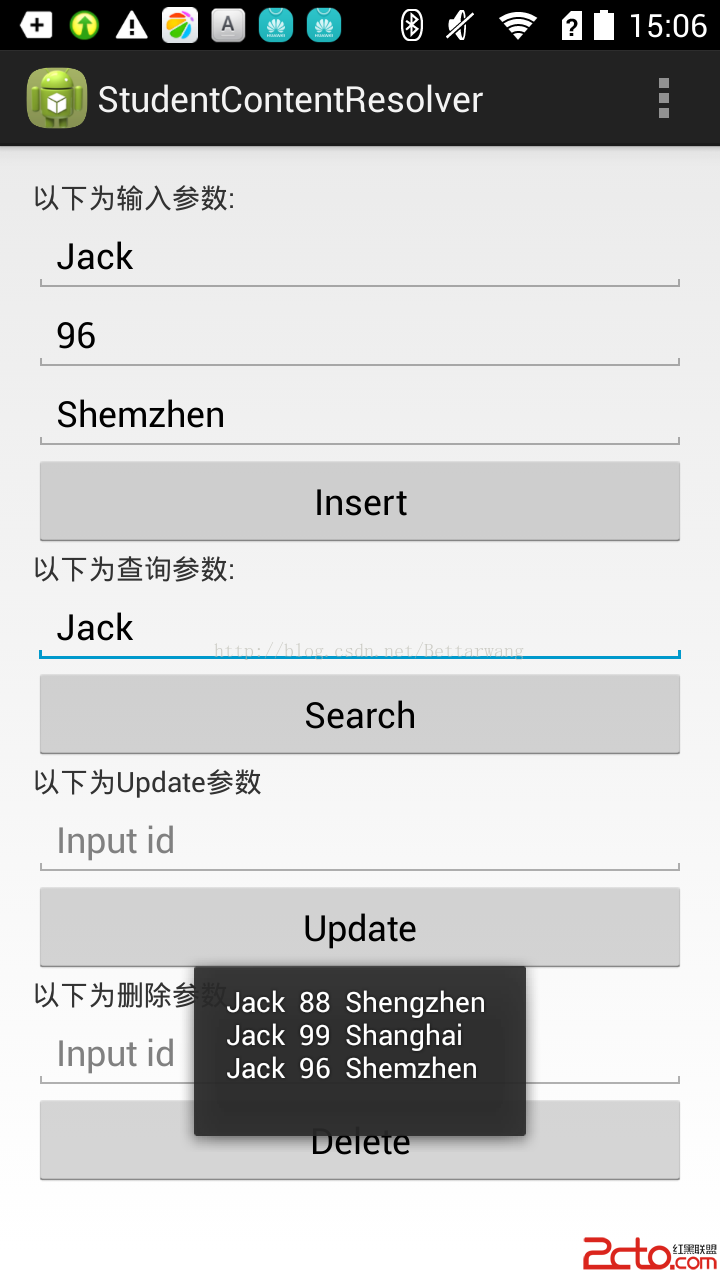
private void query() {
    String name = inputNameET.getText().toString();
    Cursor cursor = contentResolver.query(StudentWords.STUDENT_URI, null,
            "name like ? or address like ?",
            new String[]{"%" + name + "%", "%" + name + "%"}, null);
    Toast.makeText(getBaseContext(), getResult(cursor), Toast.LENGTH_LONG).show();
}
private void update() {
    Integer id = new Integer(inputIdForUpdateET.getText().toString());
    Uri updateUri = ContentUris.withAppendedId(StudentWords.STUDENT_WITH_ID_URI, id);
    ContentValues values = new ContentValues();
    values.put(StudentWords.NAME, "VictorWang");
    contentResolver.update(updateUri, values, null, null);
}
private void delete() {
    Integer id = new Integer(inputIdForDeleteET.getText().toString());
    Uri deleteUri = ContentUris.withAppendedId(StudentWords.STUDENT_WITH_ID_URI, id);
    contentResolver.delete(deleteUri, null, null);
}
執行結果如下:
由此可見,ContentProvider 雖然也能實現跨進程通訊,但更適合用於對外分享結構化資料。聯絡人與 ContentObserver 的範例將於後續補充。
 Android 下拉刷新功能完整實作教學
好久沒寫部落格了,最近一直在忙。有時候即使有空也會犯懶,总想玩一玩、放鬆一下,於是這個菜鳥的部落格就一直沒更新。不過今天不一樣,我要跟大家聊聊怎麼實作很多 App 都有的
 Android 圖片模糊:RenderScript 與純 Java 兩種方案
要做出毛玻璃、虛化背景這類效果,Android 上有兩條路:API 17 以後用 RenderScript,或向下相容用純 Java 實作。 方案一:RenderSc
 Android 注解(Annotation)完全解析:元數據的妙用
之前介紹 xUtils 時提過注解,不過只是蜻蜓點水。今天我們就來詳細解剖一下 Android 中注解的使用。 Java 注解是附加在程式碼中的一些元資訊,供某些工具在
 Android OpenGL ES 紋理定距離拖動(到邊自動停止)
這次要實現的效果是:右側的文字欄可以上下拖動,拖到頂或拖到底就自動停住,而不像之前那版循環滾動。也就是說,從「無限循環」變成了「限定範圍內的定位移動」。 一、著色器 思