

編輯:關於 Android 程式設計
一般我們會用 context.getResources().getIdentifier(name, type, context.getPackageName()) 這個方法,去取得 R.java 中的資源 ID。
其中各參數的意義如下:
type——R 裡的內部類名,例如 "drawable"、"string"、"color"、"dimen"、"layout" 等,這些都是介面開發中常見的資源類型。
name——R 內部類中 static 變數的名稱,例如 "appname",這些名稱由使用者在 XML 檔中定義,也包含 layout、drawable 中 XML 檔的檔名。
最後一個參數則是 APK 的套件名稱。
之所以要用 context.getResources().getIdentifier 來動態取值,是因為在開發屬於自己的 SDK 時,資源檔與 jar 包要提供給其他人使用,介面部分自然需要用這種方式取得資源對應的值。
接著回到主題。在開發自訂控制項時用到了 attr 自訂屬性,期間發現一個問題:styleable 的值無法用 context.getResources().getIdentifier 取得,結果永遠都是 0,而且 styleable 中還包含陣列資料,因此最後只能改用 Java 反射的方式來取值。程式碼如下:
/**
 * 對於 context.getResources().getIdentifier 無法取得的資料(或陣列),
 * 改用資源反射取值。
 * @param context
 * @param name
 * @param type
 * @return
 */
private static Object getResourceId(Context context, String name, String type) {
    String className = context.getPackageName() + ".R";
    try {
        Class<?> cls = Class.forName(className);
        for (Class<?> childClass : cls.getClasses()) {
            String simple = childClass.getSimpleName();
            if (simple.equals(type)) {
                for (Field field : childClass.getFields()) {
                    String fieldName = field.getName();
                    if (fieldName.equals(name)) {
                        System.out.println(fieldName);
                        return field.get(null);
                    }
                }
            }
        }
    } catch (Exception e) {
        e.printStackTrace();
    }
    return null;
}

/**
 * context.getResources().getIdentifier 無法取得 styleable 的資料
 */
public static int getStyleable(Context context, String name) {
    return ((Integer) getResourceId(context, name, "styleable")).intValue();
}

/**
 * 取得 styleable 的 ID 號陣列
 */
public static int[] getStyleableArray(Context context, String name) {
    return (int[]) getResourceId(context, name, "styleable");
}
透過上述反射做法,就能順利讀取到原本無法用 getIdentifier 取得的 styleable 資源及其陣列資料。
 用 UltimateAndroid 快速開發(一):環境部署與配置
61775 用 UltimateAndroid 快速開發(一):環境部署與配置 為了讓大家更順利地用 UltimateAndroid 進行 Android 快速開發,特別
 Android 手勢調節螢幕亮度與音量實作解析
一、緣起 做播放器時需要上下滑動來調亮度與音量,順手記錄一下。參考的是 SuperVideoPlayer 這類專案的作法(https://github.com/curti
 Activity啟動過程源碼分析:從startActivity到系統回調
分析源碼的文章總顯得有些繁瑣枯燥,但把看源碼時的心得整理出來,本身就是一種提升。這篇筆記分析Activity的啟動流程,我會盡量講得直白一些。個人認為看源碼不宜鑽得太細,
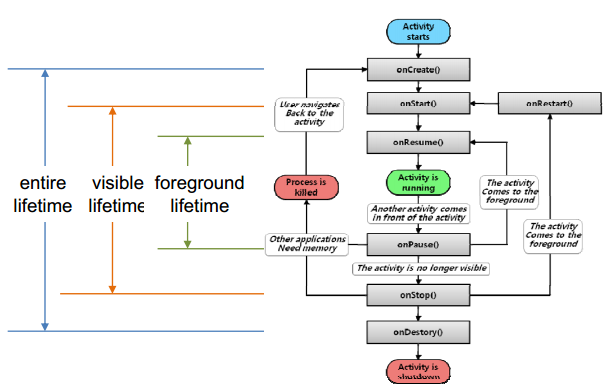 Activity、Window 與 View:Android 界面繪製全鏈路拆解
本文想回答一個問題:Activity 到底是怎麼透過 Window 與 View 把自己畫到螢幕上的。 先看 Lifecycle 這裡只聚焦兩個最常混淆的場景——按 H