

編輯:關於 Android 程式設計
Android 平台提供兩大類動畫機制。第一類是 Frame 動畫,做法是把事先準備好的圖片依序播放,原理近似 GIF 或放映電影;第二類是 Tween 動畫,透過對場景中的物件持續做圖形變換(旋轉、平移、縮放、漸變)來產生動態效果。本文聚焦在第一類,也就是逐幀動畫的實作。
逐幀動畫(Frame By Frame)的核心概念是在「連續的關鍵幀」中拆解動作,於時間軸的每一格上繪製不同的內容,連續播放後便形成動畫。因為每一幀的內容都不相同,製作負擔較大、輸出的檔案體積也偏大;但優勢同樣明顯——靈活性極高,幾乎能表現任何想呈現的畫面,而且這種接近電影的播放模式特別適合細膩的表演型動畫。
首先在 res 目錄下建立(或直接使用)drawable 資料夾,把要播放的圖片放進去,同時建立描述播放順序的 fight.xml:
<?xml version="1.0" encoding="utf-8"?>
<animation-list xmlns:android="https://schemas.android.com/apk/res/android"
    android:oneshot="false" >
    <item android:drawable="@drawable/fight_1" android:duration="200"/>
    <item android:drawable="@drawable/fight_2" android:duration="200"/>
    <item android:drawable="@drawable/fight_3" android:duration="200"/>
    <item android:drawable="@drawable/fight_4" android:duration="200"/>
    <item android:drawable="@drawable/fight_5" android:duration="200"/>
    <item android:drawable="@drawable/fight_6" android:duration="200"/>
    <item android:drawable="@drawable/fight_7" android:duration="200"/>
    <item android:drawable="@drawable/fight_8" android:duration="200"/>
    <item android:drawable="@drawable/fight_9" android:duration="200"/>
    <item android:drawable="@drawable/fight_10" android:duration="200"/>
    <item android:drawable="@drawable/fight_11" android:duration="200"/>
</animation-list>
幾個屬性值得留意:android:oneshot 設為 false 代表動畫會無限循環,設為 true 則只播放一次;android:duration 是該幀停留的毫秒數,這裡每幀 200ms,換算下來一輪約 2.2 秒。
在 MainActivity 中定義一個 ImageView,並在 onCreate() 中掛上動畫資源、取出 AnimationDrawable 物件:
ImageView fightImage = (ImageView) findViewById(R.id.image_aniation);
fightImage.setBackgroundResource(R.drawable.fight);
fightnimation = (AnimationDrawable) fightImage.getBackground();
這裡有個實務上很容易忽略的細節:不要在 onCreate() 裡立刻呼叫 start()。AnimationDrawable 在背景資源剛設定完成時尚未就緒,立即啟動往往沒有反應,較穩妥的做法是延後到使用者觸碰時再啟動:
public boolean onTouchEvent(MotionEvent event) {
    if (event.getAction() == MotionEvent.ACTION_DOWN) {
        fightnimation.start();
        return true;
    }
    return super.onTouchEvent(event);
}
如果希望動畫一進入畫面就自動播放,可以改用 ImageView 的 onAnimationStart() 或透過 View.post() 延後一輪訊息迴圈再呼叫 start(),避開資源尚未附加完成的時機問題。另外,逐幀動畫會把每張圖片都載入記憶體,幀數多、解析度高時要特別留意 OOM 風險,必要時應降低圖片尺寸或改用其他動畫方案。
 從 Android 源碼到 APK:打包流程一次看懂
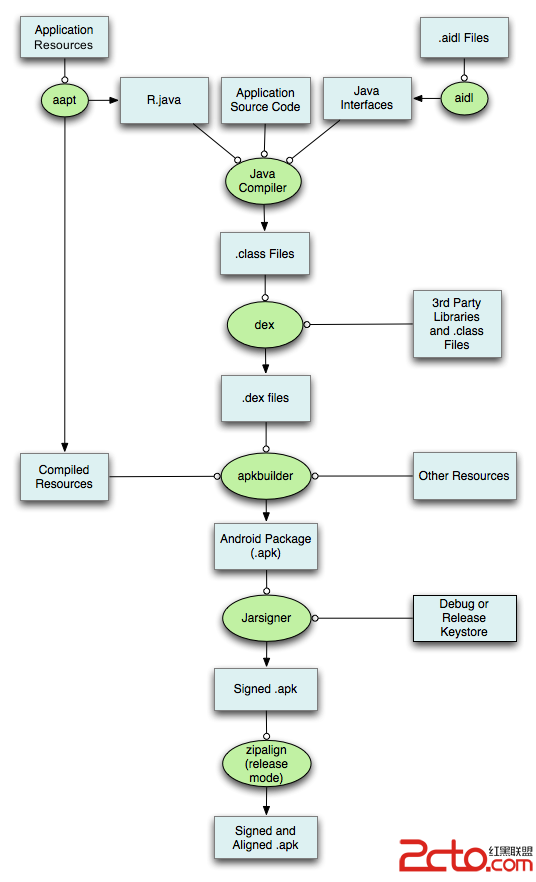
打包流程 Android 程式從源碼到可安裝的 APK,通常會經過資源處理、程式碼編譯、DEX 轉換、打包、對齊與簽名等步驟。 在較詳細的流程中,建置工具會先處理 An
 Hibernate 配置屬性完整對照表
Hibernate 的行為幾乎可以靠配置屬性調到底。這些屬性通常寫在 hibernate.properties 或 hibernate.cfg.xml 中,部分屬於系統級
 Android 使用 SubMenu 建立選項菜單
在 Android 應用中,選項菜單常用於提供與目前畫面相關的操作。早期裝置多提供 MENU 實體鍵,但從 Android 3.0 之後,系統不再強制要求裝置提供 MEN
 RecyclerView 詳解(一):從基本用法到自定義樣式
一、RecyclerView 是什麼 RecyclerView 是比 ListView 更高級、更靈活的列表組件。它本質上是一個用於展示大型數據集的容器,通過復用有限