

編輯:關於 Android 程式設計
本課重點:
· 建立在地區(locale)目錄與字串資源
· 在程式碼與版面配置中正確引用字串資源
延伸閱讀:本地化檢查清單、以資源進行本地化。
把介面上的文字從程式碼裡抽出來、集中放到外部檔案,永遠是值得堅持的好習慣。Android 每個專案天生就有資源目錄,做起來並不費力。
用 Android SDK 工具建立專案時(可參考「建立 Android 專案」),工具會在專案最上層產生 res/ 目錄,底下依資源類型分成數个子目錄,其中 res/values/strings.xml 就是用來存放字串的預設檔案。
要支援多國語言,需要在 res/ 底下多建幾個 values 系列目錄,目錄名稱的尾端加上連接符號與 ISO 國家代碼。例如 values-es/ 對應語言代碼為「es」的地區。App 執行時,Android 會依裝置的地區設定自動挑選合適的資源。
確定要支援哪些語言後,就建立對應的子目錄與字串檔,例如:
MyProject/
  res/
    values/
      strings.xml
    values-es/
      strings.xml
    values-fr/
      strings.xml
然後在各自的檔案裡放入翻譯後的字串。執行期系統會依使用者裝置的語言自動選用對應資源。
英語(預設地區),/values/strings.xml:
<?xml version="1.0" encoding="utf-8"?>
<resources>
    <string name="title">My Application</string>
    <string name="hello_world">Hello World!</string>
</resources>
西班牙語,/values-es/strings.xml:
<?xml version="1.0" encoding="utf-8"?>
<resources>
    <string name="title">Mi Aplicación</string>
    <string name="hello_world">Hola Mundo!</string>
</resources>
法語,/values-fr/strings.xml:
<?xml version="1.0" encoding="utf-8"?>
<resources>
    <string name="title">Mon Application</string>
    <string name="hello_world">Bonjour le monde !</string>
</resources>
注意:地區限定符(以及其他任何設定限定符)不只可以用在字串上,也能用在可繪圖資源。例如你可以為同一張位圖準備多個語言版本,詳見「本地化」相關章節。
在原始碼或其他 XML 檔案中,用 <string> 元素的 name 屬性所定義的名稱即可引用該字串。
在 Java 程式碼中,寫法為 R.string.<string_name>,取得字串有幾種常見方式:
// 從應用程式的 Resources 取得字串
String hello = getResources().getString(R.string.hello_world);

// 或者直接把資源 ID 交給需要字串的方法
TextView textView = new TextView(this);
textView.setText(R.string.hello_world);
在其他 XML 檔案中,凡是接受字串的屬性,都可以寫成 @string/<string_name>:
<TextView
    android:layout_width="wrap_content"
    android:layout_height="wrap_content"
    android:text="@string/hello_world" />
只要養成「UI 文字一律走資源」的習慣,後續要增加語言版本時,只需多開一個 values-xx 目錄,不必回頭翻找程式碼。
 在 Android 上自建 HTTP Server:把 App 識別碼與網頁 Cookie 綁起來
這個需求來自一個很實際的場景:如何把移動端的裝置識別碼(IMEI)與網頁端的 Cookie關聯起來?而網頁可能開在 PC 瀏覽器,也可能開在手機瀏覽器上。 一、技術方案
 Android 取得 SharedPreferences 實例的三種方式與差異
SharedPreferences 是 Android 上用來存放輕量鍵值組資料的元件。取得它的實例目前常見有三種途徑,三者看似相同,實際在檔名與權限上有明顯差別。 三種
 Android 系統移植入門:從底層架構理解起
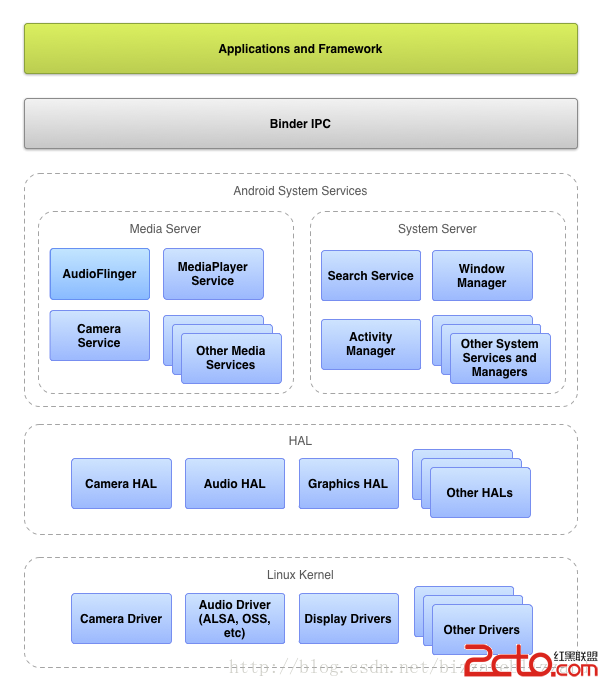
要把 Android 移植到新的硬體平台上,第一步不是急著改程式碼,而是先理解 Android 在系統層次上是如何組裝起來的。因為驅動與 HAL 會跟系統其他部分大量互動
 Android 中 MVP 模式與 MVC 模式對比(附完整示例)
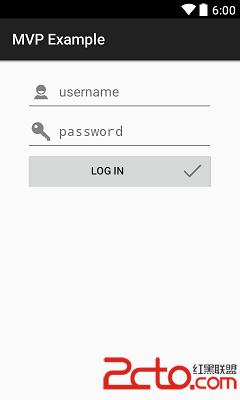
MVP 模式 介紹 MVP(Model-View-Presenter)是 MVC 模式的一個衍生版本,核心目的是解耦,讓項目更易於維護。三個角色的職責如下: Model: