

編輯:關於 Android 程式設計
本專案的目標是透過 Wi-Fi 在手機與 PC 之間建立通訊,並自訂一個簡單的協議對傳輸的檔案進行校驗。要傳輸的是兩張約 3MB 的圖片,同時必須考慮網路中斷的處理。
這裡採用非阻塞 Socket 來實作,因為查閱資料後覺得這種方式比較方便。其實傳統的阻塞式 Socket 也能達成,至於阻塞問題,只要開兩個執行緒,確保讀取不在同一個執行緒上進行,同樣可以解決。
手機端先送出一個「filename」字串給 PC,PC 校驗後回傳檔案名稱;手機端再把接收到的檔案名稱回送給 PC 進行校驗。一旦 PC 端校驗成功,便開始把檔案傳給手機,手機則負責接收。
至於網路中斷的問題,後來發現只要在服務端傳送檔案的那段程式加上 try-catch 攔截異常,服務端程式就不會當掉,而是進入等待狀態;等手機再次與 PC 建立連線後,就能重新傳送檔案。這裡採用的是重傳而非續傳——考量到檔案僅約 6MB,實測大約 2 至 3 秒就能傳完,重傳與續傳差異不大,因此選擇了較簡單的重傳方式。
public class MyServer {
    private final static Logger logger = Logger.getLogger(MyServer.class.getName());

    public static void main(String[] args) {
        Selector selector = null;
        ServerSocketChannel serverSocketChannel = null;
        try {
            selector = Selector.open();
            serverSocketChannel = ServerSocketChannel.open();
            serverSocketChannel.configureBlocking(false);
            serverSocketChannel.socket().setReuseAddress(true);
            serverSocketChannel.socket().bind(new InetSocketAddress(1991));
            serverSocketChannel.register(selector, SelectionKey.OP_ACCEPT);
            while (selector.select() > 0) {
                Iterator<SelectionKey> it = selector.selectedKeys().iterator();
                while (it.hasNext()) {
                    SelectionKey readyKey = it.next();
                    it.remove();
                    SocketChannel socketChannel = null;
                    String string = "";
                    try {
                        socketChannel = ((ServerSocketChannel) readyKey.channel()).accept();
                        string = receiveData(socketChannel);
                        logger.log(Level.INFO, string);
                        if (string.equals("filename")) {
                            File f = new File("D:/chz.jpg");
                            if (f.exists() && f.isFile()) {
                                sendData(socketChannel, "chz.jpg");
                            } else {
                                logger.info("file doesn't exist or is not a file");
                            }
                        }
                        if (string.equals("chz.jpg")) {
                            sendFile(socketChannel, new File("D:/chz.jpg"));
                        }
                    } catch (Exception ex) {
                        logger.log(Level.SEVERE, "1", ex);
                    } finally {
                        try {
                            socketChannel.close();
                        } catch (Exception ex) {
                            logger.log(Level.SEVERE, "2", ex);
                        }
                    }
                }
            }
        } catch (ClosedChannelException ex) {
            logger.log(Level.SEVERE, "3", ex);
        } catch (IOException ex) {
            logger.log(Level.SEVERE, "4", ex);
        } finally {
            try { selector.close(); } catch (Exception ex) { logger.log(Level.SEVERE, "5", ex); }
            try { serverSocketChannel.close(); } catch (Exception ex) { logger.log(Level.SEVERE, "6", ex); }
        }
    }

    private static String receiveData(SocketChannel socketChannel) throws IOException {
        String string = null;
        ByteArrayOutputStream baos = new ByteArrayOutputStream();
        ByteBuffer buffer = ByteBuffer.allocate(1024);
        try {
            byte[] bytes;
            int size = 0;
            while ((size = socketChannel.read(buffer)) >= 0) {
                buffer.flip();
                bytes = new byte[size];
                buffer.get(bytes);
                baos.write(bytes);
                buffer.clear();
            }
            bytes = baos.toByteArray();
            string = new String(bytes);
        } catch (Exception ex) {
            logger.log(Level.SEVERE, "7", ex);
        } finally {
            try { baos.close(); } catch (Exception ex) { logger.log(Level.SEVERE, "8", ex); }
        }
        return string;
    }

    private static void sendData(SocketChannel socketChannel, String string) throws IOException {
        byte[] bytes = string.getBytes();
        ByteBuffer buffer = ByteBuffer.wrap(bytes);
        socketChannel.write(buffer);
        socketChannel.socket().shutdownOutput();
    }

    private static void sendFile(SocketChannel socketChannel, File file) throws IOException {
        FileInputStream fis = null;
        FileChannel channel = null;
        try {
            fis = new FileInputStream(file);
            channel = fis.getChannel();
            ByteBuffer buffer = ByteBuffer.allocateDirect(1024);
            int size = 0;
            while ((size = channel.read(buffer)) != -1) {
                buffer.rewind();
                buffer.limit(size);
                socketChannel.write(buffer);
                buffer.clear();
            }
            socketChannel.socket().shutdownOutput();
        } catch (Exception ex) {
            logger.log(Level.SEVERE, "12", ex);
        } finally {
            try { channel.close(); } catch (Exception ex) { logger.log(Level.SEVERE, "13", ex); }
            try { fis.close(); } catch (Exception ex) { logger.log(Level.SEVERE, "14", ex); }
        }
    }
}
public class MainActivity extends Activity {
    private Button mButton;
    private EditText et;
    private static String string;

    @Override
    protected void onCreate(Bundle savedInstanceState) {
        super.onCreate(savedInstanceState);
        setContentView(R.layout.main);
        et = (EditText) findViewById(R.id.edittext1);
        et.setText("192.168.1.214");
        mButton = (Button) findViewById(R.id.button1);
        mButton.setOnClickListener(new OnClickListener() {
            @Override
            public void onClick(View arg0) {
                string = et.getText().toString();
                new Thread(new Runnable() {
                    @Override
                    public void run() {
                        SocketChannel socketChannel = null;
                        try {
                            socketChannel = SocketChannel.open();
                            SocketAddress socketAddress = new InetSocketAddress(string, 1991);
                            socketChannel.connect(socketAddress);
                            sendData(socketChannel, "filename");
                            String string = receiveData(socketChannel);
                            if (!string.isEmpty()) {
                                socketChannel = SocketChannel.open();
                                socketChannel.connect(new InetSocketAddress("192.168.1.214", 1991));
                                sendData(socketChannel, string);
                                receiveFile(socketChannel, new File("sdcard/afile/" + string));
                            }
                        } catch (Exception ex) {
                            Log.i("chz", null, ex);
                        } finally {
                            try { socketChannel.close(); } catch (Exception ex) {}
                        }
                    }
                }).start();
            }
        });
    }

    private void sendData(SocketChannel socketChannel, String string) throws IOException {
        byte[] bytes = string.getBytes();
        ByteBuffer buffer = ByteBuffer.wrap(bytes);
        socketChannel.write(buffer);
        socketChannel.socket().shutdownOutput();
    }

    private String receiveData(SocketChannel socketChannel) throws IOException {
        String string = null;
        ByteArrayOutputStream baos = new ByteArrayOutputStream();
        try {
            ByteBuffer buffer = ByteBuffer.allocateDirect(1024);
            byte[] bytes;
            int count = 0;
            while ((count = socketChannel.read(buffer)) >= 0) {
                buffer.flip();
                bytes = new byte[count];
                buffer.get(bytes);
                baos.write(bytes);
                buffer.clear();
            }
            bytes = baos.toByteArray();
            string = new String(bytes);
        } finally {
            try { baos.close(); } catch (Exception ex) {}
        }
        return string;
    }

    private static void receiveFile(SocketChannel socketChannel, File file) throws IOException {
        FileOutputStream fos = null;
        FileChannel channel = null;
        try {
            fos = new FileOutputStream(file);
            channel = fos.getChannel();
            ByteBuffer buffer = ByteBuffer.allocateDirect(1024);
            int size = 0;
            while ((size = socketChannel.read(buffer)) != -1) {
                buffer.flip();
                if (size > 0) {
                    buffer.limit(size);
                    channel.write(buffer);
                    buffer.clear();
                }
            }
        } finally {
            try { channel.close(); } catch (Exception ex) {}
            try { fos.close(); } catch (Exception ex) {}
        }
    }
}
其實整個專案最令人頭痛的不是程式本身,而是 Wi-Fi 連線的建立。最初用自己的電腦連路由器、手機也連路由器測試,一切正常;但後來需求變成下位機是一台 XP 電腦,而且要求點對點建立 Wi-Fi,也就是一端設為熱點、另一端連上這個熱點。設想很完美,然而實際測試時發現 XP 並不支援為 Android 建立 Wi-Fi 熱點,卡了兩天都連不上。反過來讓手機建熱點、電腦去連倒是連上了,但程式卻怎麼都跑不動,手機還發燙到不行,最後只能放棄這個方向,改研究外接硬體設備的方案。
整個檔案傳輸工程亦參考了不少關於 Java Socket 的優質技術文章,在此一併致謝。
 Android 屬性動畫入門:ObjectAnimator 與自定義屬性
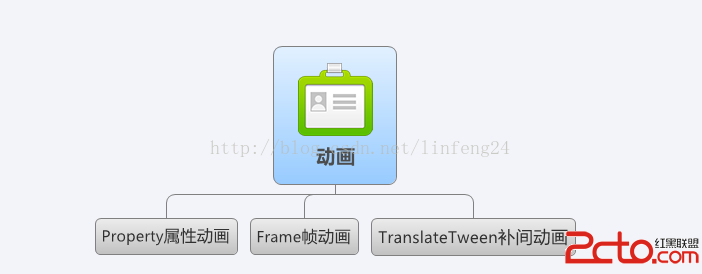
動畫分類Android 動畫大致可分為補間動畫、逐幀動畫與屬性動畫。屬性動畫從 Android 3.0 後成為官方方案,能直接操作物件屬性,靈活度較高。XML 與 Act
 Android 架構模式詳解:MVC、MVP 與 MVVM 的區別與實踐
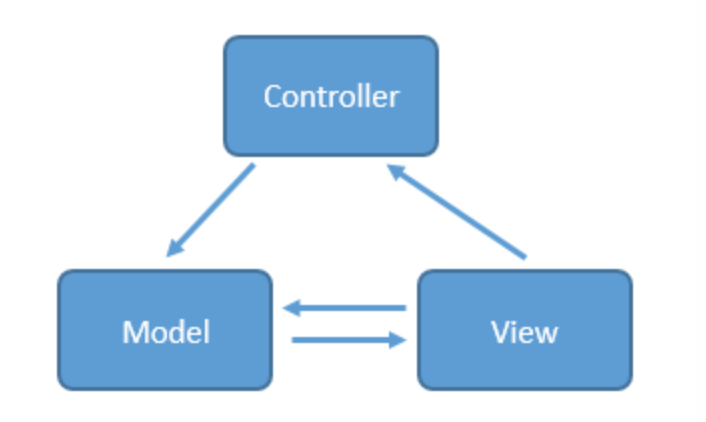
MVC、MVP、MVVM,這三個名字相信大家都耳熟能詳。作為 Android 開發中最常被提及的架構模式,它們的應用範圍極廣。但對不少新手來說,光是分清三者就已頗具挑戰,
 Android 動畫詳解之 View 動畫(Tween Animation)
為了讓互動更順暢,動畫在某些場景下是必要的。Android 3.0 之前支援兩種動畫:Tween 動畫與 Frame 動畫。前者負責平移、縮放、旋轉、透明度漸變這類變換,
 把 Android 開源專案發佈到 JCenter 的完整流程與踩坑筆記
我們每天都在 build.gradle 裡寫 compile com.android.support:design:23.4.0,一行字就把別人的成果拉進自己的專案。那反