

編輯:關於 Android 程式設計
Android 內建了一個輕量級資料庫 SQLite。它不想跟 Oracle、MySQL 比規模,定位是嵌入式引擎,專為手機、PDA 這類資源有限的裝置做「適量資料存取」。
SQLite 支援絕大部分 SQL92 語法,卻不需要安裝、也不需要啟動伺服器行程——整個資料庫就是一個檔案。從本質上看,開啟或建立一個 SQLite 資料庫,其實就是開啟一個檔案準備讀寫,這也是為什麼有人說它像 Microsoft Access(實際功能要強大得多)。
Android 用 SQLiteDatabase 類別代表一個資料庫,底層就是那個資料庫檔。取得物件之後,後續所有操作都透過它進行。
取得方式有三種靜態方法:
openDatabase(String path, CursorFactory factory, int flags):開啟指定路徑的既有資料庫。openOrCreateDatabase(File file, CursorFactory factory):開啟或建立(不存在時)檔案代表的資料庫。openOrCreateDatabase(String path, CursorFactory factory):同上,以路徑字串為參數。其中 CursorFactory 是負責產生 Cursor 的工廠,傳 null 就是使用預設實作。
直接下 SQL:
execSQL(String sql) 與 execSQL(String sql, Object[] bindArgs):執行任意 SQL,通常用於 DDL 與 DML,因為它沒有回傳值。rawQuery(String sql, String[] selectionArgs):執行帶佔位符的查詢,回傳 Cursor。方法式操作:
insert(String table, String nullColumnHack, ContentValues values)update(String table, ContentValues values, String whereClause, String[] whereArgs)delete(String table, String whereClause, String[] whereArgs)query(...):多個重載版本,參數依序對應 distinct、table、columns、selection、selectionArgs、groupBy、having、orderBy、limit,其中 limit 常用來做分頁。事務:beginTransaction() 與 endTransaction()。
這些方法用 SQL 也做得到,但 Android 貼心地提供了它們,讓不熟 SQL 語法的開發者也能操作資料表。可以粗略把 SQLiteDatabase 想成 JDBC 裡 Connection 與 Statement 的合體。
所有查詢方法都回傳 Cursor,它相當於 JDBC 的 ResultSet,並提供移動指標的方法:
move(int offset):正數往下、負數往上移動指定行數。moveToFirst() / moveToLast() / moveToNext() / moveToPrevious() / moveToPosition(int):移動到指定位置,成功回傳 true。指標定位後,再用 getInt()、getString() 這類 getXxx() 方法取值,搭配 getColumnIndex("欄位名") 取得欄位索引。
SQLiteDatabase db = SQLiteDatabase.openOrCreateDatabase("/mnt/db/temp.db3", null);

// 定義建表語句
String sql = "create table tb_news("
        + "id integer primary key autoincrement, "
        + "title varchar(100) not null, "
        + "content varchar(2000));";
db.execSQL(sql);
檔案存在就是開啟,不存在就在該目錄建立。取得 db 之後,execSQL() 可以執行任何 SQL。
String sql = "insert into tb_news(title, content, publishDate) values(?, ?, ?)";
db.execSQL(sql, new Object[]{news.getTitle(), news.getContent(), news.getPublishDate()});
簽名為 long insert(String table, String nullColumnHack, ContentValues values):
ContentValues 本質上像 Map,用 put() 存、getAsXxx() 取。
ContentValues values = new ContentValues();
values.put("name", "孫悟空");
values.put("age", 500);
// 回傳新記錄的 rowid,出錯回傳 -1
long rowid = db.insert("person_info", null, values);
底層其實還是拼 SQL,形式固定為 insert into <表名>(key1, key2...) values(value1, value2...)。所以當 ContentValues 為 null 或沒有任何 key-value 時,拼出來的會是 insert into <表名>() values(),這在語法上不成立——這正是第二參數的用途:它提供一個欄位名,讓語句變成 insert into person(name) values(null)。
因此第二參數指定的欄位不應是主鍵,也不應是非空欄位,否則強塞 null 會引發異常。另外要注意:即使 values 為空,insert 仍會新增一條記錄,只是除主鍵外其餘欄位皆為 null。
ContentValues values = new ContentValues();
values.put("title", news.getTitle());
values.put("content", news.getContent());
db.update("tb_news", values, "id=?", new String[]{String.valueOf(news.getId())});

db.delete("tb_news", "id=?", new String[]{String.valueOf(newsId)});
兩者都回傳受影響的記錄筆數。whereClause 用佔位符 ?,實際值放進 whereArgs 陣列,順序必須與佔位符一致。
public List<News> getNewsByPage(int currentPage, int pageSize) {
    db = helper.getReadableDatabase();
    List<News> list = new ArrayList<News>();
    String start = String.valueOf((currentPage - 1) * pageSize);

    Cursor cursor = db.query(true, "tb_news", null, null, null, null, null,
            "id asc", start + "," + String.valueOf(pageSize));

    while (cursor.moveToNext()) {
        int id = cursor.getInt(cursor.getColumnIndex("id"));
        String title = cursor.getString(cursor.getColumnIndex("title"));
        String content = cursor.getString(cursor.getColumnIndex("content"));
        list.add(new News(id, title, content, null));
    }
    cursor.close();
    return list;
}
等價的 rawQuery 寫法是 select * from tb_news order by id asc limit ?,?。參數含義:distinct 是否去除重複、columns 對應 select 後的欄位、selection 對應 where 條件、groupBy / having 對應分組與過濾、orderBy 對應排序(如 personId desc, age asc)、limit 對應分頁。
事務的標準寫法有一個容易忽略的細節:提交與否取決於有沒有呼叫 setTransactionSuccessful()。
public void transfer(int id1, int id2, int amount) {
    SQLiteDatabase db = helper.getWritableDatabase();
    db.beginTransaction();
    try {
        db.execSQL("update tb_news set account = account - ? where id = ?",
                new Integer[]{amount, id1});
        db.execSQL("update tb_news set account = account + ? where id = ?",
                new Integer[]{amount, id2});
        db.setTransactionSuccessful(); // 設了這個才會提交
    } finally {
        db.endTransaction();           // 沒設成功旗標就回滾
    }
}
endTransaction() 一定會結束事務,但到底是 commit 還是 rollback,看的是前面有沒有把成功旗標設起來。另外還有 inTransaction() 可查詢目前是否處於事務中。把 setTransactionSuccessful() 放在 try 的最後一行,並把 endTransaction() 放在 finally,是比較安全的寫法。
這是 Android 提供的資料庫管理工具類,負責「建立」與「版本升級」兩件事。實作時繼承它並覆寫兩個抽象方法:
onCreate(SQLiteDatabase db):第一次建立資料庫時呼叫,在這裡建表、寫入初始資料。onUpgrade(SQLiteDatabase db, int oldVersion, int newVersion):版本號提高時呼叫,可收到舊版與新版號。取得連線則用 getReadableDatabase() 或 getWritableDatabase(),關閉用 close()。
版本號由開發者在建構 SQLiteOpenHelper 時傳入,也就是說升級時機完全由程式控制:只要你這次傳的數字比上次大,系統就會觸發 onUpgrade。
兩個讀寫方法的差異值得記住:getWritableDatabase() 以讀寫方式開啟,磁碟滿了就會失敗;getReadableDatabase() 會先嘗試讀寫開啟,失敗後再退一層改用唯讀模式開啟,因此在空間緊張時比較不容易出錯。
實務提醒:升級表結構時,既有的舊資料很可能導致流程失敗。常見策略是先把資料暫存、清空舊表、改建新表,再把資料寫回去。
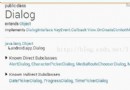 Android 對話框入門:AlertDialog 的退出確認與三按鈕問卷
Dialog 是 Android 裡相當常用的使用者介面元素。和 Menu 一樣,它並不是 View 的子類別,而是獨立的一支繼承體系。 其中的 DatePicke
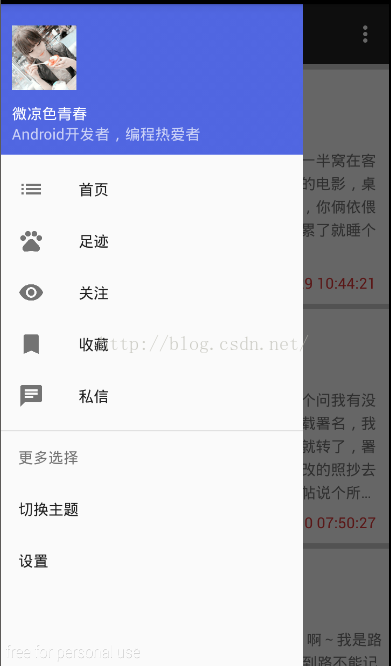 Android 實作:JSON 解析、ListView 圖文混排與 LruCache 快取
專案目標 這個範例以類似的內容流介面為目標,示範如何從網路取得 JSON 資料,解析後顯示在 ListView 中,並加入圖片快取與效能優化。適合想理解網路資料載入、圖文
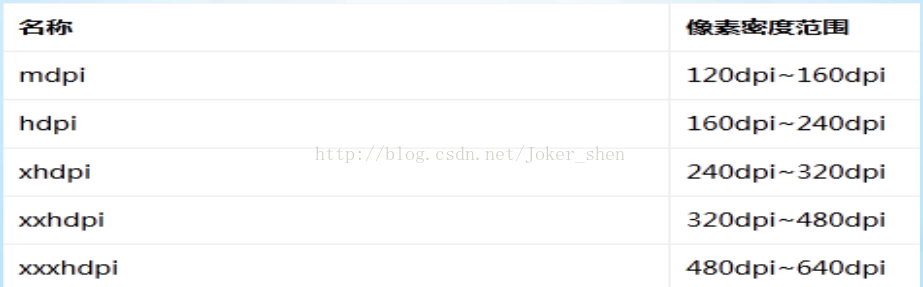 談談 Android 機型適配:語言、屏幕與 SDK 三大面向
機型適配的核心目的,在於讓 Android 應用能夠適應不同國家語言、型號、螢幕尺寸與 SDK 版本等多元的手机環境,同時保持主要功能與介面風格不變。手機適配主要包括三個
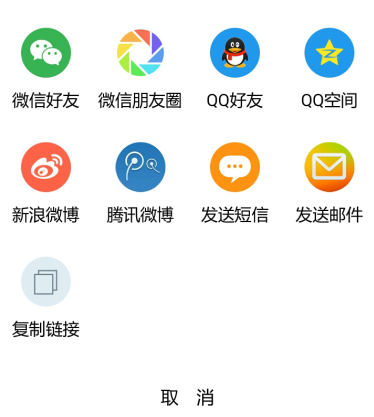 Android 開發筆記(一百零五):社會化分享的三條實作路線
什麼是社會化分享 社會化分享指的是使用者透過網路媒介,把文字、圖片或多媒體資訊散布到自己的社交圈,藉此加速訊息傳播。對 App 來說,社群平台雖多,但真正用戶量夠大的其實