

編輯:關於 Android 程式設計
在 Android 開發中,Activity 之間傳遞數據最常用的方式就是透過 Intent。下面以一個 Activity 跳轉到另一個 Activity 並傳遞字符串為例進行說明。
首先是發送方 Activity,透過 Intent 的 putExtra 方法放入要傳遞的數據,再呼叫 startActivity 跳轉到目標 Activity:
package com.example.myapp;

import android.app.Activity;
import android.content.Intent;
import android.os.Bundle;
import android.view.View;
import android.widget.Button;

public class MyActivity extends Activity {
    private Button btnOk = null;

    @Override
    public void onCreate(Bundle savedInstanceState) {
        super.onCreate(savedInstanceState);
        setContentView(R.layout.main);
        btnOk = (Button) findViewById(R.id.btnCallOther);
        btnOk.setOnClickListener(new MyButtonListener());
    }

    class MyButtonListener implements View.OnClickListener {
        @Override
        public void onClick(View view) {
            Intent intent = new Intent();
            intent.putExtra("key", "value");
            intent.setClass(MyActivity.this, otherActivity.class);
            MyActivity.this.startActivity(intent);
        }
    }
}
接著是接收方 Activity,透過 getIntent() 取得啟動它的 Intent,再用 getStringExtra 取出傳入的數據並顯示:
package com.example.myapp;

import android.app.Activity;
import android.content.Intent;
import android.os.Bundle;
import android.widget.TextView;

public class otherActivity extends Activity {
    private TextView tv = null;

    @Override
    protected void onCreate(Bundle savedInstanceState) {
        super.onCreate(savedInstanceState);
        setContentView(R.layout.other);
        Intent intent = getIntent();
        String s = intent.getStringExtra("key");
        tv = (TextView) findViewById(R.id.otherTextView);
        tv.setText(s);
    }
}
關鍵點在於:發送時 putExtra 使用的 key(此處為 "key")與接收時 getStringExtra 使用的 key 必須完全一致,否則會取到 null。除了字符串,Intent 還能透過 putExtra 傳遞多種基本類型數據,甚至實現 Parcelable 或 Serializable 對象的傳遞,是 Android 組件間通訊最基礎也最重要的手段。
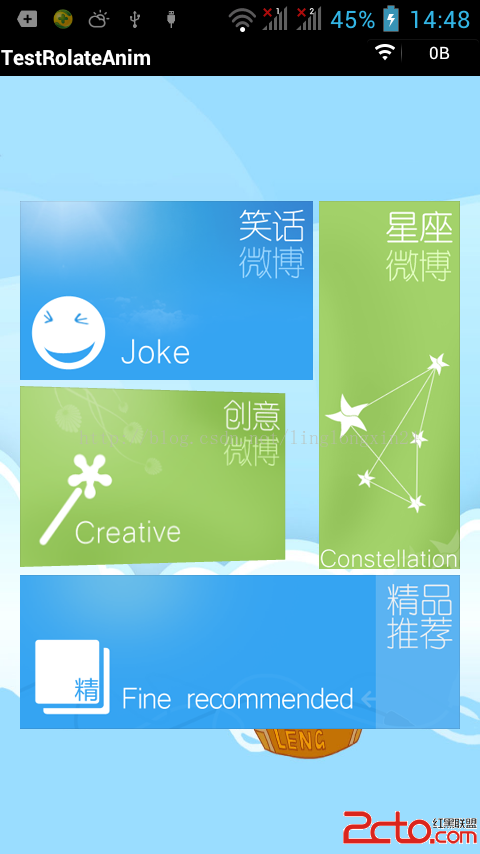 模擬 Windows 8 磁貼點擊下沉傾斜動畫效果
※效果預覽 ※使用說明 本文示範如何打造類似 Windows 8 動態磁貼的點擊效果——當使用者點擊磁貼時,圖示會呈現下沉、傾斜的動畫回饋。做法是透過自訂的 MyIma
 Android 好奇寶寶(05):PopupWindow 與懸浮窗
之所以把 PopupWindow 與懸浮窗放在一起講,是因為兩者的實現原理基本一致,只是細節上略有差異。 原理 使用系統服務 WindowManagerService,把
 Android 自定義 View:三種流行進度條實作教學
自定義 View 的 onDraw 很適合實作各種進度條。本文整理三種常見形式。 圓形充滿型 先畫灰色底圓,再依 progress 畫出綠色內圓。由於半徑隨進度變化,視覺
 Android 多渠道打包實戰:從 productFlavors 到 META-INF 極速方案
渠道包是國內 Android 開發繞不開的一環。友盟統計、應用市場歸因、運營渠道分發,都要靠渠道標識來區分。本文把三條主流路徑講清楚:基於 productFlavors