

編輯:關於 Android 程式設計
檔案上傳是一個比較耗時的操作,如果為上傳過程加上進度提示,就能顯著提升用戶體驗。最終效果如下圖:
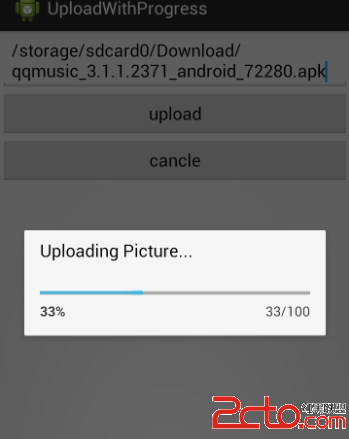
下面直接貼出核心程式碼,可根據實際情況自行修改。
這個類繼承自 AsyncTask,在上傳過程中透過自定義的 ProgressListener 回調已傳輸的位元組數,再換算成百分比更新進度條:
package com.lxb.uploadwithprogress.http;

import java.io.File;
import org.apache.http.HttpResponse;
import org.apache.http.client.HttpClient;
import org.apache.http.client.methods.HttpPost;
import org.apache.http.entity.mime.content.FileBody;
import org.apache.http.impl.client.DefaultHttpClient;
import org.apache.http.protocol.BasicHttpContext;
import org.apache.http.protocol.HttpContext;
import org.apache.http.util.EntityUtils;
import android.app.ProgressDialog;
import android.content.Context;
import android.os.AsyncTask;
import com.lxb.uploadwithprogress.http.CustomMultipartEntity.ProgressListener;

public class HttpMultipartPost extends AsyncTask<String, String, String> {
    private Context context;
    private String filePath;
    private ProgressDialog pd;
    private long totalSize;

    public HttpMultipartPost(Context context, String filePath) {
        this.context = context;
        this.filePath = filePath;
    }

    @Override
    protected void onPreExecute() {
        pd = new ProgressDialog(context);
        pd.setProgressStyle(ProgressDialog.STYLE_HORIZONTAL);
        pd.setMessage("Uploading Picture...");
        pd.setCancelable(false);
        pd.show();
    }

    @Override
    protected String doInBackground(String... params) {
        String serverResponse = null;
        HttpClient httpClient = new DefaultHttpClient();
        HttpContext httpContext = new BasicHttpContext();
        HttpPost httpPost = new HttpPost("上傳 URL,如:https://www.xx.com/upload.php");
        try {
            CustomMultipartEntity multipartContent = new CustomMultipartEntity(
                    new ProgressListener() {
                        @Override
                        public void transferred(long num) {
                            publishProgress((int) ((num / (float) totalSize) * 100));
                        }
                    });
            // 使用 FileBody 傳輸圖片
            multipartContent.addPart("data", new FileBody(new File(filePath)));
            totalSize = multipartContent.getContentLength();
            // 發送
            httpPost.setEntity(multipartContent);
            HttpResponse response = httpClient.execute(httpPost, httpContext);
            serverResponse = EntityUtils.toString(response.getEntity());
        } catch (Exception e) {
            e.printStackTrace();
        }
        return serverResponse;
    }

    @Override
    protected void onProgressUpdate(Integer... progress) {
        pd.setProgress((int) (progress[0]));
    }

    @Override
    protected void onPostExecute(String result) {
        System.out.println("result: " + result);
        pd.dismiss();
    }

    @Override
    protected void onCancelled() {
        System.out.println("cancle");
    }
}
這個類繼承自 MultipartEntity,透過自定義的 CountingOutputStream 在寫出數據時統計已傳輸的位元組數,從而實現上傳進度的實時回調:
package com.lxb.uploadwithprogress.http;

import java.io.FilterOutputStream;
import java.io.IOException;
import java.io.OutputStream;
import java.nio.charset.Charset;
import org.apache.http.entity.mime.HttpMultipartMode;
import org.apache.http.entity.mime.MultipartEntity;

public class CustomMultipartEntity extends MultipartEntity {
    private final ProgressListener listener;

    public CustomMultipartEntity(final ProgressListener listener) {
        super();
        this.listener = listener;
    }

    public CustomMultipartEntity(final HttpMultipartMode mode, final ProgressListener listener) {
        super(mode);
        this.listener = listener;
    }

    public CustomMultipartEntity(HttpMultipartMode mode, final String boundary,
            final Charset charset, final ProgressListener listener) {
        super(mode, boundary, charset);
        this.listener = listener;
    }

    @Override
    public void writeTo(OutputStream outstream) throws IOException {
        super.writeTo(new CountingOutputStream(outstream, this.listener));
    }

    public static interface ProgressListener {
        void transferred(long num);
    }

    public static class CountingOutputStream extends FilterOutputStream {
        private final ProgressListener listener;
        private long transferred;

        public CountingOutputStream(final OutputStream out, final ProgressListener listener) {
            super(out);
            this.listener = listener;
            this.transferred = 0;
        }

        public void write(byte[] b, int off, int len) throws IOException {
            out.write(b, off, len);
            this.transferred += len;
            this.listener.transferred(this.transferred);
        }

        public void write(int b) throws IOException {
            out.write(b);
            this.transferred++;
            this.listener.transferred(this.transferred);
        }
    }
}
最後在 Activity 中呼叫,透過輸入框指定檔案路徑,點擊上傳開始,並可隨時取消:
package com.lxb.uploadwithprogress;

import java.io.File;
import com.lxb.uploadwithprogress.http.HttpMultipartPost;
import android.app.Activity;
import android.content.Context;
import android.os.Bundle;
import android.view.View;
import android.view.View.OnClickListener;
import android.widget.Button;
import android.widget.EditText;
import android.widget.Toast;

public class MainActivity extends Activity implements OnClickListener {
    private Context context;
    private EditText et_filepath;
    private Button btn_upload;
    private Button btn_cancle;
    private HttpMultipartPost post;

    @Override
    protected void onCreate(Bundle savedInstanceState) {
        super.onCreate(savedInstanceState);
        context = this;
        setContentView(R.layout.activity_main);
        et_filepath = (EditText) findViewById(R.id.et_filepath);
        btn_upload = (Button) findViewById(R.id.btn_upload);
        btn_cancle = (Button) findViewById(R.id.btn_cancle);
        btn_upload.setOnClickListener(this);
        btn_cancle.setOnClickListener(this);
    }

    @Override
    public void onClick(View v) {
        switch (v.getId()) {
            case R.id.btn_upload:
                String filePath = et_filepath.getText().toString();
                File file = new File(filePath);
                if (file.exists()) {
                    post = new HttpMultipartPost(context, filePath);
                    post.execute();
                } else {
                    Toast.makeText(context, "file not exists", Toast.LENGTH_LONG).show();
                }
                break;
            case R.id.btn_cancle:
                if (post != null && !post.isCancelled()) {
                    post.cancel(true);
                }
                break;
        }
    }
}
當然,要在 Android 中使用 MultipartEntity 類,必須為專案加入相應的 jar 檔 httmime-4.1.2.jar。透過 AsyncTask 把網路請求放到子執行緒、把進度更新放到主執行緒,就能實現流暢且不阻塞 UI 的帶進度上傳體驗。
 一分鐘搞懂 Android 的 ldpi、mdpi、hdpi 與 xhdpi
DPI 是「每英寸的像素數」,它決定了螢幕看起來有多細緻,也決定了同一個 dp 值在不同機種上會被換算成多少 px。 取得螢幕參數 DisplayMetrics met
 Android Toast 提示框完整指南:使用、定位與自訂
Toast 是什麼? Toast 是 Android 常見的輕量提示機制,它不會搶走焦點,也不接受使用者互動,通常用來短暫告知操作結果。與 Dialog 不同,Toast
 VideoView 播放影片實戰:全螢幕、進度保持與黑屏問題一次解
忙完一段專案,趁空整理收藏夾,發現還有些東西值得分享。近期需求是加上影片播放能力。市面上第三方播放器無論是播放體驗還是功能完整度都遠勝原生方案,公司自家的 SDK 和 G
 Android 簡易音樂播放器:兩種音源的完整實作教學
做一個能用的音樂播放器,其實只需要掌握 MediaPlayer 的生命週期加上一個會走的進度條。本文提供兩份可直接執行的完整程式碼,分別對應「播放 App 內建音樂」與「