

編輯:關於 Android 程式設計
寫專案的時候,Log 是躲不掉的。問題在於越寫越多——這裡加一行、那裡加一行,等到要上線,誰也不知道到底散落了幾百個 Log.d。手忙腳亂地找,簡直有殺人的衝動。
解法很簡單:把所有日誌呼叫收攏到一個工具類裡,用一個 static final boolean 當總開關。上線前改成 false,重新編譯,全部靜音。直接複製到專案裡就能用。
package com.example.qlog;

import java.util.Calendar;

public final class QLog {

    /** 是否列印 */
    public static final boolean DEBUG = true;

    /** Send a VERBOSE log message. */
    public static int v(String tag, String format, Object... args) {
        if (DEBUG) {
            if (args == null || args.length == 0) {
                return android.util.Log.v(tag, format);
            }
            return android.util.Log.v(tag, String.format(format, args));
        }
        return 0;
    }

    /** Send a DEBUG log message. */
    public static int d(String tag, String format, Object... args) {
        if (DEBUG) {
            if (args == null || args.length == 0) {
                return android.util.Log.d(tag, format);
            }
            return android.util.Log.d(tag, String.format(format, args));
        }
        return 0;
    }

    /** Send an INFO log message. */
    public static int i(String tag, String format, Object... args) {
        if (DEBUG) {
            if (args == null || args.length == 0) {
                return android.util.Log.i(tag, format);
            }
            return android.util.Log.i(tag, String.format(format, args));
        }
        return 0;
    }

    /** Send a WARN log message. */
    public static int w(String tag, String format, Object... args) {
        if (DEBUG) {
            if (args == null || args.length == 0) {
                return android.util.Log.w(tag, format);
            }
            return android.util.Log.w(tag, String.format(format, args));
        }
        return 0;
    }

    /** Send a WARN log message and log the exception. */
    public static int w(String tag, Throwable tr) {
        if (DEBUG) {
            return android.util.Log.w(tag, tr);
        }
        return 0;
    }

    /** Send an ERROR log message. */
    public static int e(String tag, String msg, Throwable e) {
        if (DEBUG) {
            return android.util.Log.e(tag, msg, e);
        }
        return 0;
    }

    /** Send an ERROR log message. */
    public static int e(String tag, String msg) {
        if (DEBUG) {
            return android.util.Log.e(tag, msg);
        }
        return 0;
    }

    /** Low-level logging call. */
    public static int println(int priority, String tag, String msg) {
        if (DEBUG) {
            return android.util.Log.println(priority, tag, msg);
        }
        return 0;
    }

    /**
     * 列印呼叫耗時
     * @param cur 上一次的時間點
     * @return 本次的時間點,可直接作為下一次呼叫的參數
     */
    public static long debugDuration(long cur) {
        long sec = System.currentTimeMillis();
        StackTraceElement elem = Thread.currentThread().getStackTrace()[3];
        d("Performance", elem.getFileName() + "_" + elem.getLineNumber()
                         + ":" + (sec - cur));
        return sec;
    }

    /** 列印當前呼叫位置:類別、行號、方法名 */
    public static int printLogPos(String tag) {
        StackTraceElement elem = Thread.currentThread().getStackTrace()[3];
        return d(tag, elem.getClassName() + ":" + elem.getLineNumber()
                     + "::" + elem.getMethodName());
    }

    /** 取得當前呼叫位置的類名 */
    public static String getLogPos(int depth) {
        StackTraceElement elem = Thread.currentThread().getStackTrace()[depth];
        return elem.getClassName();
    }

    /** depth = 4 */
    public static String getLogPos() {
        return getLogPos(4);
    }

    /** 取得從 from 到現在經過的秒數 */
    public static long getSecond(Calendar from) {
        return (System.currentTimeMillis() - from.getTimeInMillis()) / 1000;
    }

    private static final Calendar _20120101 = Calendar.getInstance();
    static {
        _20120101.set(2012, 0, 0, 0, 0, 0);
    }

    /** from = 20120101 */
    public static long getSecond() {
        return getSecond(_20120101);
    }
}
可變參數支援格式化。每個方法都接受 Object... args,內部用 String.format() 組字串。這樣寫 QLog.d(TAG, "user=%s, age=%d", name, age) 比手動拼字串可讀得多,而且當 DEBUG 為 false 時,連 String.format 的開銷都省下來了——這是包一層的隱性收益。
回傳值保持與 android.util.Log 一致。原本的 Log 方法回傳實際寫入的字節數,這裡在關閉時回傳 0,維持了介面契約,呼叫方不會因為回傳值異常而做錯判斷。
用 getStackTrace() 自動取得呼叫位置。printLogPos() 與 debugDuration() 都靠 Thread.currentThread().getStackTrace()[3] 抓呼叫者資訊,省下每次手寫類名的麻煩。索引 3 是固定的:0 是 getStackTrace 本身、1 是工具方法、2 是包裹的方法、3 才是真正的業務呼叫點。
debugDuration() 的串接用法。它回傳本次時間戳,可以直接餵給下一次呼叫:
long t = QLog.debugDuration(0);      // 起點
// ... 一段要測的程式碼
QLog.debugDuration(t);               // 印出這段耗時
注意這幾個依賴 getStackTrace() 的方法都有額外效能成本, stack trace 的捕獲並不便宜,不適合放在高頻路徑上。
這個封裝已足以解決「上線前關不掉日誌」的痛點,但可以再往前一步:
用 BuildConfig.DEBUG 取代手寫 boolean。Gradle 會自動產生這個常數,debug 建置時為 true、release 建置為 false,完全不需要手動維護:
public static final boolean DEBUG = BuildConfig.DEBUG;
或者直接接入 Timber。Jake Wharton 的 Timber 把這套思路做到極致——用 Timber.plant() 一次決定日誌要去哪裡,呼叫端只寫 Timber.d(), Tree 可以依需求替換成寫檔、上報、只在 debug 輸出等多種實作。
不管是自己封裝還是用現成庫,核心觀念只有一個:日誌的開關必須是編譯期或設定期的單一決策點,不能散落在幾百個呼叫端。這份程式碼示範的就是這個原則。
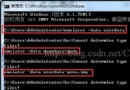 用 emulator -data 參數從 CMD 啟動 Android 模擬器
在命令列(CMD)中使用 emulator.exe 啟動 Android 模擬器有兩種方式: ・emulator -avd(AVD 名稱) ・emulator -data
 安卓開發之 ViewDragHelper 使用大全,並自定義可下拉展開內容的 ViewGroup
一、ViewDragHelper 一個自定義 ViewGroup 的工具類,它提供了許多有用的方法和狀態,允許用戶去拖拽並繪製子 View 在自定義 ViewGroup
 FlexboxLayout 詳解(一):用 Flexbox 思維寫 Android 流式佈局
做過前端的朋友對 Flexbox 一定不陌生,而在 Android 原生佈局體系裡,想實現「一行放不下就自動換行」的流式排列,過去往往得自己繼承 ViewGroup 折騰
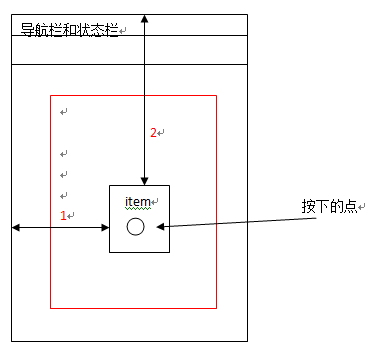 Android 實現 GridView 項目長按拖動排序與刪除(含動畫)
前幾天領導安排了一個需求:實現類似支付寶首頁那樣支持長按拖動、拖動刪除的界面。以前沒做過,一開始簡直老虎吃天、無從下手,網上的 demo 又五花八門、bug 眾多,最終只