

編輯:關於 Android 程式設計
系統預設的 AlertDialog 只有標題、訊息與按鈕,一旦需要在對話框裡放輸入框或其他元件,就得自己指定版面。做法其實很單純:先寫一個版面檔,再用 LayoutInflater 填載,最後透過 AlertDialog.Builder 的 setView() 指定。
先準備一個版面檔(此例為 home_phone.xml),裡面放兩個 EditText,分別用來輸入名稱與電話:
<?xml version="1.0" encoding="utf-8"?>
<LinearLayout xmlns:android="https://schemas.android.com/apk/res/android"
    android:layout_width="match_parent"
    android:layout_height="wrap_content"
    android:orientation="vertical"
    android:padding="10dp">

    <EditText
        android:id="@+id/alert_homephone_nameEt"
        android:layout_width="match_parent"
        android:layout_height="wrap_content"
        android:hint="名稱" />

    <EditText
        android:id="@+id/alert_homephone_phoneEt"
        android:layout_width="match_parent"
        android:layout_height="wrap_content"
        android:hint="電話"
        android:inputType="phone" />

</LinearLayout>
這個版面就是對話框要顯示的內容。
AlertDialog.Builder builder = new AlertDialog.Builder(this);

LayoutInflater inflater = getLayoutInflater();
View layout = inflater.inflate(R.layout.home_phone, null);
builder.setView(layout);

EditText homePhoneNameEt = (EditText) layout.findViewById(R.id.alert_homephone_nameEt);
EditText homePhoneEt = (EditText) layout.findViewById(R.id.alert_homephone_phoneEt);
homePhoneEt.setText("13195338922");
homePhoneNameEt.setText("老王");

builder.setPositiveButton("確定", new DialogInterface.OnClickListener() {
    @Override
    public void onClick(DialogInterface dialog, int which) {
        //在這裡取出 homePhoneNameEt 與 homePhoneEt 的內容做處理
    }
});

builder.setNegativeButton("取消", new DialogInterface.OnClickListener() {
    @Override
    public void onClick(DialogInterface dialog, int which) {
        dialog.dismiss();
    }
});

builder.show();
注意最後別忘了呼叫 show(),否則對話框不會出現。
整個流程就是:自訂一個 layout → 用 LayoutInflater 填載 → 交給 AlertDialog.Builder 的 setView() → 呼叫 show()。
關於 show(),官方 API 的說明是:以 Builder 上設定的參數建立一個 AlertDialog,並呼叫 Dialog.show() 把它顯示出來。也就是「建立 + 顯示」一次完成。
實務上還有一個常被忽略的細節:在 setPositiveButton 的 onClick 裡直接讀取 EditText 的值是可以的,因為 view 已經被外部持有;但如果你希望使用者按確定後能攔截輸入內容不被關閉,就需要改用自訂 Dialog 並覆寫 dispatchPopulateControls,這超出本篇範圍,有興趣可以再深入。
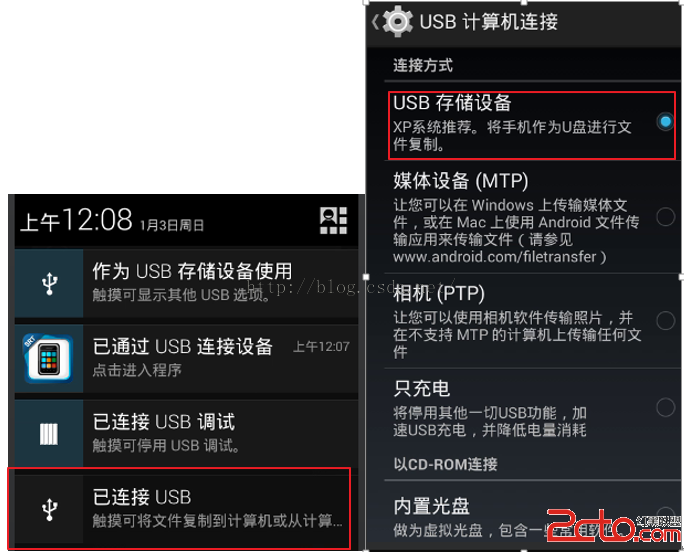 MSM8909 + Android 5.1.1 的 USB 連接方式完整整理
以下測試環境以 Windows 7 電腦為主。 先給結論: 作為 Host 使用時,接上滑鼠與 U 盤都能正常工作。 作為 Client 使用時,在 Windows 7
 Android SDK 更新連三次失敗的原因與解決方法
近來看到 Moto 360 的照片實在太吸引人,於是想來研究一下 Android Wear,沒想到更新 Android SDK 的過程居然接連失敗了三次。以下把整個過程與
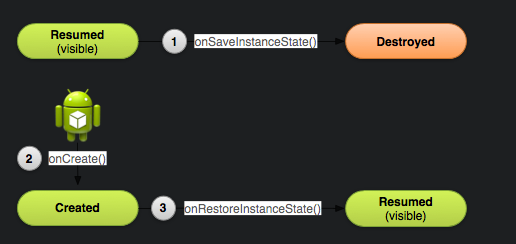 Android 螢幕旋轉適配全解析
預設旋轉行為 當 Android 螢幕旋轉時,重力感應會觸發 Configuration 變更。預設情況下,系統會銷毀目前的 Activity,再依新的方向重新建立。因此
 Android 使用 Universal Image Loader 載入網路圖片並整合 ListView 互動
網路圖片載入的常見需求 在列表頁面中,網路圖片是很常見的元素。若要同時處理快取、非同步載入、記憶體管理與列表滾動時的圖片綁定,使用成熟開源庫會比自行實作更穩定。本文以 U