

編輯:關於 Android 程式設計
系統內建的控件不一定能滿足所有設計需求。舉例來說,需要讓 TextView 裡的文字傾斜一個角度時,就必須自己寫一個子類別,在 onDraw 之前把 Canvas 旋轉一下。
package com.leigo.ratatetextview;

import android.content.Context;
import android.content.res.TypedArray;
import android.graphics.Canvas;
import android.util.AttributeSet;
import android.view.Gravity;
import android.widget.TextView;

/**
 * 可旋轉的 TextView
 */
public class RotateTextView extends TextView {

    private static final int DEFAULT_DEGREES = 0;
    private int mDegrees;

    public RotateTextView(Context context) {
        super(context, null);
    }

    public RotateTextView(Context context, AttributeSet attrs) {
        super(context, attrs, android.R.attr.textViewStyle);
        this.setGravity(Gravity.CENTER);

        TypedArray a = context.obtainStyledAttributes(attrs, R.styleable.RotateTextView);
        mDegrees = a.getDimensionPixelSize(R.styleable.RotateTextView_degree, DEFAULT_DEGREES);
        a.recycle();
    }

    @Override
    protected void onMeasure(int widthMeasureSpec, int heightMeasureSpec) {
        super.onMeasure(widthMeasureSpec, heightMeasureSpec);
        setMeasuredDimension(getMeasuredWidth(), getMeasuredWidth());
    }

    @Override
    protected void onDraw(Canvas canvas) {
        canvas.save();
        canvas.translate(getCompoundPaddingLeft(), getExtendedPaddingTop());
        //以檢視中心為軸心旋轉
        canvas.rotate(mDegrees, this.getWidth() / 2f, this.getHeight() / 2f);
        super.onDraw(canvas);
        canvas.restore();
    }

    public void setDegrees(int degrees) {
        mDegrees = degrees;
    }
}
關鍵在 onDraw:先 save() 保存畫布狀態,旋轉後畫完再 restore() 還原,避免影響到同一層的其他元件。旋轉的軸心刻意設為檢視中心,這樣文字才會繞著自己轉,而不是被甩到畫面外。
<?xml version="1.0" encoding="utf-8"?>
<resources>
    <declare-styleable name="RotateTextView">
        <attr name="degree" format="dimension" />
    </declare-styleable>
</resources>
1. 版面檔中直接使用:
<com.leigo.ratatetextview.RotateTextView
    xmlns:app="https://schemas.android.com/apk/res-auto"
    android:id="@+id/text"
    android:layout_height="wrap_content"
    android:layout_width="wrap_content"
    android:padding="10dp"
    android:text="@string/hello_world"
    app:degree="10dp" />
2. 或在程式碼中動態設定:
RotateTextView mText = (RotateTextView) findViewById(R.id.text);
mText.setDegrees(10);
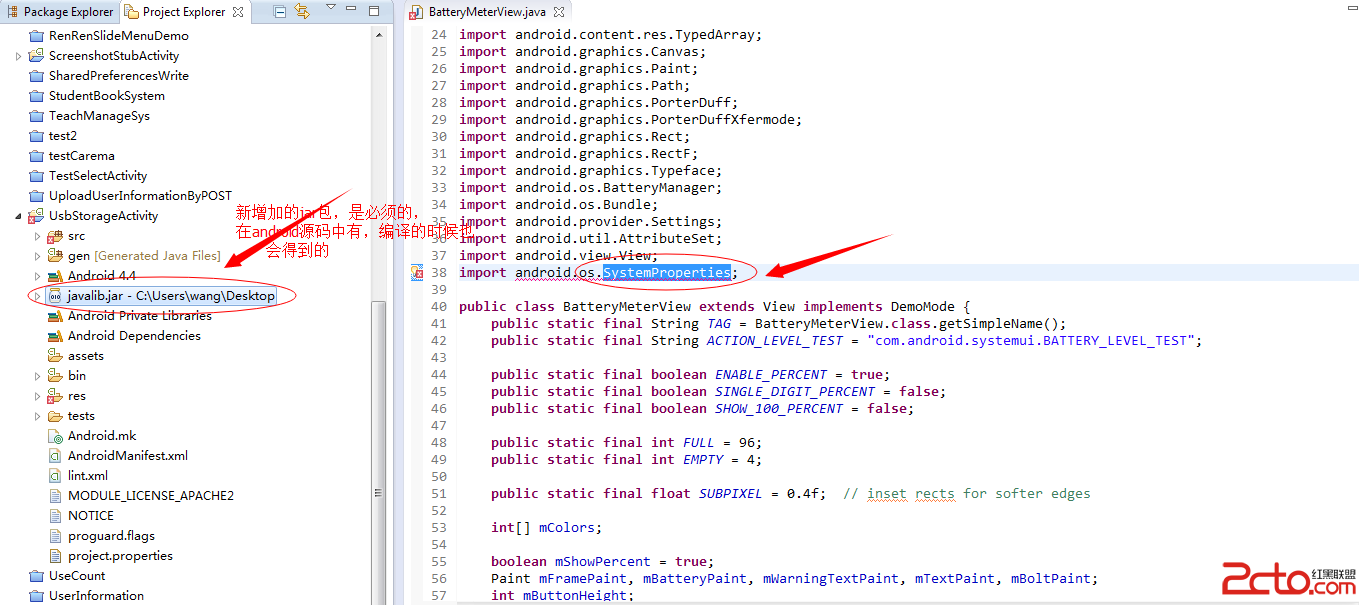 Android 系統應用編譯缺少 Framework 類別的原因與解法
在 Android 源碼環境中編譯 framework 下的應用程式時,常會遇到找不到某些類別的問題。這並不是程式碼本身錯誤,而是因為部分 framework API 在
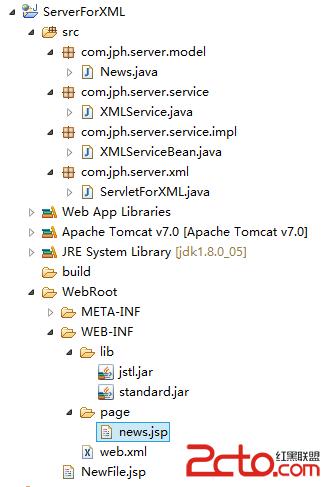 Android 網絡編程:獲取並解析網絡上的 XML
要在 App 中取得網絡上的 XML,同樣需要伺服器端配合。本文以「最新資訊列表」為例,走一遍伺服器產生 XML、客戶端抓取並解析的完整流程。 一、建立伺服器端 專案結構
 理解 Android 3D Emulation 的運作架構
Android Emulator 提供了 GPU on 選項,意思是利用 Host(運行 Emulator 的 PC)的 GPU,當然 PC 必須先裝好 OpenGL 驅
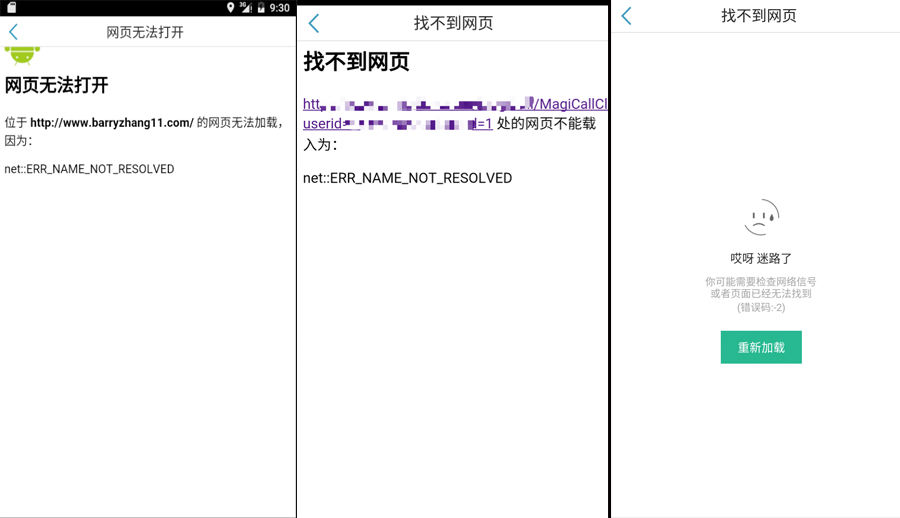 Android WebView:onReceivedError 的應用與版本變遷
WebView 的 onReceivedError 是處理網頁載入錯誤的重要 callback。不過它在不同 Android 版本中的行為有變化,若沒有妥善處理,可能會在