

編輯:關於 Android 程式設計
跨進程溝通時,我們通常會用 AIDL 產生一堆樣板程式。但其實 AIDL 最後生成的東西,就是 Android 底層 Binder 機制在 Java 層的介面——Binder、IInterface、Parcel。既然能看懂它生成的程式,那我們也可以自己手寫。
這種做法的優點:Client 端與 Server 端的 DESCRIPTOR 可以自訂,不受套件名稱限制,適合需要與既有系統對接、或不想維護 .aidl 檔的情境。
原理:Client 端呼叫 transact 發起跨進程請求,Server 端則在 onTransact 中被回呼處理,雙方以 Parcel 包裝與讀取參數。
public interface ITimeCountService {
    int getCount() throws RemoteException;
}
Stub 繼承 Binder 並實作 IInterface,在 onTransact 中依 code 分派不同的請求:
public abstract class TimeCountStub extends android.os.Binder
        implements IInterface, ITimeCountService {

    private static final java.lang.String DESCRIPTOR = "com.example.servicedemo.nonaidl.ITimeCountService";

    /** 建立 stub 並綁定介面 */
    public TimeCountStub() {
        this.attachInterface(this, DESCRIPTOR);
    }

    @Override
    public android.os.IBinder asBinder() {
        return this;
    }

    @Override
    public boolean onTransact(int code, android.os.Parcel data,
                              android.os.Parcel reply, int flags)
            throws android.os.RemoteException {
        switch (code) {
            case INTERFACE_TRANSACTION: {
                reply.writeString(DESCRIPTOR);
                return true;
            }
            case TRANSACTION_getCount: {
                data.enforceInterface(DESCRIPTOR);
                int _result = this.getCount();
                reply.writeNoException();
                reply.writeInt(_result);
                return true;
            }
        }
        return super.onTransact(code, data, reply, flags);
    }

    static final int TRANSACTION_getCount = (android.os.IBinder.FIRST_CALL_TRANSACTION + 0);
}
Proxy 負責把呼叫打包成 Parcel 送出去,再把 reply 裡的結果讀回來:
public class TimeCountProxy implements ITimeCountService {

    private static final java.lang.String DESCRIPTOR = "com.example.servicedemo.nonaidl.ITimeCountService";
    private android.os.IBinder mRemote;

    TimeCountProxy(android.os.IBinder remote) {
        mRemote = remote;
    }

    public java.lang.String getInterfaceDescriptor() {
        return DESCRIPTOR;
    }

    /**
     * 把 IBinder 物件轉成 ITimeCountService 介面,必要時產生 proxy
     */
    public static ITimeCountService asInterface(android.os.IBinder obj) {
        if (obj == null) {
            return null;
        }
        android.os.IInterface iin = obj.queryLocalInterface(DESCRIPTOR);
        if (iin != null && iin instanceof ITimeCountService) {
            return (ITimeCountService) iin;
        }
        return new TimeCountProxy(obj);
    }

    @Override
    public int getCount() throws android.os.RemoteException {
        android.os.Parcel _data = android.os.Parcel.obtain();
        android.os.Parcel _reply = android.os.Parcel.obtain();
        int _result;
        try {
            _data.writeInterfaceToken(DESCRIPTOR);
            mRemote.transact(TimeCountStub.TRANSACTION_getCount, _data, _reply, 0);
            _reply.readException();
            _result = _reply.readInt();
        } finally {
            _reply.recycle();
            _data.recycle();
        }
        return _result;
    }
}
這裡有兩個容易忽略的細節:一是 asInterface 會先嘗試 queryLocalInterface,若 Client 與 Service 在同一進程,就能直接拿到本地物件,省去跨進程的封送開銷;二是 Parcel 用完務必 recycle,否則在大量呼叫時會造成記憶體浪費。
public class TimeCountService extends Service {

    // ...
    TimeCountStub stub = new TimeCountStub() {
        @Override
        public int getCount() throws RemoteException {
            return count;
        }
    };

    @Override
    public IBinder onBind(Intent intent) {
        Log.i(TAG, "onBind");
        return stub;
    }
    // ...
}
public class MainActivity extends Activity {

    // ...
    private ITimeCountService timeCountService;

    private ServiceConnection conn = new ServiceConnection() {
        @Override
        public void onServiceConnected(ComponentName name, IBinder service) {
            Log.i(TAG, "onServiceConnected");
            timeCountService = TimeCountProxy.asInterface(service);
            Log.i(TAG, "timeCountService: " + timeCountService);
            canTimeUpdateTaskRunning = true;
            TimeUpateTask t = new TimeUpateTask();
            t.execute(new Object());
            Log.i(TAG, "task status: " + t.getStatus());
        }

        @Override
        public void onServiceDisconnected(ComponentName name) {
            Log.i(TAG, "onServiceDisconnected");
        }
    };
    // ...
}
整體流程就是:Service 的 onBind 回傳 Stub → Client 在 onServiceConnected 拿到 IBinder → 用 Proxy.asInterface 轉成介面物件 → 之後就能像呼叫區域函式一樣使用 timeCountService.getCount()。若之後要擴充新方法,只要雙方約定同一個 TRANSACTION_xxx 數值並各自補上打包與讀取的邏輯即可。
 Android View 繪製機制全解:從 performTraversals 到自定義 ViewGroup
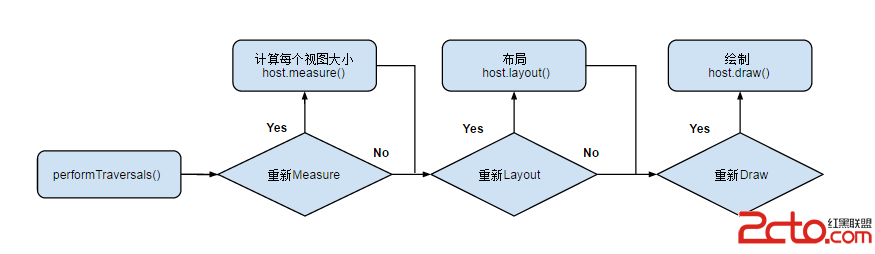
整體流程 整棵 View 樹的繪圖流程由 ViewRoot 的 performTraversals() 發起,它做的事可以概括成三段判斷:是否需要重新計算大小(measu
 Android 逆向實戰:以 Xposed Hook 定位微信搖骰子隨機函數的完整思路
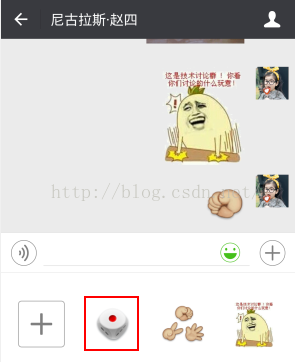
一、前言 先前一篇已經介紹過 Xposed 這個 Hook 神器,包含框架原理、安裝方式,以及如何撰寫第一個模塊去攔截並改寫系統方法的回傳值。當時也強調了一個關鍵環節:H
 Android 開源 UI 特效分享:常用元件與動畫庫
開源 UI 元件的價值在 Android 開發中,重複實作常見互動會消耗大量時間。開源 UI 元件能快速提供列表、動畫、選單、進度條與圖片效果,讓開發者把力氣放在產品邏輯
 Android 網路檔案下載實作教學:HttpURLConnection 與外部儲存
把遠端資源抓回手機裡 幾乎每個 App 都逃不掉「從伺服器取檔案」這件事,可能是歌詞、音樂、圖片,也可能是設定檔。在 Android 上,最直覺的做法就是走 HTTP:開