

編輯:關於 Android 程式設計
如果你需要在程式碼中為一群 View 設定對應的一批圖片資源——例如幫 ListView 或 GridView 的每個 item 配一張圖——最乾淨的做法是在 XML 裡宣告一個資源陣列,再用程式碼讀取,而不是把資源 ID 硬寫在 Java 裡。
一開始我直覺地寫成 integer-array:
<integer-array name="actions_images">
    <item>@drawable/pencil1</item>
    <item>@drawable/pencil2</item>
    <item>@drawable/pencil3</item>
    <item>@drawable/pencil4</item>
    <item>@drawable/pencil5</item>
    <item>@drawable/pencil6</item>
</integer-array>
然後想用 getResources().getIntArray() 把圖片 ID 取出來——結果完全行不通。查了 Stack Overflow 才找到正解。
1. XML 中改用 string-array:
<string-array name="actions_images">
    <item>@drawable/pencil1</item>
    <item>@drawable/pencil2</item>
    <item>@drawable/pencil3</item>
    <item>@drawable/pencil4</item>
    <item>@drawable/pencil5</item>
    <item>@drawable/pencil6</item>
</string-array>
2. Java 中用 TypedArray 讀取:
TypedArray ar = context.getResources().obtainTypedArray(R.array.actions_images);
int len = ar.length();
int[] resIds = new int[len];
for (int i = 0; i < len; i++)
    resIds[i] = ar.getResourceId(i, 0);
ar.recycle();
跑完這段,所有圖片 ID 就都存在 resIds 裡了,之後要設定時直接 img.setImageResource(resIds[0]) 即可。
想在 XML 中定義 id 陣列,做法完全相同:一樣宣告成 string-array,一樣用 obtainTypedArray() 搭配 getResourceId() 取出。
順帶一提,ar.recycle() 別忘了呼叫。TypedArray 會佔用一點原生記憶體,用完不歸還,在列表大量重複呼叫的場景下容易累積出不必要的開銷。
參考來源:Stack Overflow: Android - Storing R.drawable IDs in XML array
 Android Spinner 下拉選單效果:C# 與 Java 雙版本實作
Spinner 是 Android 提供的下拉式選擇器,用法概念上等同於桌面平台的下拉方塊。以下以「選擇城市」為例,示範 C# 與 Java 兩種寫法。 效果預覽
 Android 的 assets、res/raw 與 res/xml 資源讀取完全解析
一、三種資源目錄的定位 1. assets/ 放在 assets 底下的檔案會被原封不動地打包進 APK,不會編譯成二進位,也不會產生資源 ID,只能透過檔名存取,並以位
 StepView:打造步驟流程的客製化 View
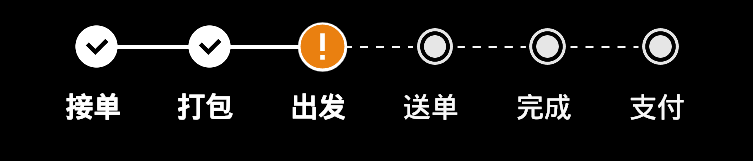
StepView 是一個用來展示步驟流程的自訂 View,效果如下圖: 這個元件可以呈現類似快遞 App 那樣的步驟流程展示。 1. 首先在 XML 版面中這樣使用:
 Android 軟鍵盤遮擋輸入框的四種解決方案
當使用者點擊輸入框時,系統會彈出軟鍵盤。若頁面沒有做好配置,鍵盤可能會遮擋輸入框或底部按鈕。以下整理了四種常見解法。 問題效果如下: 方法一:使用 adjustPan