

編輯:關於 Android 程式設計
當使用者點擊輸入框時,系統會彈出軟鍵盤。若頁面沒有做好配置,鍵盤可能會遮擋輸入框或底部按鈕。以下整理了四種常見解法。
問題效果如下:

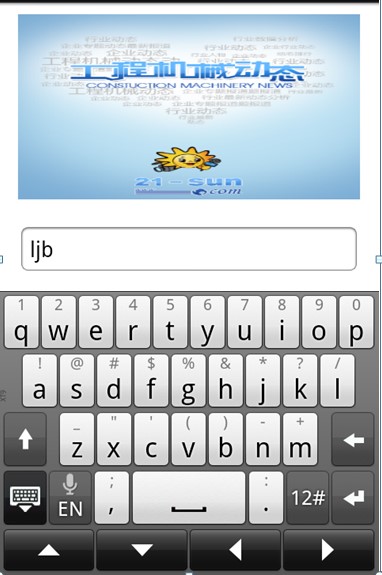
在 Activity 的 onCreate 中,於 setContentView 前設定:
getWindow().setSoftInputMode(
    WindowManager.LayoutParams.SOFT_INPUT_ADJUST_PAN
);
這種方式會讓視窗內容自動移動,嘗試保持焦點可見。
在 AndroidManifest.xml 的 Activity 中加入:
android:windowSoftInputMode="stateVisible|adjustResize"
或使用:
android:windowSoftInputMode="adjustPan"
adjustResize 會讓視窗重新調整大小,adjustPan 則是平移內容。
將最外層 Layout 替換成 ScrollView,或在外層再加一層 ScrollView,讓內容可以隨鍵盤捲動。
<ScrollView xmlns:android="https://schemas.android.com/apk/res/android"
    android:layout_width="match_parent"
    android:layout_height="match_parent">

    <LinearLayout
        android:layout_width="match_parent"
        android:layout_height="wrap_content"
        android:orientation="vertical">

        <EditText
            android:layout_width="match_parent"
            android:layout_height="wrap_content"
            android:hint="輸入內容" />
    </LinearLayout>
</ScrollView>
若需要更精細控制,可以自訂 LinearLayout,在 onSizeChanged 中判斷高度變化,進而隱藏或顯示某些區塊。
public class KeyboardLayout extends LinearLayout {
    private static final int KEYBOARD_MIN_HEIGHT = 50;
    private KeyBordStateListener listener;

    public interface KeyBordStateListener {
        void stateChange(int state);
    }

    public void setKeyBordStateListener(KeyBordStateListener listener) {
        this.listener = listener;
    }

    @Override
    protected void onSizeChanged(int w, int h, int oldw, int oldh) {
        super.onSizeChanged(w, h, oldw, oldh);

        if (oldh - h > KEYBOARD_MIN_HEIGHT) {
            if (listener != null) {
                listener.stateChange(1);
            }
        } else {
            if (listener != null) {
                listener.stateChange(0);
            }
        }
    }
}
在 Activity 中,可以根據回呼結果隱藏或顯示 Logo、橫幅等非必要區域,讓輸入區獲得更多空間。
鍵盤彈出時:
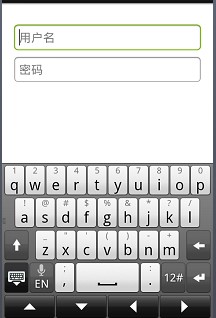
鍵盤關閉時:

這四種方式各有適用場景。簡單頁面可以用 adjustResize 或 adjustPan;複雜頁面則可以搭配 ScrollView 或自訂 Layout 做更精細的控制。
 Android 基礎:Context 的作用與使用範例
一、Context 是什麼 類別繼承關係 官方定義的含意 Context 是關於應用程式環境的全域資訊接口。它是一個抽象類別,具體實作由 Android 系統提供。透過
 Android 短信驗證碼實作:以雲之訊短信平台為例
好一陣子沒更新部落格了,這段時間总算忙完,抽空回來寫一篇。這次要分享的是短信驗證碼——這個功能幾乎每個專案都用得上。這裡選用雲之訊平台,理由很簡單:原理直白,接入體驗也還
 ViewPager 多頁面滑動切換與指示條動畫實作
先看成果 要做的是新浪微博那種 Tab 效果:手勢滑動或點擊標題都能切換頁面,而下方那條白色指示條會平滑地滑到對應的頁卡下方。 認識 ViewPager ViewPa
 Android Activity 與 Service 資料交互實作
在 Android 中,Activity 負責與使用者互動,Service 則適合執行背景任務。當 Service 執行較長時間的操作時,可以透過 Binder 與回呼介