

編輯:關於 Android 程式設計
這段時間在學習 Android,結果碰上了教學影片裡經常提到和使用的 AIDL,於是上網找了些資料,寫了几个案例來分析研究。假如我寫的或解釋得有偏差,希望能被大家指正。
先說說 AIDL 是什麼:AIDL 是一個介面描述檔,用於實現 Android 平台上的 RPC。aapt 在編譯時會自動根據規則生成用於 IPC 的介面與物件,而作為使用者只需做兩件事:1. 在服務端 Service 中實現介面;2. 在客戶端 bindService,並在 onServiceConnected 時取得介面物件。這裡的介面都是 AIDL 中描述的介面,其他細節則由 AIDL 生成的同名源碼檔負責處理。下面以「從服務端獲取一本書的資訊」為例來實作。
首先是實體類 BookInfo,需要實作 Parcelable 介面:
package com.edify.bluenfcserver.myservice; import java.util.Date; import android.annotation.SuppressLint; import android.os.Parcel; import android.os.Parcelable; /** * @Description 寫一個實體類步驟: * 1. 實現Pracelable接口 * 2. 需要定義一個Parcelable.Creator CREATOR對象 * 3. 同時要建立一個aidl文件 */ @SuppressLint("ParcelCreator") public class BookInfo implements Parcelable { private int id; private String name; private String author; private float price; private Date product; public BookInfo(Parcel in) { } public int getId() { return id; } public void setId(int id) { this.id = id; } public String getName() { return name; } public void setName(String name) { this.name = name; } public Date getProduct() { return product; } public void setProduct(Date product) { this.product = product; } public String getAuthor() { return author; } public void setAuthor(String author) { this.author = author; } public float getPrice() { return price; } public void setPrice(float price) { this.price = price; } public BookInfo(int id, String name, String author, float price, Date product) { super(); this.id = id; this.name = name; this.author = author; this.price = price; this.product = product; } @Override public int describeContents() { return 0; } /** * 將對象序列號 * dest 就是對象即將寫入的目的對象 * flags 有關對象序列號的方式的標識 * 這裡要注意,寫入的順序要和在createFromParcel方法中讀出的順序完全相同。 */ @Override public void writeToParcel(Parcel dest, int flags) { dest.writeInt(id); dest.writeString(name); dest.writeString(author); dest.writeFloat(price); dest.writeValue(product);// 寫一個date類型的數據 } /** * 在想要進行序列號傳遞的實體類內部一定要聲明該常量。常量名只能是CREATOR,類型也必須是 Parcelable.Creator */ public static final Parcelable.Creator CREATOR = new Parcelable.Creator() { /*** * 根據序列號的Parcel對象,反序列號為原本的實體對象 * 讀出順序要和writeToParcel的寫入順序相同 */ public BookInfo createFromParcel(Parcel in) { int id = in.readInt(); String name = in.readString(); String author = in.readString(); float price = in.readFloat(); Date product = (Date) in.readValue(this.getClass().getClassLoader()); return new BookInfo(id, name, author, price, product); } public BookInfo[] newArray(int size) { return new BookInfo[size]; } }; } 客戶端的程式碼:
package com.edify.bluenfc; import android.app.Activity; import android.content.ComponentName; import android.content.Context; import android.content.Intent; import android.content.ServiceConnection; import android.os.Bundle; import android.os.IBinder; import android.os.RemoteException; import android.util.Log; import android.view.Menu; import android.view.View; import android.view.View.OnClickListener; import android.widget.Button; import android.widget.TextView; import com.edify.bluenfcserver.Beauty; import com.edify.bluenfcserver.RemoteBeauty; import com.edify.bluenfcserver.myservice.BookInfo; import com.edify.bluenfcserver.myservice.MyRemoteBookInfo; import com.edify.bluenfcserver.myservice.MyRemoteBookInfo.Stub; public class MainActivity extends Activity implements OnClickListener { TextView textView; Button button; String actionName = "com.edify.bluenfcserver.remoteservice"; String actionName2 = "com.edify.bluenfcserver.myservice.myRemoteService"; RemoteBeauty remoteBeauty; private MyRemoteBookInfo myRemoteBookInfo; private TextView textView2; private View button2; @Override protected void onCreate(Bundle savedInstanceState) { super.onCreate(savedInstanceState); setContentView(R.layout.activity_main); textView = (TextView) findViewById(R.id.textView1); textView2 = (TextView) findViewById(R.id.textView2); button = (Button) findViewById(R.id.button1); button2 = (Button) findViewById(R.id.button2); button.setOnClickListener(this); button2.setOnClickListener(this); } private class MyServiceConnection implements ServiceConnection { @Override public void onServiceConnected(ComponentName name, IBinder service) { Log.i("通知", "鏈接成功!"); remoteBeauty = RemoteBeauty.Stub.asInterface(service); try { Beauty beauty = remoteBeauty.getBeauty(); textView.setText("美女 姓名:" + beauty.getName() + " 年齡:" + beauty.getAge() + " 性別:" + beauty.getSex()); } catch (RemoteException e) { e.printStackTrace(); } } @Override public void onServiceDisconnected(ComponentName name) { } } MyServiceConnection connection = new MyServiceConnection(); @Override public void onClick(View v) { switch (v.getId()) { case R.id.button1: Intent intent = new Intent(actionName); bindService(intent, connection, Context.BIND_AUTO_CREATE); break; case R.id.button2: Intent intent2 = new Intent(actionName2); bindService(intent2, new MyBookInfoServiceConnection(), Context.BIND_AUTO_CREATE); break; } } private class MyBookInfoServiceConnection implements ServiceConnection { @Override public void onServiceConnected(ComponentName name, IBinder service) { myRemoteBookInfo = MyRemoteBookInfo.Stub.asInterface(service); try { BookInfo bookInfo = myRemoteBookInfo.getBookInfo("我是一個tagName"); textView2.setText(bookInfo.toString()); } catch (RemoteException e) { e.printStackTrace(); } } @Override public void onServiceDisconnected(ComponentName name) { } } } 服務端程式碼:
package com.edify.bluenfcserver.myservice; import java.util.Date; import android.app.Service; import android.content.Intent; import android.os.IBinder; import android.os.RemoteException; import android.util.Log; public class MyRemoteService extends Service { //建立連接:第二步,返回一個該提供給客戶端操作服務端的對象 @Override public IBinder onBind(Intent intent) { return stub; } /** * 實例化一個對象,該對象就是提供給客戶端的對象 */ private MyRemoteBookInfo.Stub stub = new MyRemoteBookInfo.Stub() { /** *實現接口未實現的方法 */ //建立連接:第五步;通過調用該方法回去服務器端的數據信息,操作 @Override public BookInfo getBookInfo(String tagName) throws RemoteException { return getBookInfoByTagName(tagName); } }; /** * 服務的自身的方法 * @param tagName * @return */ public BookInfo getBookInfoByTagName(String tagName){ Log.i("getBookInfoByTagName--------------", tagName); if(tagName != null){ return new BookInfo(1, "盡忠報國", "金庸", 100f, new Date()); }else{ return new BookInfo(1, "水浒傳", "未知", 200f, new Date()); } } }
歸納一下 AIDL 的核心原理:AIDL 的作用是實現 Android 平台上的 RPC(遠程例程調用),本質上就是對 Binder 的 transact() 與 onTransact() 兩個方法進行封裝,供 Client 端與 Server 端使用。同一進程內通信時,Stub.asInterface 會直接返回 Service.onBind() 所返回的物件,根本用不到 Parcelable 的限制;只有跨進程時,客戶端才會拿到 Stub.Proxy 代理物件,透過 Binder 的 IPC 機制把方法調用轉發到服務端。理解了這一點,就能明白為什麼實體類一定要實作 Parcelable,以及整個 AIDL 通信流程背後的來龍去脈了。
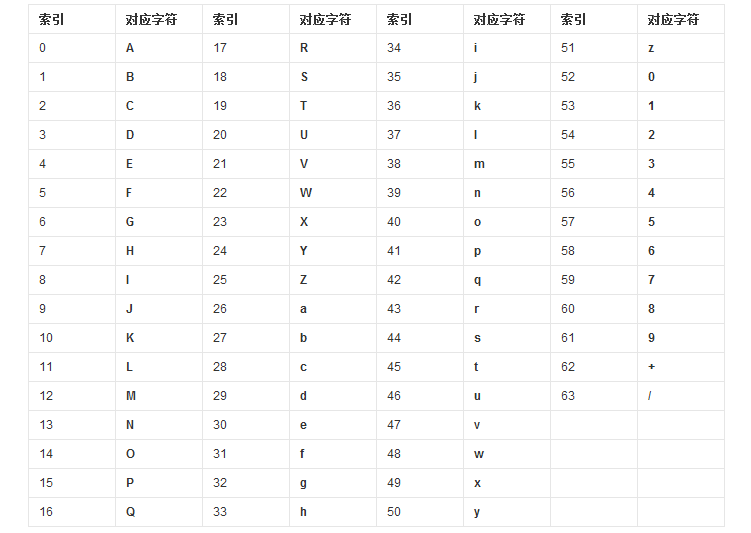 Android Base64 編碼解碼詳解:原理、用途與 API 參數
做過數據加密的應該都有印象:無論用哪種加密算法,最終都會對密文的二進制數據做一次 Base64 編碼。它常被當作「二次加密」,但嚴格來說 Base64 並不是加密算法,而
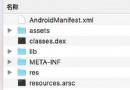 安卓 APK 瘦身實戰:把安裝包砍掉四分之一
以前打包就是 Eclipse 或 Android Studio 直接生成簽名文件,從沒關注過體積問題。直到有人問我「你有做過 APK 瘦身嗎」,才發現這塊一直是空白。折騰
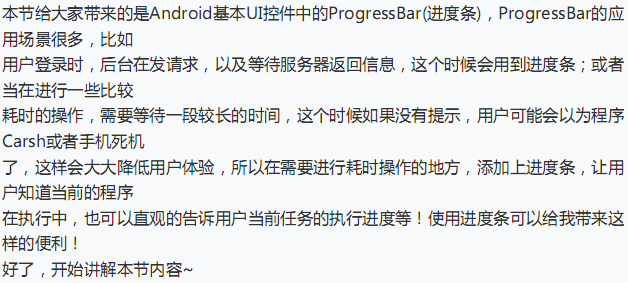 Android UI 控件之 ProgressBar:從系統樣式到自定義圓形進度條
(一)概述 ProgressBar 是 Android 裡反饋「正在進行中」的基礎控件。它既可以表達確定的百分比,也可以表達不確定的忙碌狀態。 (二)常用屬性與基礎實
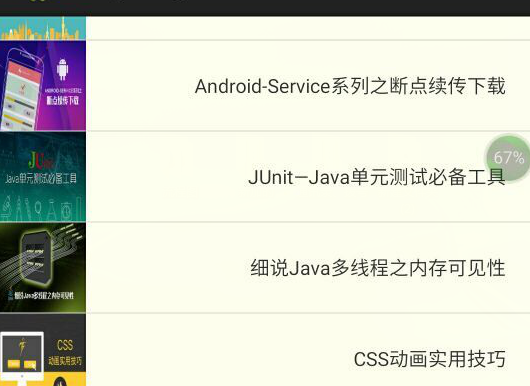 Volley 學習(四):NetworkImageView + LruCache 圖片請求實例與源碼簡讀
今天來寫一個關於圖片請求的小例子,我們使用 NetworkImageView 這個類來實現。它可以直接用在 xml 控制項中當作 ImageView,而且內部原理同樣使用