

編輯:關於 Android 程式設計
TextView 是 View 的子類,同時也是 Button、EditText 等眾多控制項的父類——理解這一點很重要,因為很多「EditText 的屬性」其實是從 TextView 繼承來的。
android:ems:設定 TextView 寬度為 N 個字元寬。
android:maxEms:寬度最長為 N 個字元寬,與 ems 同時使用時會覆蓋 ems。
android:maxLength:限制輸入字元數。
android:lines:設定文字行數。
android:maxLines:最大顯示行數,超出行數將不顯示。
android:lineSpacingExtra / lineSpacingMultiplier:行間距與行間距倍數。
android:password:以密碼形式顯示文字。
android:numeric:若設定,會彈出數字輸入法(EditText 的屬性)。
android:phoneNumber:設定為電話號碼的輸入方式。
android:singleLine:單行顯示。
android:textAppearance:文字外觀。
android:textColor:文字顏色。
android:textColorHighlight:被選中文字的底色。
android:textColorHint:提示訊息文字顏色,預設灰色,與 hint 一起使用。
android:textColorLink:文字連結的顏色。
android:textScaleX:文字間隔縮放。
android:textSize:文字大小,建議使用 sp 單位。
android:textStyle:字形(粗體、斜體等)。
android:typeface:文字字體。
android:drawableTop:文字上方的圖片。
android:drawablePadding:文字與圖片的間距。
屬性都是在 XML 檔案中設定的。打開 layout 下的 activity_main.xml,切換到程式碼模式——真正的 Android 開發是不需要拖拽控制項的。
根節點是一個 ViewGroup 控制項,表示裡面可以包含很多子控制項,比如各種佈局控制項:
<LinearLayout xmlns:android="https://schemas.android.com/apk/res/android"
    xmlns:tools="https://schemas.android.com/tools"
    android:layout_width="match_parent"
    android:layout_height="match_parent">
    <!-- 在這中間區域輸入 TextView -->
</LinearLayout>
在中間區域加入:
<TextView
    android:layout_width="match_parent"
    android:layout_height="wrap_content"
    android:text="@string/app_name"
    android:textColor="#8A2BE2"
    android:textSize="30sp" />
佈局檔中,所有控制項都必須加上 android:layout_width 與 android:layout_height,它們決定控制項在螢幕上的寬與高。常見有三種取值:
match_parent:控制項會顯示得與其父容器一樣大。
wrap_content:內容有多大就顯示多大。
fill_parent:與 match_parent 意思相同,2.2 之後改用 match_parent。
上面這個 TextView 寫好後,效果就是顯示紫色的文字,字級大小為 30sp。剩下的屬性就交給大家自己動手試試了——把所有屬性都改一遍、看一次效果,比死記列表有效得多。
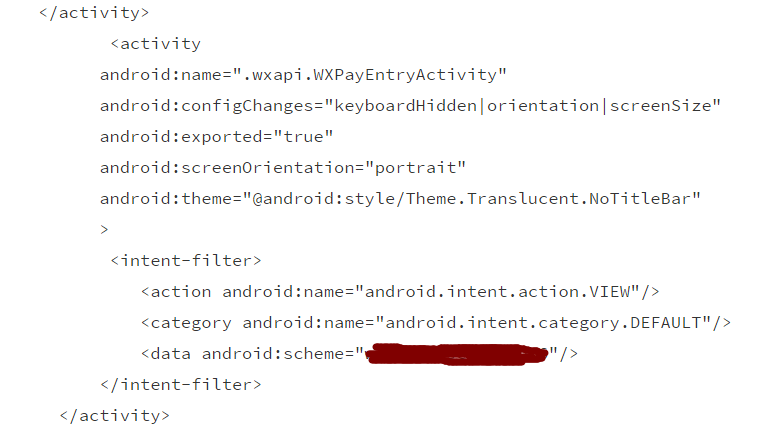 Android 微信支付接入源碼解析與常見問題排查
本文整理 Android 接入微信支付的關鍵程式碼與實作過程中容易卡住的地方,供需要串接此功能的開發者參考。 一、參數配置 public static final St
 Android PopupWindow 基礎用法完整示範
PopupWindow 適合實作「浮動在當前畫面之上」的輕量互動元件,例如點一下按鈕展開的下拉選單。以下用一個最典型的例子走過整個流程:點擊按鈕後,在其下方彈出一個分類清
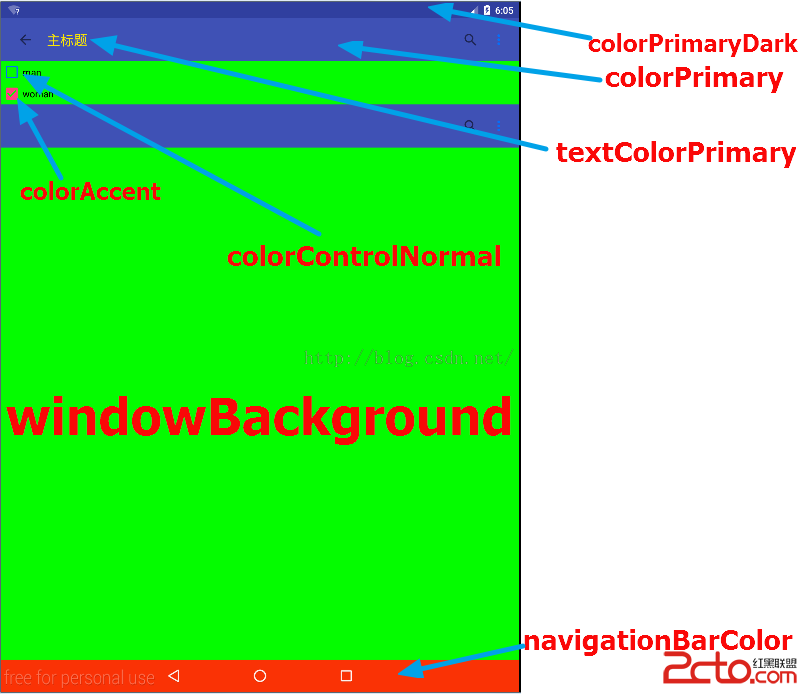 Android 5.0 常用顏色屬性說明
在 Eclipse 時代,開發者較少在 style 中統一配置全局顏色。Material Design 出現後,通過主題配置可以快速提升界面一致性。Android 5.0
 Android Activity 跳轉入門:用 Intent 打開第二個畫面
開發環境:Android 4.1.1 幾乎所有 App 的第一個功能需求都是「換頁」。在 Android 裡,這件事由 Intent 負責,而它同時也是理解整個專案目錄