

編輯:關於 Android 程式設計
先提醒一件重要的事:Android 的日曆只有真實設備才有,模擬器上並不存在,所以測試環境務必使用真機。
日曆屬於系統內建應用,讀寫它必須先申請權限。在 AndroidManifest.xml 中加入以下兩行(一個讀、一個寫):
<!-- get calendar read and write permission -->
<uses-permission android:name="android.permission.READ_CALENDAR" />
<uses-permission android:name="android.permission.WRITE_CALENDAR" />
日曆的 ContentProvider URI 在 2.2 之後有過變動,因此需要做版本判斷:
// 為了相容不同版本的日曆,2.2 以後 URL 發生改變
private static String calanderEventURL = "";
static {
    if (Integer.parseInt(Build.VERSION.SDK) >= 8) {
        calanderEventURL = "content://com.android.calendar/events";
    } else {
        calanderEventURL = "content://calendar/events";
    }
}
ContentResolver cr = context.getContentResolver();
Uri uri = Uri.parse(calanderEventURL);
Cursor cursor = cr.query(uri, null, null, null, null);
while (cursor.moveToNext()) {
    CalendarEvent cde = new CalendarEvent();
    cde.setCalendar_id(cursor.getString(cursor.getColumnIndex(Events.CALENDAR_ID)));
    cde.setTitle(cursor.getString(cursor.getColumnIndex(Events.TITLE)));
    cde.setDtstart(cursor.getString(cursor.getColumnIndex(Events.DTSTART)));
    cde.setDtend(cursor.getString(cursor.getColumnIndex(Events.DTEND)));
    cde.setDuration(cursor.getString(cursor.getColumnIndex(Events.DURATION)));
    cde.setRrule(cursor.getString(cursor.getColumnIndex(Events.RRULE)));
    cde.setEventTimezone(cursor.getString(cursor.getColumnIndex(Events.EVENT_TIMEZONE)));
    calendarEvents.add(cde);
}
cursor.close();
新增行程時,有幾個欄位屬於必填,範例只示範這幾項:
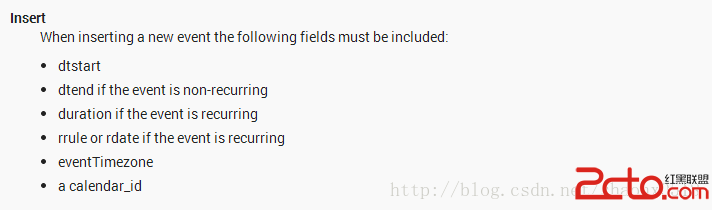
ContentValues values = new ContentValues();
values.put(Events.CALENDAR_ID, calendarId);   // 所屬日曆 ID,必填
values.put(Events.TITLE, "測試行程");          // 標題,必填
values.put(Events.DTSTART, startTime);         // 開始時間(毫秒),必填
values.put(Events.DTEND, endTime);             // 結束時間(毫秒),必填
values.put(Events.EVENT_TIMEZONE, TimeZone.getDefault().getID());

context.getContentResolver().insert(Uri.parse(calanderEventURL), values);
實務上容易踩到的幾個點:Android 4.0 以後,寫入 Events 之前必須先確定要掛在哪個 calendar_id 底下,若裝置上沒有任何可寫日曆(例如未登入帳號),insert 會直接失敗,需先透過 Calendars URI 查詢或建立;此外修改與刪除行程要用 ContentResolver.update / delete 搭配 event 的 _ID,而非重新 insert;最後,若同時存在多個帳號的日曆,記得用 selection 條件篩選,否則會撈到意料之外的資料。
 Android 四大元件之 Service(六):用 Binder 取得服務代理
前幾節我們學過了如何用 startService 啟動服務、用 bindService 綁定服務,也認識了服務的生命週期,以及什麼是 IntentService。 可能有
 Android 觸摸事件分發機制全解析:源碼、四種情況與點擊事件來源
Android 中的事件分為按鍵事件與觸摸事件,本文聚焦觸摸事件。一次完整的觸摸會由一個 ACTION_DOWN、若干個 ACTION_MOVE 和一個 ACTION_U
 Android Shape 與 Selector 結合:自訂控制項狀態背景
在 Android UI 設計中,shape 用來描述幾何外觀,selector 則用來描述不同狀態下的顯示結果。兩者結合後,可以做出圓角按鈕、列表項選取效果與狀態背景。
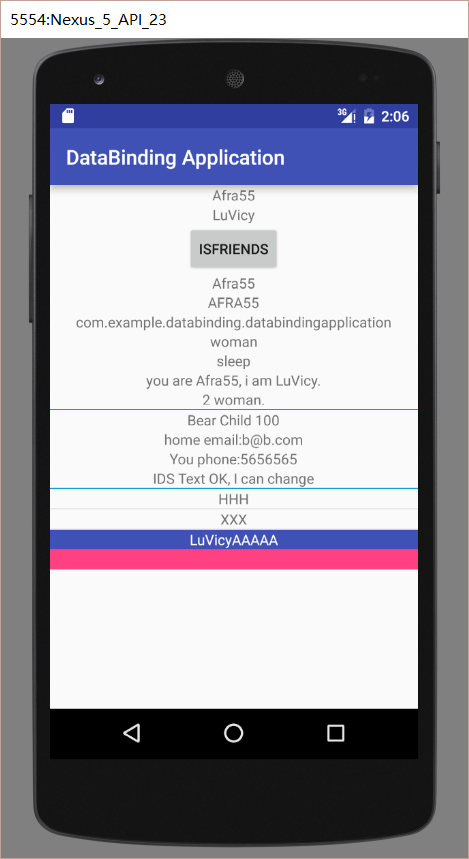 Data Binding 資料綁定庫完整指南:從第一個表達式到自定義 BindingAdapter
開場 我的經驗是:先跑一次 Demo,帶著疑問回去讀文件,理解會快很多。Demo 放在 https://github.com/Afra55/DataBindingApp