

編輯:關於 Android 程式設計
向伺服器發送 HTTP 請求後,接收到的 JSON 回應若以 EntityUtils.toString(entity, "utf-8") 解碼仍出現中文亂碼,該如何處理?本文記錄一個實際排查過程與解法。
原本使用以下方式解碼卻仍有亂碼:
String content = EntityUtils.toString(response.getEntity(), "utf-8");
嘗試改用位元組轉碼也無效:
String name = new String(response.getBytes("iso-8859-1"), "UTF-8");
由於伺服器端是以 URLENCODER 編碼,最後在回傳前加上 URLDecoder.decode(content, "utf-8") 便成功解碼。
以下為網路端的完整程式碼:
package com.trilink.ibeaconlocationdisplay.utils; import java.io.UnsupportedEncodingException; import java.util.List; import org.apache.http.HttpResponse; import org.apache.http.HttpStatus; import org.apache.http.NameValuePair; import org.apache.http.client.HttpClient; import org.apache.http.client.entity.UrlEncodedFormEntity; import org.apache.http.client.methods.HttpPost; import org.apache.http.impl.client.DefaultHttpClient; import org.apache.http.params.BasicHttpParams; import org.apache.http.params.HttpConnectionParams; import org.apache.http.util.EntityUtils; import android.util.Log; public class NetworkService { private static String TAG = "NetworkService"; public static void cancel() { Log.i(TAG, "cancel!"); } public static String getPostResult(String url) { HttpPost post = new HttpPost(url); BasicHttpParams httpParams = new BasicHttpParams(); HttpConnectionParams.setConnectionTimeout(httpParams, 10 * 1000); HttpConnectionParams.setSoTimeout(httpParams, 10 * 1000); HttpClient httpClient = new DefaultHttpClient(httpParams); try { HttpResponse response = httpClient.execute(post); if (response.getStatusLine().getStatusCode() == HttpStatus.SC_OK) { String content = EntityUtils.toString(response.getEntity()); return URLDecoder.decode(content, "utf-8"); } } catch (Exception e) { e.printStackTrace(); return "{\"status\":405,\"resultMsg\":\"網絡超時!\"}"; } finally { httpClient.getConnectionManager().shutdown(); } return "{\"status\":405,\"resultMsg\":\"網絡超時!\"}"; } public static String getPostResult(String url, List paramList) { UrlEncodedFormEntity entity = null; try { entity = new UrlEncodedFormEntity(paramList, "utf-8"); } catch (UnsupportedEncodingException e1) { e1.printStackTrace(); } HttpPost post = new HttpPost(url); BasicHttpParams httpParams = new BasicHttpParams(); HttpConnectionParams.setConnectionTimeout(httpParams, 10 * 1000); HttpConnectionParams.setSoTimeout(httpParams, 10 * 1000); post.setEntity(entity); HttpClient httpClient = new DefaultHttpClient(httpParams); try { HttpResponse response = httpClient.execute(post); if (response.getStatusLine().getStatusCode() == HttpStatus.SC_OK) { String content = EntityUtils.toString(response.getEntity(), "UTF-8"); return URLDecoder.decode(content, "utf-8"); } } catch (Exception e) { e.printStackTrace(); return "{\"status\":405,\"resultMsg\":\"網絡超時!\"}"; } finally { httpClient.getConnectionManager().shutdown(); } return "{\"status\":405,\"resultMsg\":\"網絡超時!\"}"; } }
關鍵在於:當伺服器端已對內容做 URL 編碼,客戶端在取得字串後仍需以 URLDecoder 解碼一次,才能還原正確的中文。理解編碼與解碼成對出現的特性,是解決這類亂碼的核心。
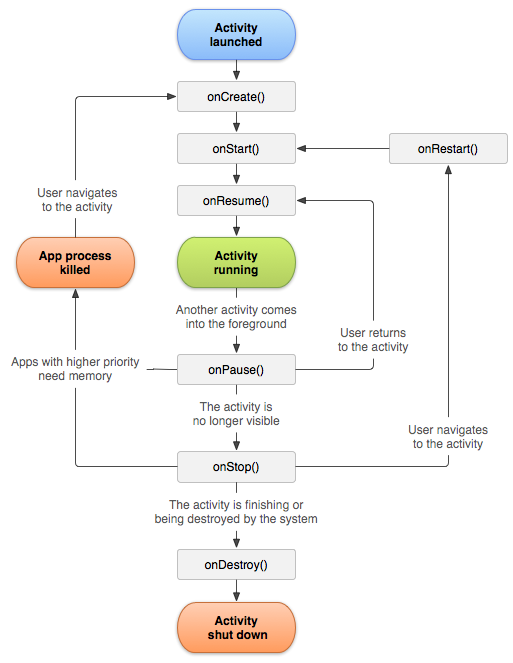 Android Activity 基礎全解:從生命周期到狀態保存
一、Activity 簡介Activity 是一種應用組件,用戶可以與它所提供的屏幕進行交互,從而完成撥打電話、拍攝照片、發送郵件或查看地圖等操作。每個 Activity
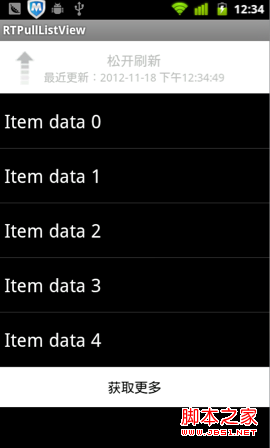 Android 下拉刷新 ListView 實作教學——RTPullListView(附範例)
下拉刷新已經成為越來越多 App 的標準互動,成了使用者根深柢固的操作習慣——遇到列表,手指很自然就往下一拉。本文要介紹如何在 Android 上實作下拉刷新,參考了 G
 Android 仿微信聊天介面實作:文字訊息與語音錄製功能解析
仿微信聊天介面通常包含標題列、訊息列表、輸入框、語音切換按鈕與錄音提示層。設計重點在於讓文字輸入與語音輸入能自然切換,並提供清楚的錄音狀態回饋。 介面結構 聊天
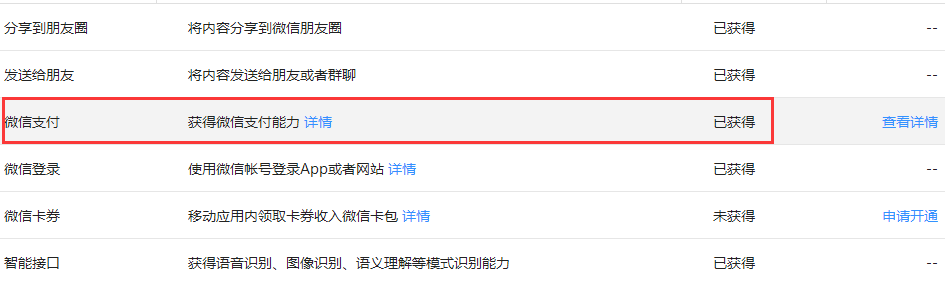 Android 接入微信支付功能實作說明
前置準備 在 Android 應用中接入微信支付,首先需要具備已審核通過的應用,並申請微信支付能力。完成後,還要取得商戶號與 API 密鑰,這兩項資料是後續生成訂單與簽名