

編輯:關於 Android 程式設計
Volley 是 Google 在 I/O 2013 大會上正式發布的網絡通信庫,專為 Android 平台打造,目標是讓網絡通信變得更快、更簡單、更健壯。它的主要特點包括:
其一,通信更簡單快捷;其二,能對 GET、POST 請求以及網絡圖像進行高效的異步處理;其三,可以對多個請求進行優先級排序,並支持多級別的取消操作;其四,內建請求緩存,並能與 Activity 生命週期聯動,在頁面銷毀時自動取消請求,避免內存洩漏。
Volley 的使用流程非常清晰:
第一步,下載 Volley 的 jar 包或源代碼;第二步,獲取 RequestQueue,通常放在 Application 中統一初始化;第三步,實例化一個 Request 對象(如 StringRequest、JsonObjectRequest、JsonArrayRequest);第四步,把 Request 加入 RequestQueue 即可。
下面先從最基礎的 StringRequest 入手。主頁面佈局文件 activity_main.xml:
<LinearLayout xmlns:android="https://schemas.android.com/apk/res/android"
    xmlns:tools="https://schemas.android.com/tools"
    android:layout_width="match_parent"
    android:layout_height="wrap_content"
    android:orientation="vertical"
    android:layout_margin="10dp">

    <Button
        android:id="@+id/get_btn"
        android:layout_width="match_parent"
        android:layout_height="wrap_content"
        android:gravity="center"
        android:text="GET請求"
        android:textSize="16sp"
        android:layout_marginTop="15dp" />

    <Button
        android:id="@+id/post_btn"
        android:layout_width="match_parent"
        android:layout_height="wrap_content"
        android:gravity="center"
        android:text="POST請求"
        android:textSize="16sp" />
</LinearLayout>
請求操作的實現如下:
public class MainActivity extends Activity implements OnClickListener {

    private Button getBtn, postBtn;

    @Override
    protected void onCreate(Bundle savedInstanceState) {
        super.onCreate(savedInstanceState);
        setContentView(R.layout.activity_main);
        getBtn = (Button) findViewById(R.id.get_btn);
        postBtn = (Button) findViewById(R.id.post_btn);
        getBtn.setOnClickListener(this);
        postBtn.setOnClickListener(this);
    }

    @Override
    public void onClick(View v) {
        switch (v.getId()) {
            case R.id.get_btn:// GET請求獲取數據
                getStringRequest();
                break;
            case R.id.post_btn:// POST請求獲取數據
                postStringRequest();
                break;
        }
    }

    private void getStringRequest() {// 用GET方法使用字符串數據請求
        String url = "https://apis.juhe.cn/mobile/get?phone=134****4320&key=d6099881640aed5e0bacc058cfd4357b";
        StringRequest strRequest = new StringRequest(Method.GET, url,
                new Listener<String>() {
                    @Override
                    public void onResponse(String arg0) {// 請求成功
                        Toast.makeText(MainActivity.this, arg0, Toast.LENGTH_LONG).show();
                    }
                },
                new ErrorListener() {
                    @Override
                    public void onErrorResponse(VolleyError arg0) {// 請求失敗
                        Toast.makeText(MainActivity.this, arg0.toString(), Toast.LENGTH_LONG).show();
                    }
                });
        strRequest.setTag(getLDM);
        MyApplication.getRequestQueues().add(strRequest);
    }

    private void postStringRequest() {// 用POST方法使用字符串數據請求
        String url = "https://apis.juhe.cn/mobile/get?";
        StringRequest postRequest = new StringRequest(Method.POST, url,
                new Listener<String>() {
                    @Override
                    public void onResponse(String arg0) {
                        Toast.makeText(MainActivity.this, arg0, Toast.LENGTH_LONG).show();
                    }
                },
                new ErrorListener() {
                    @Override
                    public void onErrorResponse(VolleyError arg0) {
                        Toast.makeText(MainActivity.this, arg0.toString(), Toast.LENGTH_LONG).show();
                    }
                }) {
            @Override
            protected Map<String, String> getParams() throws AuthFailureError {
                // getParams 方法用於 POST 請求時傳遞參數
                Map<String, String> map = new HashMap<String, String>();
                map.put("phone", "134****4320");
                map.put("key", "d6099881640aed5e0bacc058cfd4357b");
                return map;
            }
        };
        postRequest.setTag(postLDM);
        MyApplication.getRequestQueues().add(postRequest);
    }
}
以上就是 StringRequest 的 GET 與 POST 兩種基本用法,後續文章我們再來探討圖像加載與請求隊列的進階應用。
 OkHttp 框架入門實戰:Android 網路請求一篇搞定
自 Android 6.0 起,Google 移除了 HttpClient 相關 API,改用 HttpURLConnection 取代。在實際開發中,網路請求幾乎是每個
 Volley 原始碼分析入門
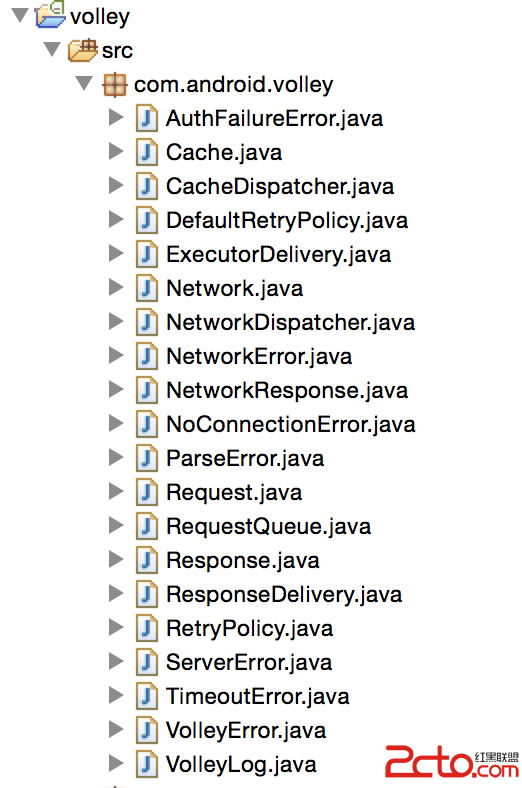
Volley 架構Volley 是 Android 的網路通信庫,提供簡單快速的網路操作。核心概念包括 Request、Network、Response、RequestQ
 Android 遊戲源碼分享:2048 的實作解析
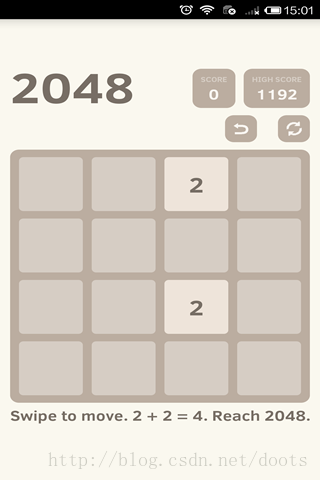
2048 是一款規則極簡單的數字合併遊戲:在 4×4 的棋盤上滑動,相同數字相撞即合併,目標是湊出 2048。正因規則簡單,它很適合作為 Android 遊戲開發的練習題
 圖解 Android Activity 應用程式的生命週期
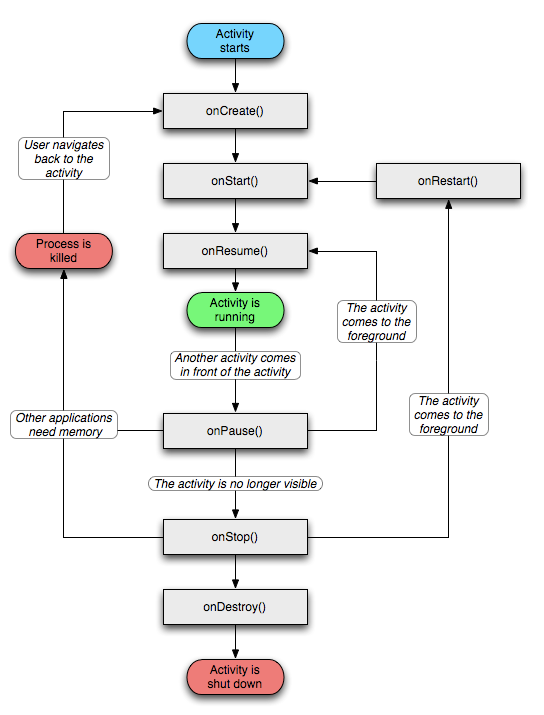
理解 Activity 的生命週期,是寫好 Android 應用的基礎。每一次頁面的開啟、切換、返回,背後都是一連串生命週期方法的依序呼叫。掌握它們的觸發時機,才能妥善管