

編輯:關於 Android 程式設計
自己手寫下載邏輯往往要處理線程、流、斷點、進度回調等一堆細節,稍不留神就容易出錯。其實借助成熟開源庫 Xutils,幾行代碼就能實現帶進度回調的文件下載,開發效率大大提升。
先在一個垂直的 LinearLayout 中放置輸入框、下載按鈕與提示文本:
<LinearLayout
    android:layout_height="match_parent"
    android:layout_width="match_parent"
    android:orientation="vertical"
    xmlns:android="https://schemas.android.com/apk/res/android"
    xmlns:tools="https://schemas.android.com/tools"
    tools:context=".MainActivity">

    <EditText
        android:id="@+id/tv_path"
        android:layout_height="wrap_content"
        android:layout_width="match_parent"
        android:text="https://down.360safe.com/inst.exe" />

    <Button
        android:layout_height="wrap_content"
        android:layout_marginTop="10dip"
        android:layout_width="match_parent"
        android:onClick="download"
        android:text="下載" />

    <TextView
        android:id="@+id/tv_info"
        android:layout_height="wrap_content"
        android:layout_marginTop="10dip"
        android:layout_width="match_parent"
        android:text="提示信息" />
</LinearLayout>
核心是利用 HttpUtils.download() 並傳入一個 RequestCallBack,在其中處理開始、加載中、失敗與成功四種回調:
package com.wzw.downloaddemo;

import java.io.File;
import com.lidroid.xutils.HttpUtils;
import com.lidroid.xutils.exception.HttpException;
import com.lidroid.xutils.http.ResponseInfo;
import com.lidroid.xutils.http.callback.RequestCallBack;
import android.os.Bundle;
import android.app.Activity;
import android.view.View;
import android.widget.EditText;
import android.widget.TextView;

public class MainActivity extends Activity {

    private EditText etPath;
    private TextView tvInfo;

    @Override
    protected void onCreate(Bundle savedInstanceState) {
        super.onCreate(savedInstanceState);
        setContentView(R.layout.activity_main);
        etPath = (EditText) findViewById(R.id.tv_path);
        tvInfo = (TextView) findViewById(R.id.tv_info);
    }

    public void download(View v) {
        String path = etPath.getText().toString();
        HttpUtils http = new HttpUtils();
        http.download(path, "/sdcard/360.exe", true, true, new RequestCallBack() {
            @Override
            public void onStart() {
                tvInfo.setText("正在連接...");
            }

            @Override
            public void onLoading(long total, long current, boolean isUploading) {
                tvInfo.setText(current + " / " + total);
            }

            @Override
            public void onFailure(HttpException error, String msg) {
                tvInfo.setText(msg);
            }

            @Override
            public void onSuccess(ResponseInfo responseInfo) {
                tvInfo.setText("downloaded: " + responseInfo.result.getPath());
            }
        });
    }
}
可以看到,相比傳統的「手動開線程 + 讀寫流 + 計算進度」方式,Xutils 把下載、斷點續傳、進度回調都封裝得妥妥當當,我們只需關注業務回調即可。在 onLoading 中實時刷新已下載與總大小,就能輕鬆呈現下載進度。這種「開箱即用」的第三方庫,正是提升開發效率的一大法寶。
 用 HorizontalScrollView 給 ListView 的頭部動態添加橫向滾動圖片
最近接到一個需求:在 ListView 頂部展示廣告位,而且圖片需要在運行時動態添加。最終的解法是把 HorizontalScrollView 用作 ListView 的
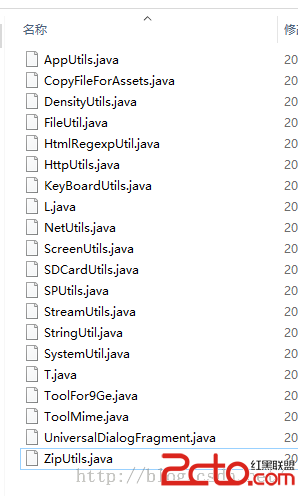 Android 開發通用工具類整理
工具類的價值 開發過程中常會遇到重複性程式碼,例如網路請求、資料儲存、字串處理與日期格式化。將這些邏輯整理成工具類,可以減少重複撰寫,也能提升專案維護效率。 使用建議
 Android 沉浸式狀態欄三種實現方案:高仿 QQ 通欄效果
什麼是沉浸式狀態欄 從 Android 4.4 開始,Google 開放了一套可以讓系統 UI 透明的樣式,作用對象是狀態欄與導航欄。有了它,頂部底部那兩條黑邊就能透出
 陌陌向附近的人喊話怎麼用?互動玩法與限制
陌陌附近喊話可讓你對周邊用戶發一句話。進入首頁附近人頁面,點擊對附近的人喊句話,輸入內容後送出。 喊話具有時效性,隱身狀態下無法使用。