

編輯:關於 Android 程式設計
Android 提供了相當便利的倒計時實作方式:CountDownTimer。自從發現了這個由系統內建的類別之後,就能果斷拋棄以前土法煉鋼的倒計時寫法了。
本文以「30 秒倒計時、每次間隔 1 秒」為例進行示範。主要參數說明如下:
● mc.start():開始倒計時。
● mc.cancel():結束倒計時。
● new MyCountDownTimer(30000, 1000):第一個參數代表總時長為 30000 毫秒,第二個參數代表間隔 1000 毫秒觸發一次。
以下是完整的程式碼:
package com.example.daojishi; import android.app.Activity; import android.os.Bundle; import android.os.CountDownTimer; import android.util.Log; import android.view.View; import android.widget.TextView; import android.widget.Toast; /** * * @author baozi * * 倒計時的類 CountDownTimer * */ public class MainActivity extends Activity { private MyCountDownTimer mc; private TextView tv; @Override protected void onCreate(Bundle savedInstanceState) { super.onCreate(savedInstanceState); setContentView(R.layout.activity_main); tv = (TextView) findViewById(R.id.show); mc = new MyCountDownTimer(30000, 1000); mc.start(); } public void oncancel(View view) { Toast.makeText(MainActivity.this, "取消", Toast.LENGTH_LONG).show();// toast有顯示時間延遲 mc.cancel(); } public void restart(View view) { Toast.makeText(MainActivity.this, "重新開始", Toast.LENGTH_LONG).show();// toast有顯示時間延遲 mc.start(); } /** * 繼承 CountDownTimer 防范 * * 重寫 父類的方法 onTick() 、 onFinish() */ class MyCountDownTimer extends CountDownTimer { /** * * @param millisInFuture * 表示以毫秒為單位 倒計時的總數 * * 例如 millisInFuture=1000 表示1秒 * * @param countDownInterval * 表示 間隔 多少微秒 調用一次 onTick 方法 * * 例如: countDownInterval =1000 ; 表示每1000毫秒調用一次onTick() * */ public MyCountDownTimer(long millisInFuture, long countDownInterval) { super(millisInFuture, countDownInterval); } @Override public void onFinish() { tv.setText("done"); } @Override public void onTick(long millisUntilFinished) { Log.i("MainActivity", millisUntilFinished + ""); tv.setText("倒計時(" + millisUntilFinished / 1000 + ")..."); } } }
版面配置如下,包含一個顯示倒計時的 TextView,以及 cancel 與 restart 兩個按鈕:
使用 CountDownTimer 時,只需繼承它並重寫 onTick()(每個間隔呼叫一次,可用來更新剩餘時間)與 onFinish()(倒數結束時呼叫)兩個方法即可。其內部是透過 Handler 的訊息機制來排程,因此 onTick() 的呼叫之間會保持同步,不會發生重疊。
附:CountDownTimer 原始碼:
/* * Copyright (C) 2008 The Android Open Source Project * * Licensed under the Apache License, Version 2.0 (the "License"); * you may not use this file except in compliance with the License. * You may obtain a copy of the License at * * https://www.apache.org/licenses/LICENSE-2.0 * * Unless required by applicable law or agreed to in writing, software * distributed under the License is distributed on an "AS IS" BASIS, * WITHOUT WARRANTIES OR CONDITIONS OF ANY KIND, either express or implied. * See the License for the specific language governing permissions and * limitations under the License. */ package android.os; import android.util.Log; /** * Schedule a countdown until a time in the future, with * regular notifications on intervals along the way. * * Example of showing a 30 second countdown in a text field: * * new CountDownTimer(30000, 1000) { * public void onTick(long millisUntilFinished) { * mTextField.setText("seconds remaining: " + millisUntilFinished / 1000); * } * public void onFinish() { * mTextField.setText("done!"); * } * }.start(); */ public abstract class CountDownTimer { private final long mMillisInFuture; private final long mCountdownInterval; private long mStopTimeInFuture; public CountDownTimer(long millisInFuture, long countDownInterval) { mMillisInFuture = millisInFuture; mCountdownInterval = countDownInterval; } public final void cancel() { mHandler.removeMessages(MSG); } public synchronized final CountDownTimer start() { if (mMillisInFuture <= 0) { onFinish(); return this; } mStopTimeInFuture = SystemClock.elapsedRealtime() + mMillisInFuture; mHandler.sendMessage(mHandler.obtainMessage(MSG)); return this; } public abstract void onTick(long millisUntilFinished); public abstract void onFinish(); private static final int MSG = 1; private Handler mHandler = new Handler() { @Override public void handleMessage(Message msg) { synchronized (CountDownTimer.this) { final long millisLeft = mStopTimeInFuture - SystemClock.elapsedRealtime(); if (millisLeft <= 0) { onFinish(); } else if (millisLeft < mCountdownInterval) { sendMessageDelayed(obtainMessage(MSG), millisLeft); } else { long lastTickStart = SystemClock.elapsedRealtime(); onTick(millisLeft); long delay = lastTickStart + mCountdownInterval - SystemClock.elapsedRealtime(); while (delay < 0) delay += mCountdownInterval; sendMessageDelayed(obtainMessage(MSG), delay); } } } }; }
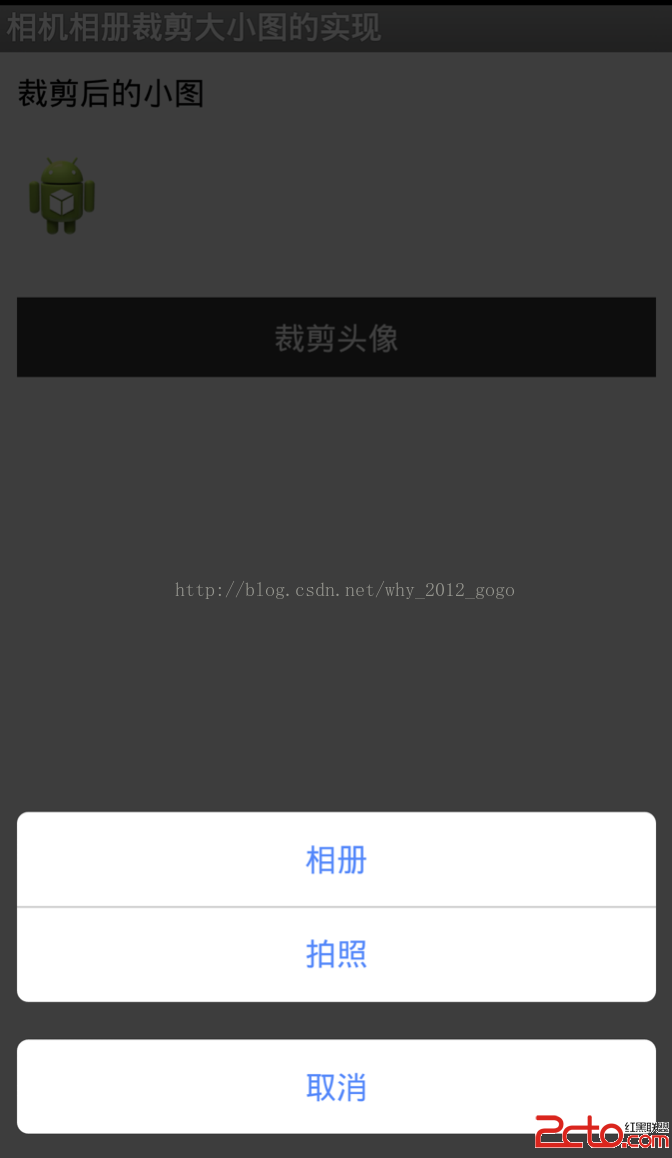 Android 相機拍照與相冊選圖完整分析(含大圖/小圖裁剪)
在手機 App 中,直接呼叫系統相機拍照,或從相冊挑選圖片,是最常見的用戶需求之一。本文以實際專案為例,示範如何合理運用相機與相冊來取圖,實作兩項功能: 1. 使用相機/
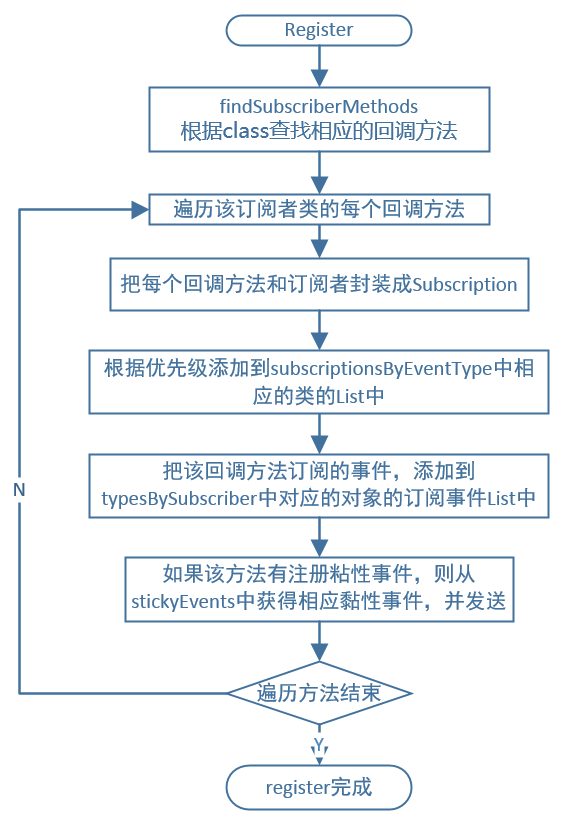 EventBus 3.0 原始碼解析:從註冊、發送到線程切換
前言在 Android 開發中,EventBus 常用於組件間通信。本文以 EventBus 3.0 為例,從取得實例、註冊訂閱者、發送事件到取消註冊,梳理其核心源碼脈絡
 Android UI 進階:活用 SlidingDrawer 抽屜控制項
最近在開發一個應用時,有個想法:把設定頁面和應用頁面放在一起,讓使用者能即時看到自己調整設定後對 UI 的影響,這樣操作起來會更方便。琢磨了好一陣子,最後發現 Slidi
 Android 多線程:IntentService 完全詳解
上一篇聊了 HandlerThread,本篇就來看看它在 IntentService 中的實際應用。閱讀前建議先了解 HandlerThread,有助於更好地掌握 Int