

編輯:關於 Android 程式設計
這是一個 Android 瀑布流(Waterfall / Staggered Grid)的實作 Demo。
我的做法是定義三個 LinearLayout 並排,然後一路往裡面 addView()。問題很快就來了:圖片一多,記憶體直接爆掉,OOM 異常接踵而至。於是我加了幾層處理:
1. LruCache 記憶體快取——複用已解碼的 Bitmap,避免重複佔用記憶體。
2. 只顯示當前螢幕內的圖片——離開可視範圍的 item 直接換成佔位圖,把 Bitmap 讓出來。
3. 滑動過程中不載入圖片——手指離開螢幕後才開始掃描與載入,避免滑動卡頓。
4. 大圖縮放成小圖——依欄位寬度做降採樣,不把原始解析度塞進記憶體。
直接看程式碼。
這是一個自訂的 ScrollView,核心邏輯都在裡面。
package com.pangzaifei.falls;

import java.io.BufferedInputStream;
import java.io.BufferedOutputStream;
import java.io.File;
import java.io.FileOutputStream;
import java.io.IOException;
import java.io.InputStream;
import java.net.HttpURLConnection;
import java.net.URL;
import java.util.ArrayList;
import java.util.HashSet;
import java.util.List;
import java.util.Set;

import android.content.Context;
import android.graphics.Bitmap;
import android.graphics.BitmapFactory;
import android.os.AsyncTask;
import android.os.Environment;
import android.os.Handler;
import android.os.Message;
import android.util.AttributeSet;
import android.view.MotionEvent;
import android.view.View;
import android.view.View.OnTouchListener;
import android.widget.ImageView;
import android.widget.ImageView.ScaleType;
import android.widget.LinearLayout;
import android.widget.ScrollView;
import android.widget.Toast;

/**
 * 瀑布流
 *
 * 原理:
 * 1. 建立三個 LinearLayout,將圖片按欄寬等比縮放後,
 *    依三欄目前的累積高度決定要加進哪一欄(貪婪法:永遠補最矮那欄)
 * 2. 翻頁:依手勢抬起的位置與滑動末端判斷是否需要載入下一頁
 */
public class PhotoFallScrollView extends ScrollView implements OnTouchListener {

    /** 目前頁數 */
    private static int page;
    /** 每頁張數 */
    private static final int PAGE_SIZE = 8;

    private Context mContext;
    private Images mImagesThoumb;
    /** 進行中的下載任務集合 */
    private Set<DownLoadTask> mTasks;

    boolean isFirstEntr = true;

    private LinearLayout mFirstColumn;
    private LinearLayout mSecondColumn;
    private LinearLayout mThirdColumn;

    private int mFirstColumnHeight;
    private int mSecondColumnHeight;
    private int mThirdColumnHeight;
    private int mClolumnWidth;

    private long mDelay = 5;

    /** 上次滑動的最後位置 */
    private static int lastScrollY = -1;
    /** onLayout 中的初始化只需做一次 */
    private boolean loadOnce;
    /** 存放所有 ImageView,用於可視性檢查 */
    private List<ImageView> mImageViewList = new ArrayList<ImageView>();

    private int mScrollViewHeight;
    private View mScrollLayout;

    public PhotoFallScrollView(Context context, AttributeSet attrs, int defStyle) {
        super(context, attrs, defStyle);
        this.mContext = context;
        init();
    }

    public PhotoFallScrollView(Context context, AttributeSet attrs) {
        super(context, attrs);
        this.mContext = context;
        init();
    }

    public PhotoFallScrollView(Context context) {
        super(context);
        this.mContext = context;
        init();
    }

    private void init() {
        mImagesThoumb = Images.getInstance();
        mTasks = new HashSet<DownLoadTask>();
        setOnTouchListener(this);
    }

    @Override
    protected void onLayout(boolean changed, int l, int t, int r, int b) {
        super.onLayout(changed, l, t, r, b);
        // 首次進入才載入第一頁
        if (changed && !loadOnce) {
            mScrollViewHeight = this.getHeight();
            mScrollLayout = this.getChildAt(0);
            mFirstColumn = (LinearLayout) findViewById(R.id.first_column);
            mSecondColumn = (LinearLayout) findViewById(R.id.second_column);
            mThirdColumn = (LinearLayout) findViewById(R.id.third_column);
            mClolumnWidth = mFirstColumn.getWidth();
            loadOnce = true;
            loadMoreImages();
        }
    }

    /** 依頁數載入圖片 */
    private void loadMoreImages() {
        if (hashSdcard()) {
            int startIndex = page * PAGE_SIZE;
            int endIndex = page * PAGE_SIZE + PAGE_SIZE;
            if (startIndex < mImagesThoumb.imageThumbs.length) {
                if (endIndex > mImagesThoumb.imageThumbs.length) {
                    endIndex = mImagesThoumb.imageThumbs.length;
                }
                for (int i = startIndex; i < endIndex; i++) {
                    String imageUrl = mImagesThoumb.imageThumbs[i].toString();
                    if (imageUrl != null && !"".equals(imageUrl)) {
                        downLoadData(imageUrl);
                    }
                }
                page++;
            } else {
                Toast.makeText(mContext, "沒有更多圖片了", 0).show();
            }
        } else {
            Toast.makeText(mContext, "無 sdcard", 0).show();
        }
    }

    private void downLoadData(String imageUrl) {
        DownLoadTask task = new DownLoadTask();
        mTasks.add(task);
        task.execute(imageUrl);
    }

    public class DownLoadTask extends AsyncTask<String, String, Bitmap> {
        private String mImageUrl;

        @Override
        protected Bitmap doInBackground(String... params) {
            try {
                mImageUrl = params[0];
                Bitmap fromMemory = mImagesThoumb.getMemoryCache(mImageUrl);
                if (fromMemory != null) {
                    return fromMemory;
                }
                if (hashSdcard()) {
                    return loadImage(mImageUrl);
                } else {
                    Toast.makeText(mContext, "無 sdcard,無法取得圖片", 0).show();
                }
            } catch (Exception e) {
                e.printStackTrace();
            }
            return null;
        }

        @Override
        protected void onPostExecute(Bitmap bitmap) {
            super.onPostExecute(bitmap);
            if (bitmap != null) {
                // 1. 依欄寬等比縮放 2. 建立 ImageView 3. 塞進最矮的那一欄
                float radio = bitmap.getWidth() / mFirstColumn.getWidth();
                float scaleHeight = bitmap.getHeight() / radio;
                addImage(bitmap, mFirstColumn.getWidth(), scaleHeight);
            }
            mTasks.remove(this);
        }

        public void addImage(Bitmap bitmap, float width, float scaleHeight) {
            ImageView iv = new ImageView(mContext);
            ViewGroup.LayoutParams params =
                    new LayoutParams((int) width, (int) scaleHeight);
            iv.setLayoutParams(params);
            if (bitmap != null) {
                iv.setScaleType(ScaleType.FIT_XY);
                iv.setPadding(5, 5, 5, 5);
                iv.setImageBitmap(bitmap);
                iv.setTag(R.string.iamgurl, mImageUrl);
                findColumnToAdd(iv, (int) scaleHeight).addView(iv);
                mImageViewList.add(iv);
            }
        }
    }

    private Bitmap downLoad(String imageUrl) throws IOException {
        BufferedInputStream bis = null;
        BufferedOutputStream bos = null;
        HttpURLConnection conn = null;
        File imageFile = null;
        try {
            URL url = new URL(imageUrl);
            conn = (HttpURLConnection) url.openConnection();
            conn.setReadTimeout(10000);
            conn.setConnectTimeout(5000);
            conn.setDoInput(true);
            InputStream is = conn.getInputStream();
            imageFile = new File(getImagePath(imageUrl));
            bis = new BufferedInputStream(is);
            bos = new BufferedOutputStream(new FileOutputStream(imageFile));
            int len = 0;
            byte[] buffer = new byte[1024];
            while ((len = bis.read(buffer)) != -1) {
                bos.write(buffer, 0, len);
                bos.flush();
            }
        } catch (Exception e) {
            e.printStackTrace();
        } finally {
            if (bis != null) bis.close();
            if (bos != null) bos.close();
            if (conn != null) conn.disconnect();
        }
        if (imageFile != null) {
            Bitmap bitmap = BitmapFactory.decodeFile(imageFile.getPath());
            mImagesThoumb.addBitmapToMemoryCache(imageUrl, bitmap);
            return bitmap;
        }
        return null;
    }

    /** 判斷 sdcard 是否有圖,有就用,沒有就下載 */
    public Bitmap loadImage(String mImageUrl) throws Exception {
        File file = new File(getImagePath(mImageUrl));
        if (!file.exists()) {
            downLoad(mImageUrl);
        }
        if (mImageUrl != null) {
            // 依欄寬降採樣,防止 OOM
            Bitmap bitmap = mImagesThoumb.decodeSimpleBitMapFromResource(
                    file.getPath(), mClolumnWidth);
            if (bitmap != null) {
                mImagesThoumb.addBitmapToMemoryCache(mImageUrl, bitmap);
                return bitmap;
            }
        }
        return null;
    }

    /** 貪婪策略:永遠補最矮的那一欄 */
    private LinearLayout findColumnToAdd(ImageView iv, int imageHeight) {
        if (mFirstColumnHeight <= mSecondColumnHeight) {
            if (mFirstColumnHeight <= mThirdColumnHeight) {
                iv.setTag(R.string.border_top, mFirstColumnHeight);
                mFirstColumnHeight += imageHeight;
                iv.setTag(R.string.border_bottom, mFirstColumnHeight);
                return mFirstColumn;
            }
            iv.setTag(R.string.border_top, mThirdColumnHeight);
            mThirdColumnHeight += imageHeight;
            iv.setTag(R.string.border_bottom, mThirdColumnHeight);
            return mThirdColumn;
        } else {
            if (mSecondColumnHeight <= mThirdColumnHeight) {
                iv.setTag(R.string.border_top, mSecondColumnHeight);
                mSecondColumnHeight += imageHeight;
                iv.setTag(R.string.border_bottom, mSecondColumnHeight);
                return mSecondColumn;
            }
            iv.setTag(R.string.border_top, mThirdColumnHeight);
            mThirdColumnHeight += imageHeight;
            iv.setTag(R.string.border_bottom, mThirdColumnHeight);
            return mThirdColumn;
        }
    }

    private String getImagePath(String imageUrl) {
        int lastIndexOf = imageUrl.lastIndexOf("/");
        String imageName = imageUrl.substring(lastIndexOf + 1);
        String imageDir = Environment.getExternalStorageDirectory().getPath()
                + "/pangzaifei/";
        File file = new File(imageDir);
        if (!file.exists()) {
            file.mkdir();
        }
        return imageDir + imageName;
    }

    private boolean hashSdcard() {
        return Environment.getExternalStorageState().equals(Environment.MEDIA_MOUNTED);
    }

    /** 手勢抬起後才開始每 5ms 掃描一次位置 */
    @Override
    public boolean onTouch(View v, MotionEvent event) {
        if (event.getAction() == MotionEvent.ACTION_UP) {
            Message msg = mHandler.obtainMessage();
            msg.obj = this;
            mHandler.sendMessageDelayed(msg, mDelay);
        }
        return false;
    }

    private Handler mHandler = new Handler() {
        @Override
        public void handleMessage(Message msg) {
            super.handleMessage(msg);
            PhotoFallScrollView scrollView = (PhotoFallScrollView) msg.obj;
            int scrollY = scrollView.getScrollY();
            if (scrollY == lastScrollY) {
                // 已滑到底且無進行中的任務,載入下一頁
                if (mScrollViewHeight + scrollY >= mScrollLayout.getHeight()
                        && mTasks.isEmpty()) {
                    scrollView.loadMoreImages();
                }
                scrollView.checkVisibile();
            } else {
                lastScrollY = scrollY;
                Message message = new Message();
                message.obj = scrollView;
                mHandler.sendMessageDelayed(message, mDelay);
            }
        }
    };

    /** 不可見的 item 換成佔位圖,把 Bitmap 讓出來 */
    protected void checkVisibile() {
        if (mImageViewList != null && mImageViewList.size() > 0) {
            for (int i = 0; i < mImageViewList.size(); i++) {
                ImageView iv = mImageViewList.get(i);
                int borderTop = (int) iv.getTag(R.string.border_top);
                int borderBottom = (int) iv.getTag(R.string.border_bottom);
                if (borderBottom > getScrollY()
                        && borderTop < getScrollY() + mScrollViewHeight) {
                    String imageUrl = (String) iv.getTag(R.string.iamgurl);
                    if (imageUrl != null && !"".equals(imageUrl)) {
                        Bitmap bitmap = mImagesThoumb.getMemoryCache(imageUrl);
                        if (bitmap != null) {
                            iv.setImageBitmap(bitmap);
                        } else {
                            downLoadData(imageUrl);
                        }
                    }
                } else {
                    iv.setImageResource(R.drawable.empty_photo);
                }
            }
        }
    }
}
其中 ImageView 的 tag 值得單獨說明:我存了三個值——這一列的上邊距、下邊距,以及圖片 URL。checkVisibile() 就是靠這組資訊判斷每個 item 是否在可視範圍內,不在範圍內就換成空圖,這正是「只顯示當前螢幕圖片」的實作方式。
<LinearLayout xmlns:android="https://schemas.android.com/apk/res/android"
    xmlns:tools="https://schemas.android.com/tools"
    android:layout_width="match_parent"
    android:layout_height="match_parent" >

    <com.pangzaifei.falls.PhotoFallScrollView
        android:layout_width="fill_parent"
        android:layout_height="fill_parent" >

        <LinearLayout
            android:layout_width="fill_parent"
            android:layout_height="wrap_content"
            android:orientation="horizontal" >

            <LinearLayout
                android:id="@+id/first_column"
                android:layout_width="0dp"
                android:layout_height="wrap_content"
                android:layout_weight="1"
                android:orientation="vertical" >
            </LinearLayout>

            <LinearLayout
                android:id="@+id/second_column"
                android:layout_width="0dp"
                android:layout_height="wrap_content"
                android:layout_weight="1"
                android:orientation="vertical" >
            </LinearLayout>

            <LinearLayout
                android:id="@+id/third_column"
                android:layout_width="0dp"
                android:layout_height="wrap_content"
                android:layout_weight="1"
                android:orientation="vertical" >
            </LinearLayout>
        </LinearLayout>
    </com.pangzaifei.falls.PhotoFallScrollView>
</LinearLayout>
三欄寬度都設為 0dp 搭配 layout_weight="1",才能均分。若寫成 wrap_content,三欄寬度會隨內容變化,後續的縮放計算就會失準。
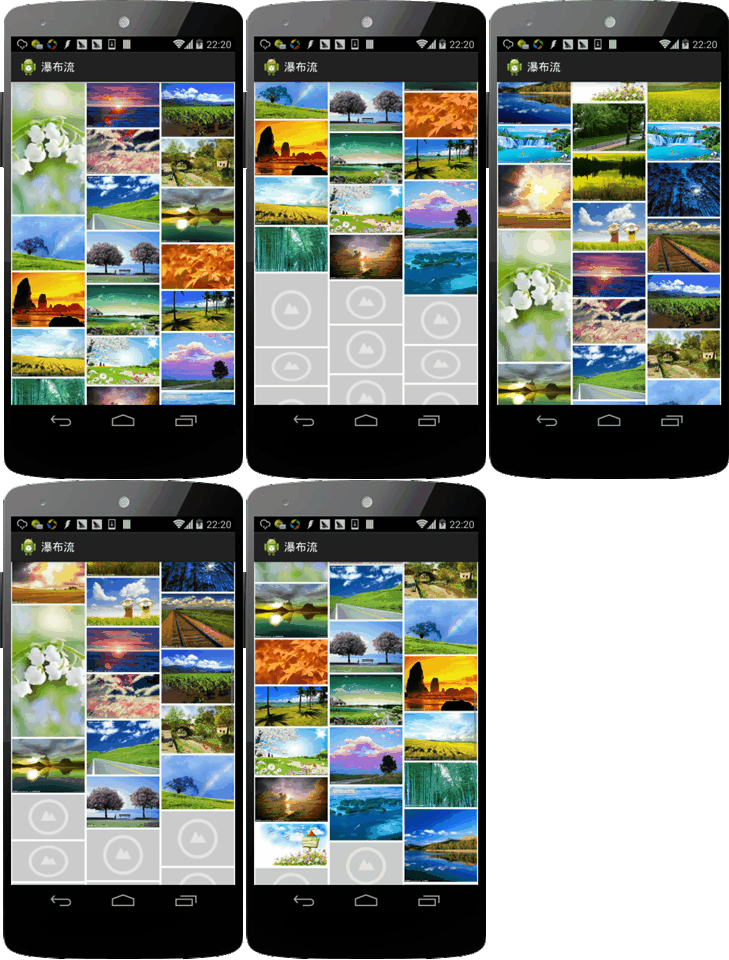
說實話,如今寫瀑布流的正確答案是用 RecyclerView + StaggeredGridLayoutManager,回收機制由 framework 負責,上面這幾百行手動管理可以省下來。這篇的價值在於把「OOM 到底從哪來」拆開來看:
解析度是最兇的兇手。降採樣那一步(decodeSimpleBitMapFromResource 內部用 BitmapFactory.Options.inSampleSize)通常比任何快取策略都有效,因為它直接削減了單張圖的記憶體佔用。
快取要有上限。LruCache 一定要設 maxSize,一般抓可用記憶體的 1/8 當上限,並在 onLowMemory() 與 trimMemory() 中主動清理。
離屏就該放手。這個 Demo 用「換成佔位圖」來達到目的,RecyclerView 則是直接回收 View 並丟掉引用。兩者思路一致:螢幕上看不到的東西,不該佔著記憶體。
滑動時別做重活。把載入時機延後到手勢結束,是簡單有效的一致性優化,在真實專案裡通常還要加上間隔請求與併發數控制。
源碼下載:https://download.csdn.net/detail/pangzaifei/7639423
 Android 圖示陰影與邊框處理:仿小米風格
在開發桌面啟動器或圖示美化功能時,常需要為應用程式圖示加上邊框與陰影。本文分享一種以 Android 自繪方式處理圖示的思路。 核心概念 邊框的顏色可以取自原圖的主要色
 Android UI 設計實務:尺寸換算與 Material Design 規範速查
前言 直接把 iOS 的互動設計整套搬到 Android 上,這種做法見仁見智——畢竟很多人這麼幹。但既然要做,就得有能力把尺寸正確換算過來。最省事的辦法是直接比對雙方的
 Android WebView 遠程代碼執行漏洞淺析
背景 本文以一個實際的 WebView 示例為切入點,分析遠程代碼執行漏洞的成因。代碼地址為:https://github.com/jltxgcy/AppVulnerab
 Android 使用 SharedPreferences 實現數據存儲與讀取
開發中我們經常需要為用戶提供參數設置功能,比如 QQ 裡是否允許陌生人加我為好友這類開關。保存這類配置參數,桌面軟件通常用 ini 文件,J2SE 應用則多用 prope