

編輯:關於 Android 程式設計
開發中我們經常需要為用戶提供參數設置功能,比如 QQ 裡"是否允許陌生人加我為好友"這類開關。保存這類配置參數,桌面軟件通常用 ini 文件,J2SE 應用則多用 properties 或 xml。那麼在 Android 上,最合適的方案是什麼呢?
Android 為我們準備了 SharedPreferences 這個輕量級的存儲類,用它保存軟件配置參數可謂恰到好處。SharedPreferences 底層其實就是一個 xml 文件,存放路徑位於 /data/data/<package name>/shared_prefs 目錄下。
下面以默認路徑設置為例,演示它的完整用法。首先是布局文件:
接著是封裝了讀寫邏輯的 PreferencesService 類:
package lhjd.cnc.dispenser.setting; import java.util.HashMap; import java.util.Map; import android.content.Context; import android.content.SharedPreferences; import android.content.SharedPreferences.Editor; public class PreferencesService { private Context context; public PreferencesService(Context context) { this.context = context; } /** * 實現應用參數保存 * @param name * @param age * @throws Exception */ public void save(String name) throws Exception { SharedPreferences preferences=context.getSharedPreferences("pathSet", Context.MODE_WORLD_READABLE); Editor editor=preferences.edit(); editor.putString("name", name); editor.commit(); } /** * 實現應用參數提取 * @return * @throws Exception */ public Map getPreferences() throws Exception { SharedPreferences preferences=context.getSharedPreferences("pathSet", Context.MODE_WORLD_READABLE); Map result=new HashMap(); result.put("name", preferences.getString("name", "")); return result; } } 最後是 Activity,負責把界面與存儲邏輯串起來:
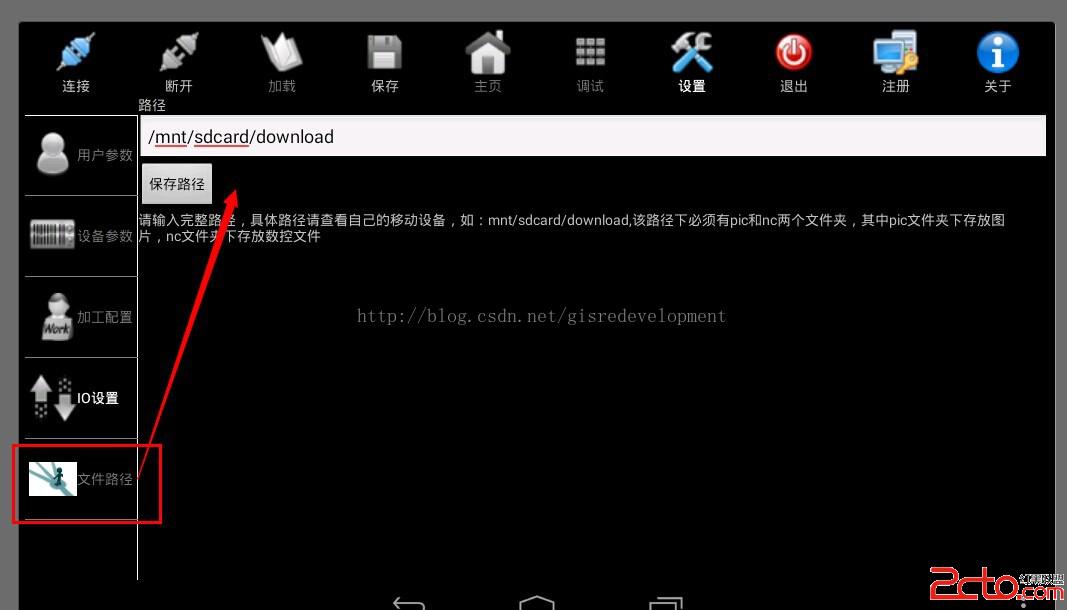
public class PathSet extends Activity{ private EditText pathNameText; private PreferencesService service; public PathSet(final Context context) { super(context); LayoutInflater inflater = (LayoutInflater)context.getSystemService(Context.LAYOUT_INFLATER_SERVICE); inflater.inflate(R.layout.pathset, this); service=new PreferencesService(context); pathNameText=(EditText)this.findViewById(R.id.pathName); Map params = null; try { params = service.getPreferences(); } catch (Exception e1) { // TODO Auto-generated catch block e1.printStackTrace(); } pathNameText.setText(params.get("name")); Button button=(Button)findViewById(R.id.btn_savePath); button.setOnClickListener(new View.OnClickListener() { public void onClick(View v) { String name=pathNameText.getText().toString().trim(); if("".equals(name)||name==null){ Toast.makeText(context, "路徑不能為空", 1).show(); }else{ try { service.save(name); Toast.makeText(context, R.string.succss, 1).show(); } catch (Exception e) { Toast.makeText(context, R.string.fail, 1).show(); e.printStackTrace(); } } } }); } } 運行效果如下圖:
 Android 自定義 SwipeLayout 實現列表項左滑顯示刪除按鈕
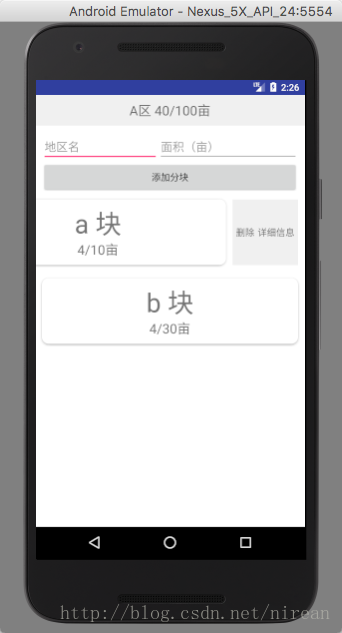
滑動刪除可以拆成兩個區域來看:內容區用於承載正常顯示的 View,操作區用於放置刪除按鈕。預設狀態下操作區隱藏,內容區填滿整個容器,操作區永遠位於內容區右側。開始滑動時,
 ContentProvider 內容提供者解析
ContentProvider 是 Android 中用於在不同應用程式之間分享資料的元件。它會將資料封裝起來,並透過 ContentResolver 對外提供統一的存取
 Android Studio 打包 aar 與兩種引用方式對比
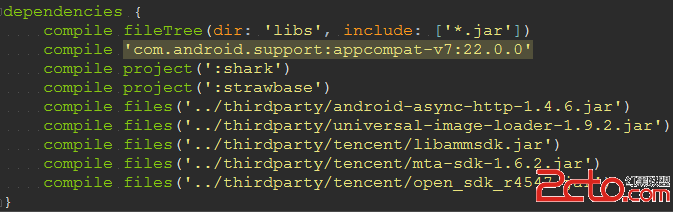
一、簡介 在規模較大的 Android 項目中,模塊、jar、aar 之間的相互引用是常態。通常我們通過 gradle 配置依賴來解決,例如: // 依賴本地 jar
 自訂 Android 百度地圖縮放圖標的實作教學
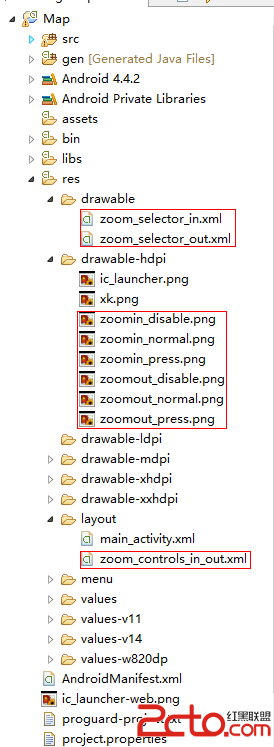
百度地圖 SDK 內建的縮放控制項外觀往往無法符合產品設計稿的要求,這時我們可以透過自訂一個縮放控制元件來達成客製化的效果。以下示範如何打造一組具備放大、縮小功能的圖標,