

編輯:關於 Android 程式設計
在之前的《Linux 文件系統 Inotify 機制》中,我們介紹了 Linux 對文件變更的監控過程。Android 在此基礎上封裝了一個 FileObserver 類,方便上層使用 Inotify。FileObserver 是一個抽象類,需要定義子類並實現其 onEvent 抽象方法;當被監控的文件或目錄發生變更時,系統會回呼 onEvent() 來處理事件。
FileObserver 類中定義了一個靜態內部類 ObserverThread,它才是真正的監控核心,各種類型的 FileObserver 都共用同一個 ObserverThread 實例:
public abstract class FileObserver { //可監控的事件類型 public static final int ALL_EVENTS = ACCESS | MODIFY | ATTRIB | CLOSE_WRITE | CLOSE_NOWRITE | OPEN | MOVED_FROM | MOVED_TO | DELETE | CREATE | DELETE_SELF | MOVE_SELF; //靜態創建並啟動一個文件監控線程 private static ObserverThread s_observerThread; static { s_observerThread = new ObserverThread(); s_observerThread.start(); } private String m_path; private Integer m_descriptor; private int m_mask; }ObserverThread 構造時會呼叫 init() 初始化一個 inotify 實例:
public ObserverThread() { super("FileObserver"); m_fd = init();//初始化一個 inotify 實例 } 對應的 JNI 實現(frameworks/base/core/jni/android_util_FileObserver.cpp):
static jint android_os_fileobserver_init(JNIEnv* env, jobject object) { #ifdef HAVE_INOTIFY return (jint)inotify_init(); #else return -1; #endif }隨後 ObserverThread 線程進入監控循環:
public void run() { observe(m_fd);//監控 inotify 實例句柄 }static void android_os_fileobserver_observe(JNIEnv* env, jobject object, jint fd) { #ifdef HAVE_INOTIFY char event_buf[512]; struct inotify_event* event; while (1) { int event_pos = 0; int num_bytes = read(fd, event_buf, sizeof(event_buf)); if (num_bytes < (int)sizeof(*event)) { if (errno == EINTR) continue; ALOGE("***** ERROR! android_os_fileobserver_observe() got a short event!"); return; } while (num_bytes >= (int)sizeof(*event)) { int event_size; event = (struct inotify_event *)(event_buf + event_pos); jstring path = NULL; if (event->len > 0) { path = env->NewStringUTF(event->name); } //通知上層響應 env->CallVoidMethod(object, method_onEvent, event->wd, event->mask, path); if (env->ExceptionCheck()) { env->ExceptionDescribe(); env->ExceptionClear(); } if (path != NULL) { env->DeleteLocalRef(path); } event_size = sizeof(*event) + event->len; num_bytes -= event_size; event_pos += event_size; } } #endif }ObserverThread 循環從 inotify 句柄讀取事件,再回呼 onEvent 分發:
public void onEvent(int wfd, int mask, String path) { FileObserver observer = null; synchronized (m_observers) { WeakReference weak = m_observers.get(wfd); if (weak != null) { observer = (FileObserver) weak.get(); if (observer == null) { m_observers.remove(wfd); } } } if (observer != null) { try { observer.onEvent(mask, path); } catch (Throwable throwable) { Log.wtf(LOG_TAG, "Unhandled exception in FileObserver " + observer, throwable); } } }透過 startWatching() 啟動監控:
public void startWatching() { if (m_descriptor < 0) { m_descriptor = s_observerThread.startWatching(m_path, m_mask, this); } }ObserverThread 會把句柄與 FileObserver 以鍵值對形式保存:
public int startWatching(String path, int mask, FileObserver observer) { int wfd = startWatching(m_fd, path, mask); Integer i = new Integer(wfd); if (wfd >= 0) { synchronized (m_observers) { m_observers.put(i, new WeakReference(observer)); } } return i; }最終由 native 方法 inotify_add_watch 添加 watch:
static jint android_os_fileobserver_startWatching(JNIEnv* env, jobject object, jint fd, jstring pathString, jint mask) { int res = -1; #ifdef HAVE_INOTIFY if (fd >= 0) { const char* path = env->GetStringUTFChars(pathString, NULL); res = inotify_add_watch(fd, path, mask); env->ReleaseStringUTFChars(pathString, path); } #endif return res; }透過 stopWatching() 停止監控:
public void stopWatching() { if (m_descriptor >= 0) { s_observerThread.stopWatching(m_descriptor); m_descriptor = -1; } }static void android_os_fileobserver_stopWatching(JNIEnv* env, jobject object, jint fd, jint wfd) { #ifdef HAVE_INOTIFY inotify_rm_watch((int)fd, (uint32_t)wfd); #endif }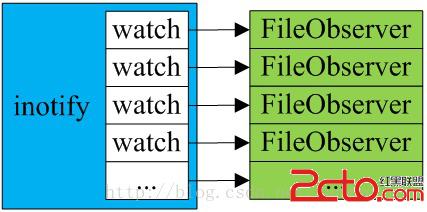
 仿 QQ 空間相冊橫向滑動展示多圖:MyHorizontalScrollView 實作
動手客製化吧 版面配置檔:activity_main.xml 版面配置檔:activity_index_gallery_item.xml
 arcgis api for js 共享干貨系列之二:自定義 Navigation 控件樣式風格
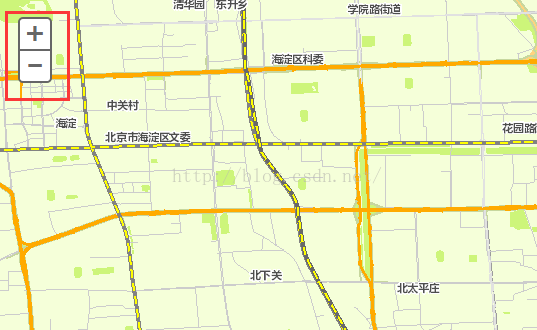
arcgis api for js 默認的 Navigation 控件樣式風格如下圖: 這樣的風格不能說不好,各有各的愛好與審美觀,這裡也不是重點。本節的重點是如何自定
 Android AutoCompleteTextView 實現搜索歷史記錄
AutoCompleteTextView 常用於搜尋框,能在使用者輸入時顯示提示。若把提示來源改為歷史紀錄,就能讓搜尋體驗更貼近實際需求。 以 SharedPrefere
 Android 手掌抑制功能的實作:多點觸控下的手寫區域隔離
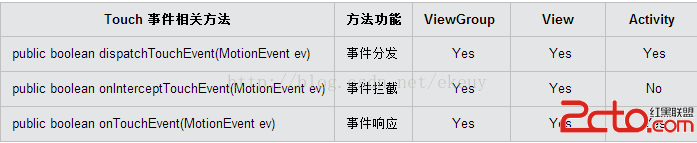
近期需要實作一個功能:Activity 中有一塊手寫區域,為了使用者體驗,希望在使用者整個手掌壓在平板上時(平板螢幕較大,這個情況很常見),系統只響應手寫區域內的觸控,手