

編輯:關於 Android 程式設計
今天在 GitHub 上偶然看到一個關於手勢鎖的 gesturelock 範例(有興趣的可以搜尋看看),於是下載來研究。無奈它幾乎沒有註解,程式碼上也有一些問題(例如設定 gravity=center_vertical 時就無法正常選擇手勢,這是我無意中發現的)。於是參考這位作者的思路,自己重寫了一版,修復了若干問題,並加入一些基本的自訂屬性。先在此感謝這位原作者~
先看預設效果圖:
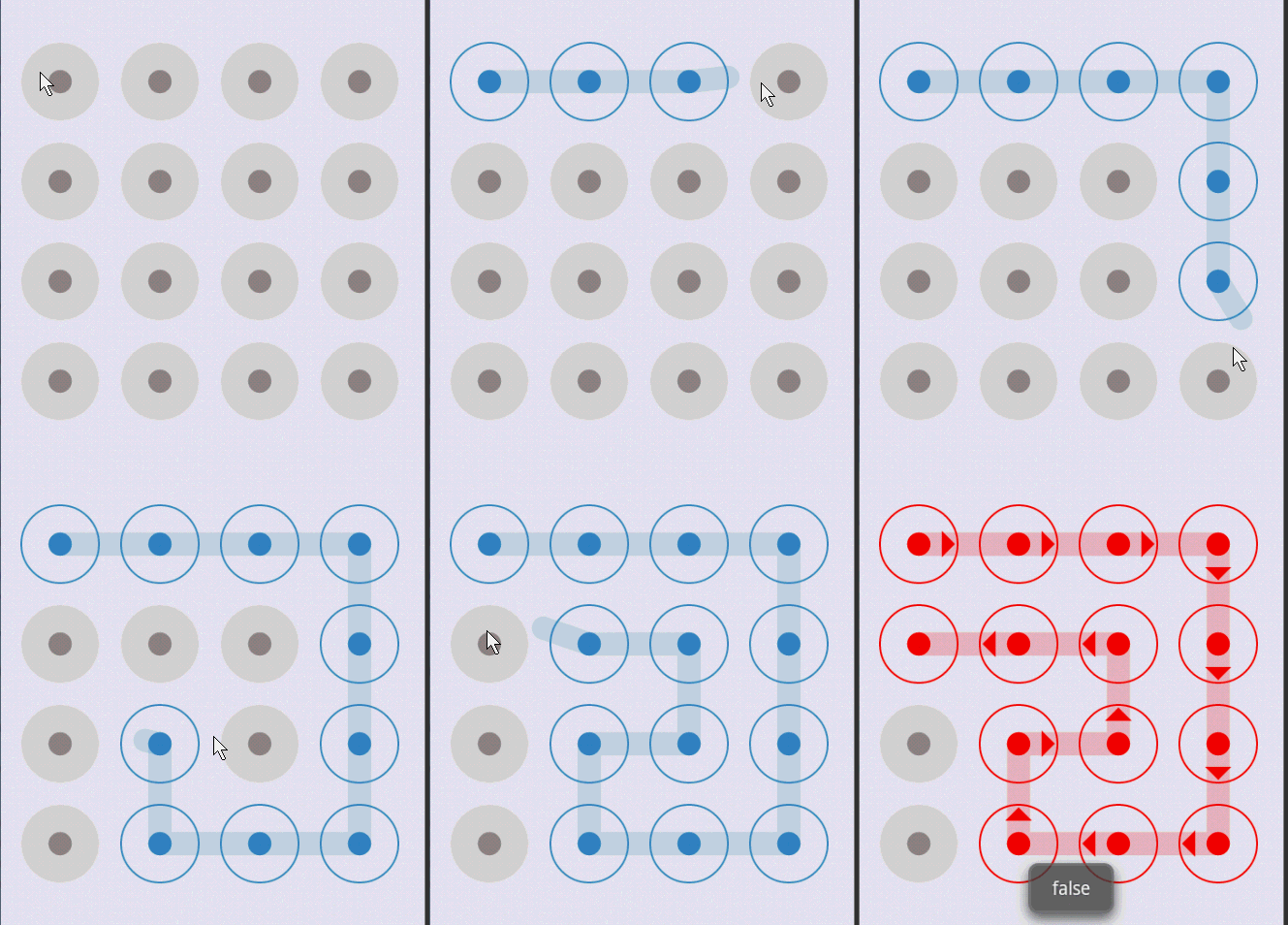
當然,數量、顏色等都可以自訂,自訂效果如下:
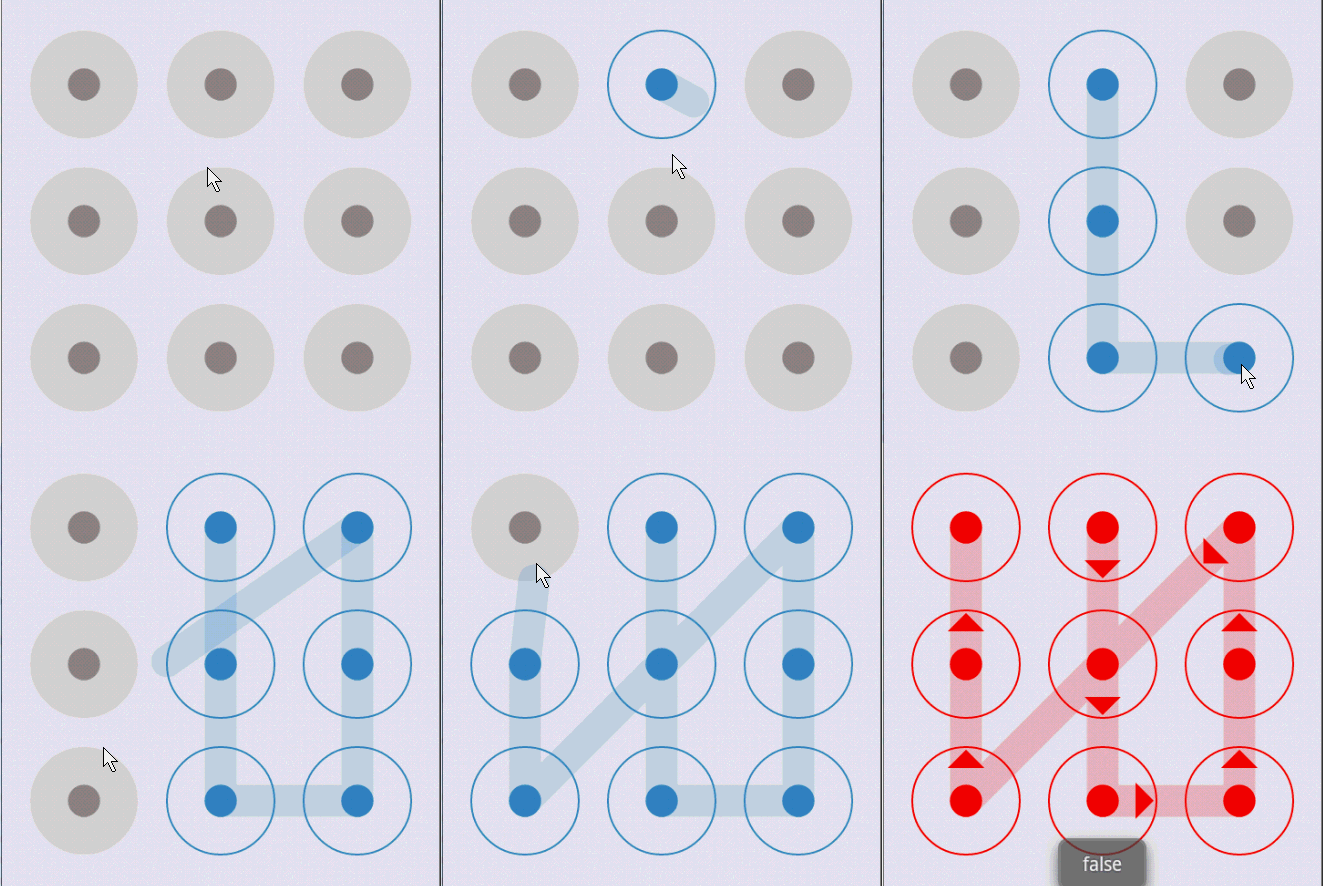
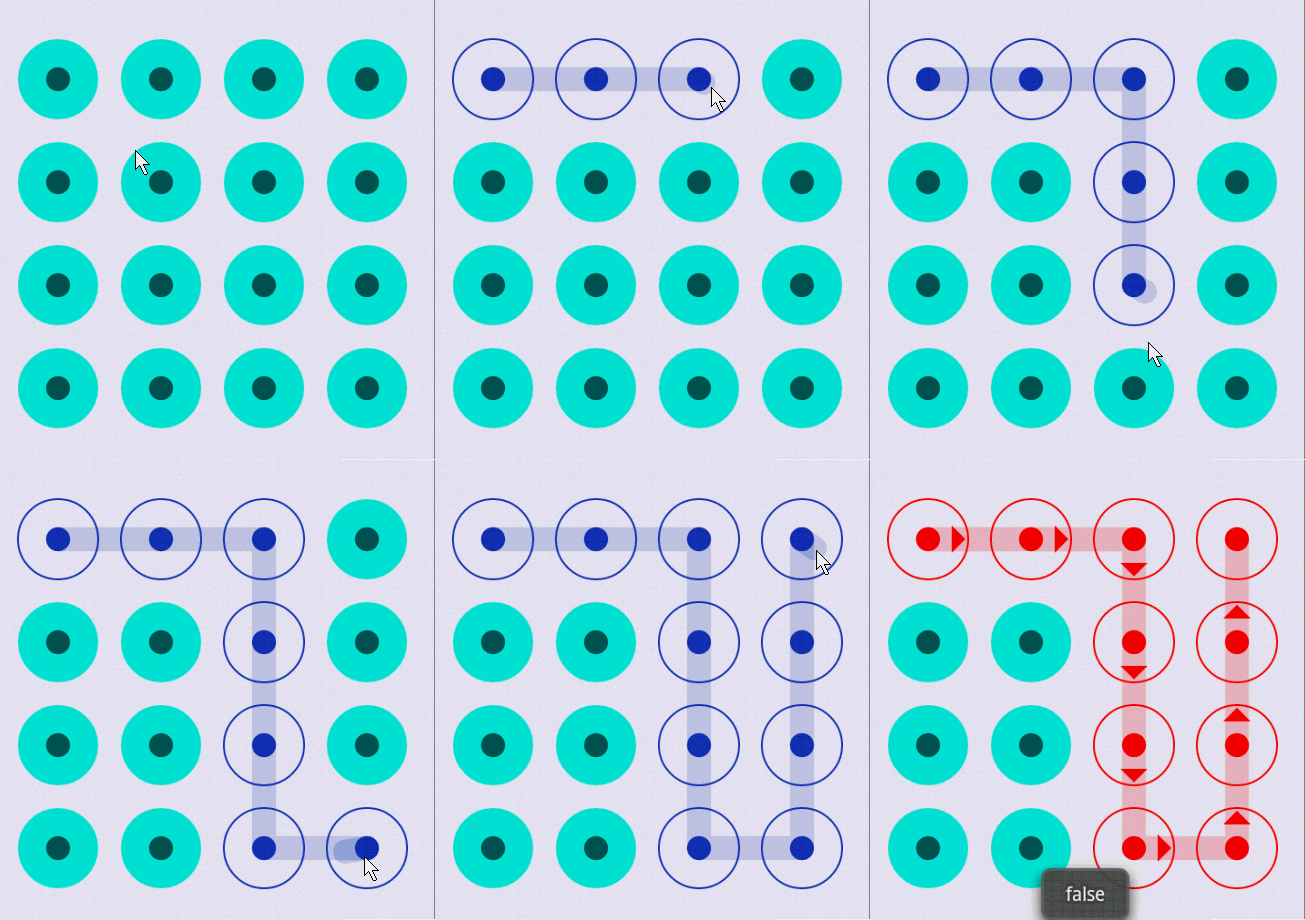
透過 declare-styleable 定義可控屬性,讓使用者能在 XML 中調整外觀、嘗試次數與數量:
<?xml version="1.0" encoding="utf-8"?>
<resources>
    <declare-styleable name="GestureLockViewGroup">
    </declare-styleable>
</resources>
它有三種狀態:無手指、手指按下、手指抬起。主要工作是在 onDraw 時依當前狀態繪製不同效果,狀態的改變則由外層的 GestureLockViewGroup 在 onTouchEvent 中設定:
public class GestureLockView extends View {
    enum Mode { STATUS_NO_FINGER, STATUS_FINGER_ON, STATUS_FINGER_UP; }

    private Mode mCurrentStatus = Mode.STATUS_NO_FINGER;
    private int mWidth, mHeight, mRadius;
    private int mStrokeWidth = 2;
    private int mCenterX, mCenterY;
    private Paint mPaint;
    private float mArrowRate = 0.333f;
    private int mArrowDegree = -1;
    private Path mArrowPath;
    private float mInnerCircleRadiusRate = 0.3F;
    private int mColorNoFingerInner, mColorNoFingerOutter, mColorFingerOn, mColorFingerUp;

    public GestureLockView(Context context, int colorNoFingerInner, int colorNoFingerOutter,
            int colorFingerOn, int colorFingerUp) {
        super(context);
        this.mColorNoFingerInner = colorNoFingerInner;
        this.mColorNoFingerOutter = colorNoFingerOutter;
        this.mColorFingerOn = colorFingerOn;
        this.mColorFingerUp = colorFingerUp;
        mPaint = new Paint(Paint.ANTI_ALIAS_FLAG);
        mArrowPath = new Path();
    }

    @Override
    protected void onMeasure(int widthMeasureSpec, int heightMeasureSpec) {
        super.onMeasure(widthMeasureSpec, heightMeasureSpec);
        mWidth = MeasureSpec.getSize(widthMeasureSpec);
        mHeight = MeasureSpec.getSize(heightMeasureSpec);
        mWidth = mWidth < mHeight ? mWidth : mHeight; // 取長寬的小值
        mRadius = mCenterX = mCenterY = mWidth / 2;
        mRadius -= mStrokeWidth / 2;
        // 繪製默認朝上的等腰三角形箭頭
        float mArrowLength = mWidth / 2 * mArrowRate;
        mArrowPath.moveTo(mWidth / 2, mStrokeWidth + 2);
        mArrowPath.lineTo(mWidth / 2 - mArrowLength, mStrokeWidth + 2 + mArrowLength);
        mArrowPath.lineTo(mWidth / 2 + mArrowLength, mStrokeWidth + 2 + mArrowLength);
        mArrowPath.close();
        mArrowPath.setFillType(Path.FillType.WINDING);
    }

    @Override
    protected void onDraw(Canvas canvas) {
        switch (mCurrentStatus) {
            case STATUS_FINGER_ON:
                mPaint.setStyle(Paint.Style.STROKE);
                mPaint.setColor(mColorFingerOn);
                mPaint.setStrokeWidth(2);
                canvas.drawCircle(mCenterX, mCenterY, mRadius, mPaint);
                mPaint.setStyle(Paint.Style.FILL);
                canvas.drawCircle(mCenterX, mCenterY, mRadius * mInnerCircleRadiusRate, mPaint);
                break;
            case STATUS_FINGER_UP:
                mPaint.setColor(mColorFingerUp);
                mPaint.setStyle(Paint.Style.STROKE);
                mPaint.setStrokeWidth(2);
                canvas.drawCircle(mCenterX, mCenterY, mRadius, mPaint);
                mPaint.setStyle(Paint.Style.FILL);
                canvas.drawCircle(mCenterX, mCenterY, mRadius * mInnerCircleRadiusRate, mPaint);
                drawArrow(canvas);
                break;
            case STATUS_NO_FINGER:
                mPaint.setStyle(Paint.Style.FILL);
                mPaint.setColor(mColorNoFingerOutter);
                canvas.drawCircle(mCenterX, mCenterY, mRadius, mPaint);
                mPaint.setColor(mColorNoFingerInner);
                canvas.drawCircle(mCenterX, mCenterY, mRadius * mInnerCircleRadiusRate, mPaint);
                break;
        }
    }

    private void drawArrow(Canvas canvas) {
        if (mArrowDegree != -1) {
            mPaint.setStyle(Paint.Style.FILL);
            canvas.save();
            canvas.rotate(mArrowDegree, mCenterX, mCenterY);
            canvas.drawPath(mArrowPath, mPaint);
            canvas.restore();
        }
    }

    public void setMode(Mode mode) { this.mCurrentStatus = mode; invalidate(); }
    public void setArrowDegree(int degree) { this.mArrowDegree = degree; }
    public int getArrowDegree() { return this.mArrowDegree; }
}
整體由 n×n 個 GestureLockView 組成,負責處理觸摸事件、判斷選擇路徑、繪製連線與箭頭,並在抬手時比對答案:
public class GestureLockViewGroup extends RelativeLayout {
    private GestureLockView[] mGestureLockViews;
    private int mCount = 4;                       // 每邊的格子數
    private int[] mAnswer = { 0, 1, 2, 5, 8 };    // 正確答案
    private List<Integer> mChoose = new ArrayList<Integer>();
    private Paint mPaint;
    private int mMarginBetweenLockView = 30;
    private int mGestureLockViewWidth;
    private int mNoFingerInnerCircleColor = 0xFF939090;
    private int mNoFingerOuterCircleColor = 0xFFE0DBDB;
    private int mFingerOnColor = 0xFF378FC9;
    private int mFingerUpColor = 0xFFFF0000;
    private int mWidth, mHeight;
    private Path mPath;
    private int mLastPathX, mLastPathY;
    private Point mTmpTarget = new Point();
    private int mTryTimes = 4;                    // 最大嘗試次數
    private OnGestureLockViewListener mOnGestureLockViewListener;

    public GestureLockViewGroup(Context context, AttributeSet attrs, int defStyle) {
        super(context, attrs, defStyle);
        TypedArray a = context.getTheme().obtainStyledAttributes(
                attrs, R.styleable.GestureLockViewGroup, defStyle, 0);
        int n = a.getIndexCount();
        for (int i = 0; i < n; i++) {
            int attr = a.getIndex(i);
            switch (attr) {
                case R.styleable.GestureLockViewGroup_color_no_finger_inner_circle:
                    mNoFingerInnerCircleColor = a.getColor(attr, mNoFingerInnerCircleColor); break;
                case R.styleable.GestureLockViewGroup_color_no_finger_outer_circle:
                    mNoFingerOuterCircleColor = a.getColor(attr, mNoFingerOuterCircleColor); break;
                case R.styleable.GestureLockViewGroup_color_finger_on:
                    mFingerOnColor = a.getColor(attr, mFingerOnColor); break;
                case R.styleable.GestureLockViewGroup_color_finger_up:
                    mFingerUpColor = a.getColor(attr, mFingerUpColor); break;
                case R.styleable.GestureLockViewGroup_count:
                    mCount = a.getInt(attr, 3); break;
                case R.styleable.GestureLockViewGroup_tryTimes:
                    mTryTimes = a.getInt(attr, 5); break;
            }
        }
        a.recycle();
        mPaint = new Paint(Paint.ANTI_ALIAS_FLAG);
        mPaint.setStyle(Paint.Style.STROKE);
        mPaint.setStrokeCap(Paint.Cap.ROUND);
        mPaint.setStrokeJoin(Paint.Join.ROUND);
        mPath = new Path();
    }

    @Override
    protected void onMeasure(int widthMeasureSpec, int heightMeasureSpec) {
        super.onMeasure(widthMeasureSpec, heightMeasureSpec);
        mWidth = mHeight = MeasureSpec.getSize(widthMeasureSpec);
        mHeight = mWidth = mWidth < mHeight ? mWidth : mHeight;
        if (mGestureLockViews == null) {
            mGestureLockViews = new GestureLockView[mCount * mCount];
            mGestureLockViewWidth = (int) (4 * mWidth * 1.0f / (5 * mCount + 1));
            mMarginBetweenLockView = (int) (mGestureLockViewWidth * 0.25);
            mPaint.setStrokeWidth(mGestureLockViewWidth * 0.29f);
            for (int i = 0; i < mGestureLockViews.length; i++) {
                mGestureLockViews[i] = new GestureLockView(getContext(),
                        mNoFingerInnerCircleColor, mNoFingerOuterCircleColor,
                        mFingerOnColor, mFingerUpColor);
                mGestureLockViews[i].setId(i + 1);
                RelativeLayout.LayoutParams lp = new RelativeLayout.LayoutParams(
                        mGestureLockViewWidth, mGestureLockViewWidth);
                if (i % mCount != 0) {
                    lp.addRule(RelativeLayout.RIGHT_OF, mGestureLockViews[i - 1].getId());
                }
                if (i > mCount - 1) {
                    lp.addRule(RelativeLayout.BELOW, mGestureLockViews[i - mCount].getId());
                }
                int rightMargin = mMarginBetweenLockView, bottomMargin = mMarginBetweenLockView;
                int leftMagin = 0, topMargin = 0;
                if (i >= 0 && i < mCount) topMargin = mMarginBetweenLockView;   // 第一行
                if (i % mCount == 0) leftMagin = mMarginBetweenLockView;         // 第一列
                lp.setMargins(leftMagin, topMargin, rightMargin, bottomMargin);
                mGestureLockViews[i].setMode(Mode.STATUS_NO_FINGER);
                addView(mGestureLockViews[i], lp);
            }
        }
    }

    @Override
    public boolean onTouchEvent(MotionEvent event) {
        int x = (int) event.getX();
        int y = (int) event.getY();
        switch (event.getAction()) {
            case MotionEvent.ACTION_DOWN:
                reset();
                break;
            case MotionEvent.ACTION_MOVE:
                mPaint.setColor(mFingerOnColor);
                mPaint.setAlpha(50);
                GestureLockView child = getChildIdByPos(x, y);
                if (child != null) {
                    int cId = child.getId();
                    if (!mChoose.contains(cId)) {
                        mChoose.add(cId);
                        child.setMode(Mode.STATUS_FINGER_ON);
                        if (mOnGestureLockViewListener != null)
                            mOnGestureLockViewListener.onBlockSelected(cId);
                        mLastPathX = child.getLeft() / 2 + child.getRight() / 2;
                        mLastPathY = child.getTop() / 2 + child.getBottom() / 2;
                        if (mChoose.size() == 1) mPath.moveTo(mLastPathX, mLastPathY);
                        else mPath.lineTo(mLastPathX, mLastPathY);
                    }
                }
                mTmpTarget.x = x;
                mTmpTarget.y = y;
                break;
            case MotionEvent.ACTION_UP:
                mPaint.setColor(mFingerUpColor);
                mPaint.setAlpha(50);
                this.mTryTimes--;
                if (mOnGestureLockViewListener != null && mChoose.size() > 0) {
                    mOnGestureLockViewListener.onGestureEvent(checkAnswer());
                    if (this.mTryTimes == 0)
                        mOnGestureLockViewListener.onUnmatchedExceedBoundary();
                }
                mTmpTarget.x = mLastPathX;
                mTmpTarget.y = mLastPathY;
                changeItemMode();
                // 計算每個格子箭頭需要旋轉的角度
                for (int i = 0; i + 1 < mChoose.size(); i++) {
                    GestureLockView start = (GestureLockView) findViewById(mChoose.get(i));
                    GestureLockView next = (GestureLockView) findViewById(mChoose.get(i + 1));
                    int dx = next.getLeft() - start.getLeft();
                    int dy = next.getTop() - start.getTop();
                    int angle = (int) Math.toDegrees(Math.atan2(dy, dx)) + 90;
                    start.setArrowDegree(angle);
                }
                break;
        }
        invalidate();
        return true;
    }

    private void changeItemMode() {
        for (GestureLockView v : mGestureLockViews) {
            if (mChoose.contains(v.getId())) v.setMode(Mode.STATUS_FINGER_UP);
        }
    }

    private void reset() {
        mChoose.clear();
        mPath.reset();
        for (GestureLockView v : mGestureLockViews) {
            v.setMode(Mode.STATUS_NO_FINGER);
            v.setArrowDegree(-1);
        }
    }

    private boolean checkAnswer() {
        if (mAnswer.length != mChoose.size()) return false;
        for (int i = 0; i < mAnswer.length; i++) {
            if (mAnswer[i] != mChoose.get(i)) return false;
        }
        return true;
    }

    private boolean checkPositionInChild(View child, int x, int y) {
        int padding = (int) (mGestureLockViewWidth * 0.15);
        return x >= child.getLeft() + padding && x <= child.getRight() - padding
            && y >= child.getTop() + padding && y <= child.getBottom() - padding;
    }

    private GestureLockView getChildIdByPos(int x, int y) {
        for (GestureLockView v : mGestureLockViews) {
            if (checkPositionInChild(v, x, y)) return v;
        }
        return null;
    }

    public void setOnGestureLockViewListener(OnGestureLockViewListener listener) {
        this.mOnGestureLockViewListener = listener;
    }
    public void setAnswer(int[] answer) { this.mAnswer = answer; }
    public void setUnMatchExceedBoundary(int boundary) { this.mTryTimes = boundary; }

    @Override
    public void dispatchDraw(Canvas canvas) {
        super.dispatchDraw(canvas);
        if (mPath != null) canvas.drawPath(mPath, mPaint);          // 已選路徑
        if (mChoose.size() > 0 && mLastPathX != 0 && mLastPathY != 0) {
            canvas.drawLine(mLastPathX, mLastPathY, mTmpTarget.x, mTmpTarget.y, mPaint); // 指引線
        }
    }

    public interface OnGestureLockViewListener {
        void onBlockSelected(int cId);
        void onGestureEvent(boolean matched);
        void onUnmatchedExceedBoundary();
    }
}
<RelativeLayout xmlns:android="https://schemas.android.com/apk/res/android"
    xmlns:zhy="https://schemas.android.com/apk/res/com.zhy.zhy_gesturelockview"
    android:layout_width="match_parent"
    android:layout_height="match_parent" >
    <com.zhy.zhy_gesturelockview.view.GestureLockViewGroup
        android:id="@+id/id_gestureLockViewGroup"
        android:layout_width="match_parent"
        android:layout_height="match_parent"
        android:background="#F2F2F7"
        android:gravity="center_vertical"
        zhy:count="3"
        zhy:tryTimes="5" />
    <!-- 也可自訂顏色:
    zhy:color_no_finger_inner_circle="#ff085D58"
    zhy:color_no_finger_outer_circle="#ff08F0E0"
    zhy:color_finger_on="#FF1734BF" -->
</RelativeLayout>
public class MainActivity extends Activity {
    private GestureLockViewGroup mGestureLockViewGroup;

    @Override
    protected void onCreate(Bundle savedInstanceState) {
        super.onCreate(savedInstanceState);
        setContentView(R.layout.activity_main);
        mGestureLockViewGroup = (GestureLockViewGroup) findViewById(R.id.id_gestureLockViewGroup);
        mGestureLockViewGroup.setAnswer(new int[] { 1, 2, 3, 4, 5 });
        mGestureLockViewGroup.setOnGestureLockViewListener(new OnGestureLockViewListener() {
            @Override
            public void onUnmatchedExceedBoundary() {
                Toast.makeText(MainActivity.this, "錯誤次數過多...", Toast.LENGTH_SHORT).show();
                mGestureLockViewGroup.setUnMatchExceedBoundary(5);
            }
            @Override
            public void onGestureEvent(boolean matched) {
                Toast.makeText(MainActivity.this, matched + "", Toast.LENGTH_SHORT).show();
            }
            @Override
            public void onBlockSelected(int cId) {}
        });
    }
}
調用是不是 so easy?不想看程式碼又想直接用的朋友,可以拿去即用;哪天閒下來再好好研究裡面的實作細節~有任何問題歡迎留言。
 打造專屬的 Android 對話框:Dialog 自定義七種常見樣式
在 Android 裡,對話框(Dialog)並不是只能「寫死在頁面上」的一次性元件。Activity 本身就提供了一整套方便管理的機制,讓你能建立、保存與還原對話框,例
 優步在線客服怎麼聯繫?優步客服咨詢入口介紹
優步在線客服聯繫方式與使用路徑 若撥打優步客服電話未接通,可嘗試使用App內的在線客服。不過,該功能並非所有城市都支援,若未看到入口,代表所在城市暫未開放。 在叫車界面點
 Android EventBus 入門:事件發布訂閱與 ThreadMode
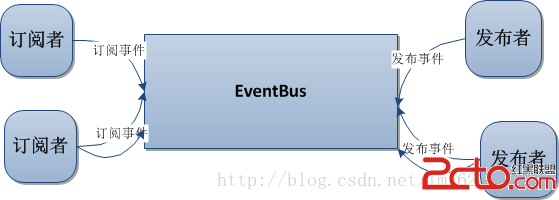
EventBus 是什麼 EventBus 是一個發布與訂閱的事件總線。它讓元件之間不需要直接依賴,也能透過事件傳遞資料。發布者送出事件,訂閱者只要註冊對應方法,就能收到
 Android Studio 匯入 PullToRefresh 第三方庫完整圖解
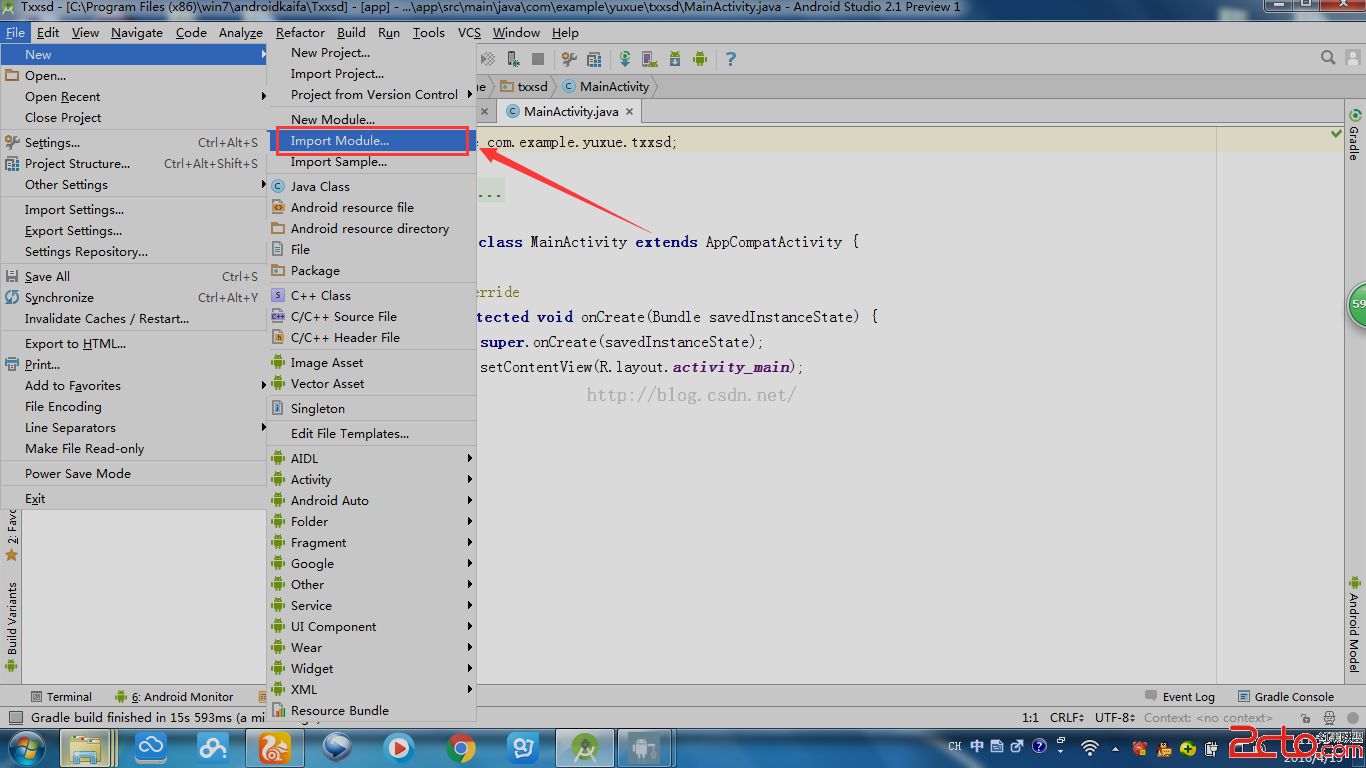
下拉刷新幾乎是清單頁面的標配,而 Android-PullToRefresh 是這個需求最經典的開源實作。問題在於它並不是標準的 aar 或 jar,而是一份需要以 Mo