

編輯:關於 Android 程式設計
分享一個相當實用又簡單的 Android 第三方 UI 元件:BottomView。小米的米 UI 也用到了類似方案。
1. 加入函式庫
下載 BottomView.jar,放到 Android 專案的 libs 目錄下。
2. 設定 Theme
把以下兩個 Theme 複製到專案的 res/values/styles.xml:
<!-- 半透明背景 Theme -->
<style name="BottomViewTheme_Defalut">
    <item name="android:windowFrame">@null</item>
    <item name="android:windowContentOverlay">@null</item>
    <item name="android:windowIsFloating">true</item>
    <item name="android:windowIsTranslucent">false</item>
    <item name="android:windowNoTitle">true</item>
    <item name="android:windowBackground">@color/white</item>
    <item name="android:backgroundDimEnabled">true</item>
    <item name="android:windowFullscreen">true</item>
</style>

<!-- 透明背景 Theme -->
<style name="BottomViewTheme_Transparent">
    <item name="android:windowFrame">@null</item>
    <item name="android:windowIsFloating">true</item>
    <item name="android:windowIsTranslucent">false</item>
    <item name="android:windowContentOverlay">@null</item>
    <item name="android:windowNoTitle">true</item>
    <item name="android:windowBackground">@color/white</item>
    <item name="android:backgroundDimEnabled">false</item>
</style>
如果提示 @color/white 找不到,表示專案的 res/values/colors.xml 裡還沒有這個顏色。補一行即可:
<color name="white">#ffffff</color>
3. 加上動畫(建議)
有進出場動畫,整體質感會好很多:
<style name="BottomToTopAnim" parent="android:Animation">
    <item name="@android:windowEnterAnimation">@anim/bottomview_anim_enter</item>
    <item name="@android:windowExitAnimation">@anim/bottomview_anim_exit</item>
</style>
res/anim/bottomview_anim_enter.xml:
<?xml version="1.0" encoding="utf-8"?>
<set xmlns:android="https://schemas.android.com/apk/res/android">
    <translate
        android:fromYDelta="100%p"
        android:toYDelta="0"
        android:duration="300" />
</set>
res/anim/bottomview_anim_exit.xml:
<?xml version="1.0" encoding="utf-8"?>
<set xmlns:android="https://schemas.android.com/apk/res/android">
    <translate
        android:fromYDelta="0"
        android:toYDelta="100%p"
        android:duration="300" />
</set>
整體目錄結構如下圖。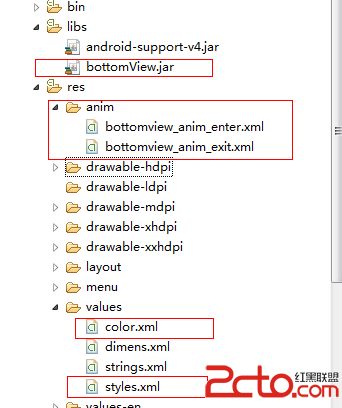
BottomView bottomView = new BottomView(this, R.style.BottomViewTheme_Defalut,
                                       R.layout.bottom_view);
bottomView.setAnimation(R.style.BottomToTopAnim);  // 動畫,可選
bottomView.showBottomView(false);
需要取得這個 View 本身的話,呼叫 getView() 即可。
效果圖之一,內容完全可以自行發揮: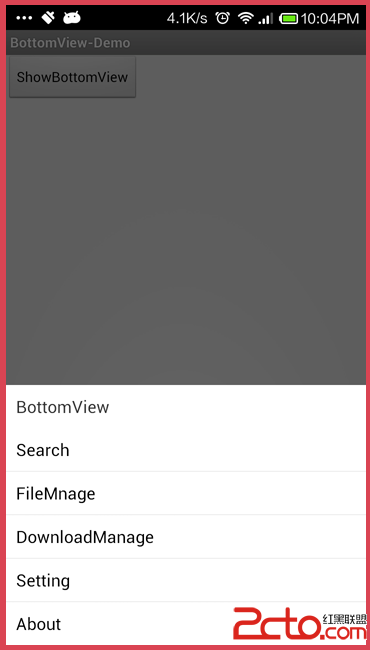

下載位置:
原文出處:https://www.aplesson.com/?p=400
這個元件的原理是把自訂版面塞進一個浮動的 Window,靠 Theme 控制背景、遮罩與動畫——理解這點之後,其實不用第三方庫也能自己實作:一個 Dialog 加上 window.setGravity(Gravity.BOTTOM)、透明背景與進出場動畫,效果基本相同。
若要在自己的專案裡用類似的底部面板,AndroidX 提供的 BottomSheetDialog 是更標準的選擇:支援拖曳手勢、多種展開狀態(收合/半開/展開)、內建遮罩與系統整合,也不需要另外拉第三方 jar。
另外原文中的 BottomViewTheme_Defalut 拼字有誤(應為 Default),複製時保持一致即可,但新專案建議直接改成正確拼法,免得之後維護時困惑。
 Android 系統開發(3):Makefile 的編寫
Makefile 是什麼? Makefile 的作用主要有兩點: 1、組織工程文件,編譯成複雜的程序;2、安裝及卸載我們的程序。 Makefile 使用示例 在 /hom
 Android 仿 iOS UIAlertView 對話框
顯示效果 我在參考連結中看到原作者仿的 QQ 提示框,但实际使用起來並不太順手,有一些不足之處。於是我參照系統的 AlertDialog 設計,沿用參考連結中的布局檔
 Android 開發實戰:用 Bmob 快速接入短信驗證碼功能
本文將帶你完整實現「發送短信驗證碼」與「校驗驗證碼」這兩個常見功能,全程借助第三方雲服務平台 Bmob 來完成。那麼 Bmob 究竟是什麼?簡單來說,它是一個面向移動端的
 Android ImageView 圖片旋轉與縮放實作
ImageView 圖片處理 ImageView 主要用來顯示圖片,也可以搭配 Matrix 做旋轉、縮放等效果。scaleType 屬性則可控制圖片在控制項中的顯示方式