

編輯:關於 Android 程式設計
獲取使用者當前位置。
追蹤使用者的移動軌跡。
LocationManager:負責管理 Android 的使用者定位服務。
LocationProvider:提供多種定位方式,供開發者依需求挑選。
GPS 定位:
需聲明權限:android.permission.ACCESS_FINE_LOCATION
網路(Network)定位:
需聲明權限:android.permission.ACCESS_FINE_LOCATION(精確)或 android.permission.ACCESS_COARSE_LOCATION(不精確)
基本步驟:
1. 在 AndroidManifest.xml 中聲明相應權限。
2. 取得 LocationManager 物件。
3. 選擇 LocationProvider。
4. 綁定 LocationListener 物件。
Criteria 可以設定一系列查詢條件,用來在當前設備中挑出最符合條件的 LocationProvider。查詢條件範例:
Criteria criteria = new Criteria();
criteria.setAccuracy(Criteria.ACCURACY_FINE);//設置為最大精度
criteria.setAltitudeRequired(true);//要求海拔資訊
criteria.setBearingRequired(true);//要求方位資訊
criteria.setBearingAccuracy(Criteria.ACCURACY_HIGH);//要求方位資訊的精確度
criteria.setCostAllowed(false);//是否允許付費
criteria.setPowerRequirement(Criteria.POWER_LOW);//對電量的要求
criteria.setSpeedAccuracy(criteria.ACCURACY_HIGH);//對速度的精確度
criteria.setHorizontalAccuracy(Criteria.ACCURACY_HIGH);//對水平的精確度
criteria.setSpeedRequired(true);//要求速度資訊
criteria.setVerticalAccuracy(Criteria.ACCURACY_HIGH);//對垂直精度
String providerFalse = locationManager.getBestProvider(criteria, false);//找到最好的 Provider,不論是否可用。
String providerTrue = locationManager.getBestProvider(criteria, true);//找到最好的、且可用的 Provider。
package com.yuexin.location01; import java.util.List; import android.annotation.SuppressLint; import android.app.Activity; import android.location.Criteria; import android.location.Location; import android.location.LocationManager; import android.os.Bundle; import android.view.View; import android.view.View.OnClickListener; import android.widget.Button; import android.widget.TextView; public class MainActivity extends Activity { private Button buttonProvider = null; private Button buttonProviderBest = null; private LocationManager locationManager ; private TextView AltitudeValue= null; private TextView BearingValue= null; private TextView SpeedValue= null; private TextView LongitudeValue= null; private TextView LatitudeValue= null; @Override protected void onCreate(Bundle savedInstanceState) { super.onCreate(savedInstanceState); setContentView(R.layout.activity_main); AltitudeValue = (TextView) findViewById(R.id.AltitudeValue); BearingValue = (TextView) findViewById(R.id.BearingValue); SpeedValue = (TextView) findViewById(R.id.SpeedValue); LongitudeValue = (TextView) findViewById(R.id.LongitudeValue); LatitudeValue = (TextView) findViewById(R.id.LatitudeValue); buttonProvider = (Button) findViewById(R.id.buttonProvider); buttonProviderBest = (Button) findViewById(R.id.buttonProviderBest); buttonProvider.setOnClickListener(new ButtonListener()); buttonProviderBest.setOnClickListener(new ButtonListrnerBest()); //得到LocationManager對象 locationManager = (LocationManager) MainActivity.this.getSystemService(LOCATION_SERVICE); locationManager.requestLocationUpdates(LocationManager.GPS_PROVIDER, 0, 0, new LocationListener()); } class ButtonListrnerBest implements OnClickListener{ @SuppressLint("NewApi") @Override public void onClick(View arg0) { Criteria criteria = new Criteria(); criteria.setAccuracy(Criteria.ACCURACY_FINE);//設置為最大精度 criteria.setAltitudeRequired(true);//要求海拔資訊 criteria.setBearingRequired(true);//要求方位資訊 criteria.setBearingAccuracy(Criteria.ACCURACY_HIGH);//要求方位資訊的精確度 criteria.setCostAllowed(false);//是否允許付費 criteria.setPowerRequirement(Criteria.POWER_LOW);//對電量的要求 criteria.setSpeedAccuracy(criteria.ACCURACY_HIGH);//對速度的精確度 criteria.setHorizontalAccuracy(Criteria.ACCURACY_HIGH);//對水平的精確度 criteria.setSpeedRequired(true);//要求速度資訊 criteria.setVerticalAccuracy(Criteria.ACCURACY_HIGH);//對垂直精度 String providerFalse = locationManager.getBestProvider(criteria, false);//找到最好的Provider不管是否能用。 String providerTrue = locationManager.getBestProvider(criteria, true);//找到最好的能用的Provider。 //locationManager.requestLocationUpdates(providerTrue, 0, 0, new LocationListener()); System.out.println("providerFalse---->"+providerFalse); System.out.println("providerTrue---->"+providerTrue); } } class ButtonListener implements OnClickListener{ @Override public void onClick(View arg0) { /* //得到LocationManager對象 LocationManager locationManager = (LocationManager) MainActivity.this.getSystemService(LOCATION_SERVICE); // 1.定義當前使用的LocationManager // 2.定義兩次定位的間隔大小。 // 3.兩次定位之間的最小距離 locationManager.requestLocationUpdates(LocationManager.GPS_PROVIDER, 0, 0, new LocationListener()); */ List allProvider = locationManager.getAllProviders(); for (int i = 0; i < allProvider.size(); i++) { System.out.println(allProvider.get(i)); } } } private class LocationListener implements android.location.LocationListener{ @Override public void onLocationChanged(Location location) { // 設備位置發生改變Location為對象的位置 System.out.println(location.getLongitude());//經度 System.out.println(location.getLatitude());//維度 AltitudeValue.setText(String.format("%.8f",location.getAltitude())); BearingValue.setText(String.format("%.8f",location.getBearing())); SpeedValue.setText(String.format("%.8f",location.getSpeed())); LongitudeValue.setText(String.format("%.8f",location.getLongitude())); LatitudeValue.setText(String.format("%.8f",location.getLatitude())); } @Override public void onProviderDisabled(String arg0) { // TODO Auto-generated method stub } @Override public void onProviderEnabled(String arg0) { // TODO Auto-generated method stub } @Override public void onStatusChanged(String arg0, int arg1, Bundle arg2) { // TODO Auto-generated method stub } } }
 仿微信清理內存圖表動畫:SurfaceView 屏幕閃爍問題解決方案詳解
最近接了一個項目,其中需要實現清理內存功能,效果要和微信一致,於是想到用 SurfaceView 而非繼承 View。下面為大家解析實現思路。 SurfaceView 採
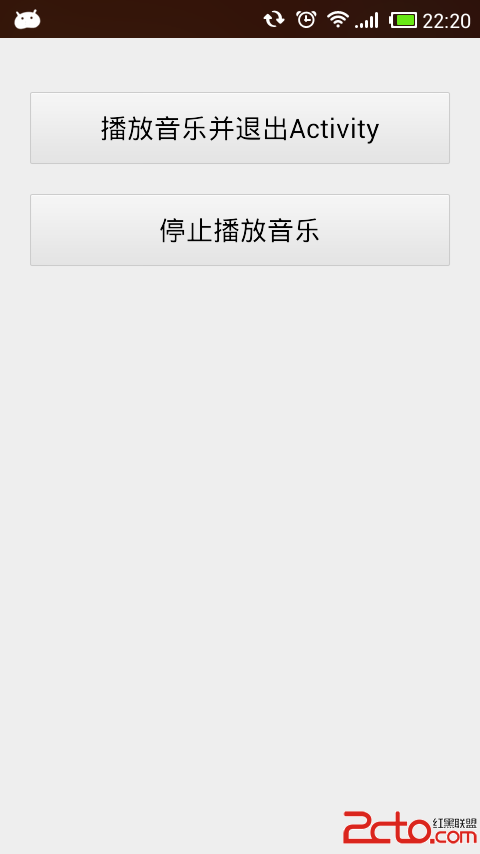 Android 透過 startService 播放背景音樂簡單範例
關於 startService 的基本用法與生命週期,可參考〈Android 中 startService 的使用及 Service 生命週期〉一文。本文則透過播放背景音
 自定義Android輪播圖控件:ViewPager與指示器的封裝實作
做過輪播圖的人大概都有這種經驗:功能不難,但每次換專案就要在 Activity 裡重寫一堆滑動、指示器同步的程式碼,既重複又容易出錯。與其反覆搬運,不如把它封裝成一個可重
 Android 利用動畫讓背景逐漸變暗:ValueAnimator 實作
在 PopupWindow、Dialog 或底部選單等互動中,常需要讓背景逐漸變暗,以突顯前景內容。相比使用 Handler 手動刷新透明度,使用 ValueAnimat