

編輯:關於 Android 程式設計
最近做專案需要檔案下載功能,上網搜了一大堆範例照抄,用途是下載 APK。結果反覆測試都遇到同一個狀況:檔案確實下載下來了,但安裝時卻跳出「解析套件錯誤」。耐心檢查之後,發現問題出在兩個很容易忽略的地方。
public static void downFile(final String url) {
    new Thread() {
        public void run() {
            FileOutputStream os = null;
            try {
                InputStream input = null;
                URLConnection httpUrlConnection = new URL(url).openConnection();
                input = httpUrlConnection.getInputStream();

                File file = new File("C:\\Users\\Administrator\\Desktop\\Apknew.apk");
                // 若目標檔案已存在則刪除,達到覆寫舊檔的效果
                if (file.exists()) {
                    file.delete();
                }

                os = new FileOutputStream(file);
                byte[] buffer = new byte[4 * 1024];
                int len;
                while ((len = input.read(buffer)) != -1) {
                    os.write(buffer, 0, len);   // 關鍵:不能寫成 os.write(buffer)
                }
                os.flush();
                os.close();
                input.close();                  // 關鍵:一定要關閉輸入流
                System.out.println("下載完畢");
            } catch (Exception e) {
                e.printStackTrace();
            } finally {
                // 建議在此統一關閉串流
            }
        }
    }.start();
}
1. 忘記關閉 input 串流
輸入流沒有關閉,在底層會導致連線與檔案描述符遲遲無法釋放。更麻煩的是緩衝區裡可能還有沒讀完的資料,讓寫出的檔案尾端缺了一塊——APK 是壓縮檔,尾端少了幾個位元組,簽章與中央目錄就對不上,安裝時自然報「解析套件錯誤」。
2. os.write(buffer, 0, len) 誤寫成 os.write(buffer)
兩者的差別在於「寫入多少」。read() 回傳的 len 是這次實際讀到的位元組數,往往小於 buffer 的容量(尤其最後一輪)。若無條件寫入整個 buffer,等於把上一次殘留的舊資料或一堆 0 一起寫進檔案,檔案就壞了。可怕的是這種寫法編譯完全通過,Eclipse 不會報任何錯誤,網路上抄來抄去的範例又多半這麼寫,於是錯誤被大量複製。
除了修正上述兩點,實務上建議改用 try-with-resources 確保資源一定被關閉,並加上寫入進度與失敗回滾:
public static void downFile(final String url, final File dest) {
    new Thread() {
        public void run() {
            InputStream input = null;
            OutputStream os = null;
            try {
                URLConnection conn = new URL(url).openConnection();
                conn.setConnectTimeout(15000);
                conn.setReadTimeout(15000);
                input = conn.getInputStream();

                if (dest.exists() && !dest.delete()) {
                    // 刪除失敗就不要硬寫,避免留下半截檔案
                }
                os = new FileOutputStream(dest);

                byte[] buffer = new byte[4 * 1024];
                int len;
                while ((len = input.read(buffer)) != -1) {
                    os.write(buffer, 0, len);   // 務必帶上 len
                }
                os.flush();
            } catch (Exception e) {
                e.printStackTrace();
                dest.delete();                  // 失敗時清掉不完整的檔案
            } finally {
                try { if (input != null) input.close(); } catch (IOException ignored) { }
                try { if (os != null) os.close(); }    catch (IOException ignored) { }
            }
        }
    }.start();
}
另外兩點提醒。第一,範例裡寫死了 Windows 路徑 C:\Users\Administrator\Desktop\,這在 Android 上一定會失敗,實際專案應改用 Environment.getExternalStorageDirectory() 或 getFilesDir(),並記得申請儲存空間權限。第二,下載 APK 後要觸發安裝,需要 FileProvider 授權並加上 FLAG_GRANT_READ_URI_PERMISSION,Android 7.0 之後直接傳 file:// URI 會被攔下來。
小結一句:寫檔案下載時,write(buffer, 0, len) 與確實關閉串流這兩件事,看起來微不足道,卻是「檔案大小對了但內容壞了」這類詭異 bug 的常見根源。
 Android 自訂特效:用 Canvas 與插值器實作水波紋擴散
水波紋特效大家應該都不陌生,印象中大略有幾種類型:支付類 App 的「咻咻咻」擴散圈、流量監控那種球體的「蕩漾」感,以及真正模擬物理水波、需要處理 Bitmap 的寫實版
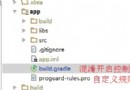 Android 代碼混淆實戰:規則配置與踩坑全記錄
最近在給 Android 應用做混淆,踩了不少坑,這裡把心得整理出來分享。 混淆是什麼,有什麼用 官方說法搜一搜一大堆,這裡口語化解釋一下:混淆就是把代碼中的類名、方法名
 Android 離線緩存實作:Volley 與圖片快取打造斷網可讀體驗
離線體驗的核心,是在網路正常時把關鍵資料保存下來,讓使用者即使暫時斷網,也能看到上次載入的內容。新聞、社群、知識類應用常使用這種策略,以降低空白頁與等待焦慮。 在 And
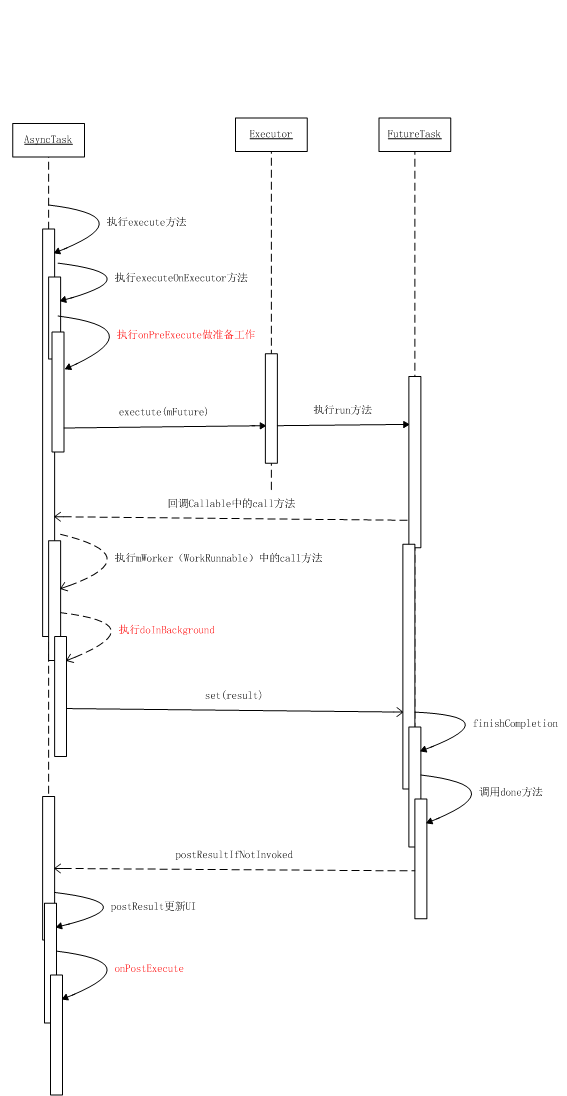 深入源碼剖析 AsyncTask 的完整運作機制
什麼是 AsyncTask AsyncTask 即 asynchronous task,異步任務。它實際上是圍繞 Thread 與 Handler 設計的一個輔助類,內部