

編輯:關於 Android 程式設計
最近想修改 ActionBar.Tab 的文字字型與顏色,卻發現該物件提供的介面非常有限,網上搜尋的結果也大多較舊,使用的並非 Google 官方範例中的 ActionBar。研究一整天後,找到了使用 setCustomView 來自訂 ActionBar.Tab 物件的方法。
做法是:先透過 ActionBar.getTabAt(int) 取得一個 ActionBar.Tab 物件,然後呼叫 setCustomView 使用自訂的 layout。注意這裡並非生成 layout 物件,而是直接使用該佈局,佈局中可預先設定文字大小、背景、顏色等。後續就和使用普通佈局一樣,取得 TextView 再設定文字、背景等。
actionBar = getSupportActionBar();
ActionBar.Tab t = actionBar.getTabAt(i);
t.setCustomView(R.layout.tab_layout_1);
TextView title = (TextView) t.getCustomView().findViewById(R.id.tab_title);
title.setBackgroundResource(R.drawable.detail);
title.setText(sectionID);
對應的自訂 tab 布局檔 tab_layout_1.xml:
<?xml version="1.0" encoding="utf-8"?>
<frameLayout xmlns:android="https://schemas.android.com/apk/res/android"
    android:layout_width="match_parent"
    android:layout_height="match_parent" >
    <TextView android:id="@+id/tab_title"
        android:layout_width="wrap_content"
        android:layout_height="wrap_content"
        android:layout_marginTop="5dp"
        android:layout_gravity="center_vertical|center"
        android:textColor="@android:color/holo_blue_dark"
        android:textSize="14sp" />
</frameLayout>
透過這種方式,即可自由定制 Tab 的文字樣式與外觀,突破原生物件介面有限的限制。
 Android 多執行緒研究(9)——深入認識 Lock 物件鎖
解決執行緒同步問題時,我們最熟悉的做法莫過於 synchronized 關鍵字。但從 Java 5.0 開始,JDK 在 java.util.concurrent.loc
 自定義View仿淘寶物流時間軸:StaticLayout換行與多條目繪製
效果展示 本文將實作一個類似淘寶物流資訊的時間軸效果。整體畫面由物流描述、時間、垂直線與節點圓圈組成,最新節點通常會以較醒目的顏色呈現。 自定義View的基本思路 物
 Android 解析度適配完全指南:dp、dpi 與資源目錄怎麼用
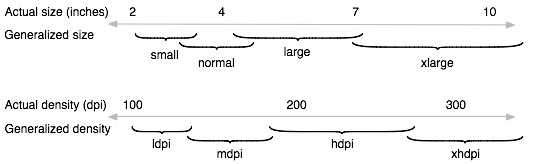
解析度適配是 Android 長年被詬病的問題之一。本文依官方文件 Supporting Multiple Screens 的脈絡,把核心概念與實務技巧整理成一份可操作的
 Android 性能優化:界面流暢度該怎麼量、又該怎麼改
先談前提:流暢度不是一個絕對標準 很多人一提到卡頓就直覺是程式碼寫得爛,但流暢度其實由兩件事共同決定:機器的硬體配置,以及你寫的程式碼。因此在動手優化之前,第一件要想清楚