

編輯:關於 Android 程式設計
Android 換膚大致有三種主流做法:第一種是透過內建的 style 切換,最常用於夜間/日間模式;第二種是打獨立的 apk 作為插件;第三種是下載 zip 解壓到約定的檔案目錄,執行時再讀入記憶體。本篇先講第一種,也是最輕量的一種。
先在 values 下建立 attrs.xml:
<?xml version="1.0" encoding="utf-8"?>
<resources>
    <declare-styleable name="main">
    </declare-styleable>
</resources><style name="dayTheme">
<item name="bgColor">#ffffff</item>
<item name="buttonBgColor">#80000000</item>
<item name="buttonTextColor">#80ffffff</item>
<item name="textSize">14sp</item>
</style>
<style name="nightTheme">
<item name="bgColor">#cc000000</item>
<item name="buttonBgColor">#80ffffff</item>
<item name="buttonTextColor">#80000000</item>
<item name="textSize">14sp</item>
</style>兩套主題的屬性名稱完全一致,只是取值不同——這是整個方案能運作的前提。屬性名對應到自訂的 attr 資源,值則由目前生效的主題決定。
<LinearLayout xmlns:android="https://schemas.android.com/apk/res/android"
    xmlns:tools="https://schemas.android.com/tools"
    android:layout_width="match_parent"
    android:layout_height="match_parent"
    android:background="?attr/bgColor" >

    <Button
        android:id="@+id/swtichThemeBtn"
        android:layout_width="match_parent"
        android:layout_height="wrap_content"
        android:textSize="?attr/textSize"
        android:text="按下按鈕切換夜間模式"
        android:layout_margin="10dip"
        android:background="?attr/buttonBgColor"
        android:textColor="?attr/buttonTextColor" />
</LinearLayout>
關鍵語法是 ?attr/xxx。注意問號與 @ 的差別:@ 是直接引用資源,?attr 則是「去目前主題裡查這個屬性的值」,換主題時引用會自動跟著改變。
public class MainActivity extends Activity {

    private Button mSwtichThemeBtn;
    private boolean isNight;
    private SharedPreferences sp;

    @Override
    protected void onCreate(Bundle savedInstanceState) {
        super.onCreate(savedInstanceState);
        sp = PreferenceManager.getDefaultSharedPreferences(this);
        setTheme((isNight = sp.getBoolean("isNight", false))
                ? R.style.nightTheme : R.style.dayTheme);
        setContentView(R.layout.activity_main);

        mSwtichThemeBtn = (Button) this.findViewById(R.id.swtichThemeBtn);
        mSwtichThemeBtn.setText(isNight ? "切換日間模式" : "切換夜間模式");
        mSwtichThemeBtn.setOnClickListener(new View.OnClickListener() {
            @Override
            public void onClick(View v) {
                Editor edit = sp.edit();
                edit.putBoolean("isNight", !isNight);
                edit.commit();
                recreateForTheme();
            }
        });
    }

    @SuppressLint("NewApi")
    public void recreateForTheme() {
        if (android.os.Build.VERSION.SDK_INT >= 11) {
            this.recreate();
        } else {
            this.finish();
            startActivity(new Intent(MainActivity.this, MainActivity.class));
        }
    }
}這裡有兩個不可更動的順序:setTheme() 必須在 setContentView() 之前呼叫,否則主題已經套用到 View 上了,設定不生效。另外,切換主題後必須重建 Activity,recreate() 在 API 11 以下不可用,只能手動 finish 再重新啟動自己。
用 SharedPreferences 記錄目前是日模式還是夜模式,是為了讓重建後的 Activity 能記住使用者的選擇,同時也讓下次開啟 App 時直接進入上次的狀態。

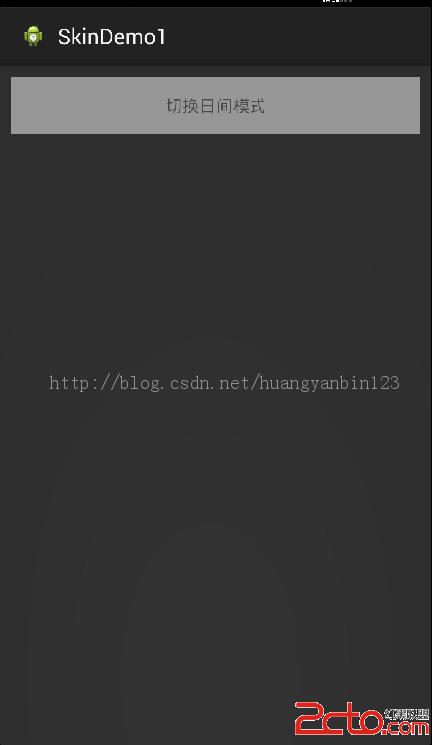
這種做法的優點是完全不需要額外資源檔、實作簡單;缺點是配色寫死在 style 裡,無法動態更換圖片資源。如果需要換的是整套圖片(例如換皮膚),就得用第二種 apk 插件方案了。
 Android Mms 深度解析:訊息接收流程(圖文詳解)
訊息的接收工作由底層完成,當有一則新訊息時,底層完成接收後會以 Intent 的方式通知上層應用,訊息的相關內容也包含在 Intent 中。Android 所支援的訊息
 Android 自定義 View 高級特效:神奇的貝塞爾曲線
效果預覽 效果圖中我們實現了一個隨手指滑動變化的二階貝塞爾曲線,還有一個能穿越所有已知點的複雜貝塞爾曲線。學會使用貝塞爾曲線後,可以做出 QQ 紅點滑動刪除、360 動
 React Native ActivityIndicator 加載指示器使用說明
在 React Native 中,ActivityIndicator 是常見的加載指示器元件,常被用來表示資料讀取、網路請求或畫面初始化中的等待狀態。它的外觀類似轉動的菊
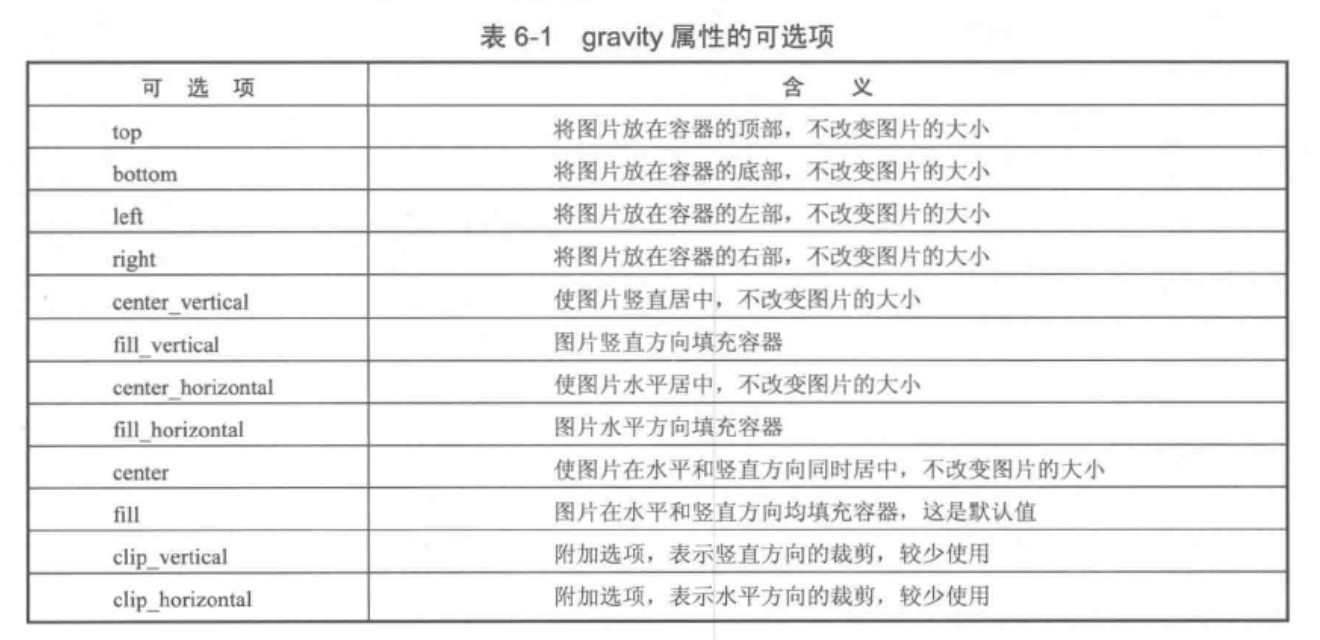 Android Drawable 進階資源:BitmapDrawable、LayerDrawable 與常見標籤用法
Android Drawable 進階資源整理 在 Android 開發中,Drawable 不只是單純的圖片,也可以透過 XML 描述形狀、層級、裁剪、縮放與狀態切換。