

編輯:關於 Android 程式設計
本文實現一個在線音樂播放器。與其只貼代碼,不如把每個回調為何存在講明白——理解播放器的狀態機,比記住 API 更重要。
<LinearLayout xmlns:android="https://schemas.android.com/apk/res/android"
    xmlns:tools="https://schemas.android.com/tools"
    android:layout_width="match_parent"
    android:layout_height="match_parent"
    android:orientation="vertical">

    <TextView
        android:id="@+id/textViewStatus"
        android:layout_width="match_parent"
        android:layout_height="wrap_content"
        android:text="Status" />

    <TextView
        android:id="@+id/statusDisplayTextView"
        android:layout_width="match_parent"
        android:layout_height="wrap_content"
        android:text="Unknown" />

    <TextView
        android:id="@+id/bufferValueTextView"
        android:layout_width="match_parent"
        android:layout_height="wrap_content"
        android:text="0%" />

    <Button
        android:id="@+id/startButton"
        android:layout_width="match_parent"
        android:layout_height="wrap_content"
        android:text="播放" />

    <Button
        android:id="@+id/stopButton"
        android:layout_width="match_parent"
        android:layout_height="wrap_content"
        android:text="暫停" />

</LinearLayout>
public class AudioHTTPPLayer extends Activity
        implements OnCompletionListener, OnErrorListener,
                   OnBufferingUpdateListener, OnPreparedListener, OnClickListener {

    private MediaPlayer mediaPlayer;
    private Button startButton, stopButton;
    private TextView statusTextView, bufferValueTextView;

    @Override
    protected void onCreate(Bundle savedInstanceState) {
        super.onCreate(savedInstanceState);
        setContentView(R.layout.activity_audio_httpplayer);
        init();
    }

    private void init() {
        startButton = (Button) findViewById(R.id.startButton);
        stopButton = (Button) findViewById(R.id.stopButton);
        statusTextView = (TextView) findViewById(R.id.statusDisplayTextView);
        bufferValueTextView = (TextView) findViewById(R.id.bufferValueTextView);

        startButton.setOnClickListener(this);
        stopButton.setOnClickListener(this);
        statusTextView.setText("onCreate");

        mediaPlayer = new MediaPlayer();
        mediaPlayer.setOnCompletionListener(this);
        mediaPlayer.setOnErrorListener(this);
        mediaPlayer.setOnBufferingUpdateListener(this);
        mediaPlayer.setOnPreparedListener(this);
        statusTextView.setText("MediaPlayer created");

        try {
            // 傳入想要播放的音頻文件的 HTTP 地址
            mediaPlayer.setDataSource(
                "https://zhangmenshiting.baidu.com/data2/music/36865035/17765263198000128.mp3?xcode=81bb2569613f49564c53ca228d87e526d7ed2c9c576c829e");
        } catch (Exception e) {
            e.printStackTrace();
        }
        statusTextView.setText("setDataSource done");
        statusTextView.setText("calling prepareAsync");

        // 異步準備:後台緩沖音頻並立即返回,不阻塞 UI 線程
        mediaPlayer.prepareAsync();
    }

    /** 緩衝過程中持續回調,percent 為已緩衝百分比 */
    @Override
    public void onBufferingUpdate(MediaPlayer mp, int percent) {
        bufferValueTextView.setText("" + percent + "%");
    }

    /** prepareAsync 完成後回調,此時才可以調用 start() */
    @Override
    public void onPrepared(MediaPlayer mp) {
        statusTextView.setText("onPrepared called");
        startButton.setEnabled(true);
    }

    /** 播放完畢回調:恢復播放按鈕,禁用暫停按鈕 */
    @Override
    public void onCompletion(MediaPlayer mp) {
        statusTextView.setText("onCompletion called");
        startButton.setEnabled(true);
        stopButton.setEnabled(false);
    }

    /**
     * 按返回鍵銷毀 Activity 時,若不重寫 onDestroy,
     * 正在播放的音樂不會停止。此處顯式調用 stop() 釋放資源。
     */
    @Override
    protected void onDestroy() {
        super.onDestroy();
        mediaPlayer.stop();
        Log.d("zhongyao", "onDestroy()");
    }

    /** 播放出錯時回調 */
    @Override
    public boolean onError(MediaPlayer mp, int what, int extra) {
        statusTextView.setText("onError called");
        switch (what) {
            case MediaPlayer.MEDIA_ERROR_NOT_VALID_FOR_PROGRESSIVE_PLAYBACK:
                statusTextView.setText(
                    "MEDIA_ERROR_NOT_VALID_FOR_PROGRESSIVE_PLAYBACK" + extra);
                break;
            case MediaPlayer.MEDIA_ERROR_SERVER_DIED:
                statusTextView.setText("MEDIA_ERROR_SERVER_DIED" + extra);
                break;
            case MediaPlayer.MEDIA_ERROR_UNKNOWN:
                statusTextView.setText("MEDIA_ERROR_UNKNOWN");
                break;
        }
        return false;
    }

    @Override
    public void onClick(View v) {
        if (v == startButton) {
            mediaPlayer.start();
            statusTextView.setText("start called");
            startButton.setEnabled(false);
            stopButton.setEnabled(true);
        } else if (v == stopButton) {
            mediaPlayer.pause();
            statusTextView.setText("pause called");
            startButton.setEnabled(true);
            stopButton.setEnabled(false);
        }
    }
}
為什麼要用 prepareAsync 而不是 prepare。在線資源的 prepare() 需要下載並解析媒體信息,耗時可能長達數秒,在主線程調用會直接 ANR。prepareAsync() 把這件事丟到後台線程,完成後通過 onPrepared 通知你。這也是為什麼示例中把播放按鈕的 enable 控制放在 onPrepared 裡——沒有準備完成就調用 start() 會拋 IllegalStateException。
onDestroy 中必須 stop 並 release。MediaPlayer 持有底層音頻硬件資源,Activity 銷毀時若不釋放,不僅音樂會繼續播放,還會造成資源洩漏。嚴謹的寫法應該是 stop() 之後再調 release(),並把引用置空。
onError 的返回值有意義。返回 true 表示錯誤已被你處理完畢,onCompletion 不會再被調用;返回 false 則系統認為你沒有處理,會接著觸發 onCompletion。示例返回 false,是為了讓界面狀態能走統一的收尾邏輯。
按鈕互斥。播放與暫停通過互相 setEnabled 實現互斥,這是最簡單的狀態同步手段。項目複雜時更推薦用一個整型或枚舉記錄當前播放狀態,再在 onClick 中統一分支——避免狀態散落在各個回調裡難以維護。
另外別忘了在清單中申請 INTERNET 權限,Android 4.0 之後網絡請求必須在子線程進行,而 prepareAsync 已經在內部處理了這一點。
 Android 高頻 UI 元件一把抓:自訂對話框、進度提示、下拉重新整理與 Popup 彈出層
做專案的時候,對話框、載入進度、下拉重新整理、彈出式選單這幾樣東西幾乎每個 App 都躲不掉。麻煩的是每次都要重新翻開源專案找一次、改一次,時間就這樣被吃掉了。 這份 d
 Android 類加載機制淺析
Android 的類加載機制與傳統 Java 虛擬機有相似之處,也有其獨特之處。開發者在進行外掛化、動態載入或熱修復相關技術時,往往需要理解 DexClassLoader
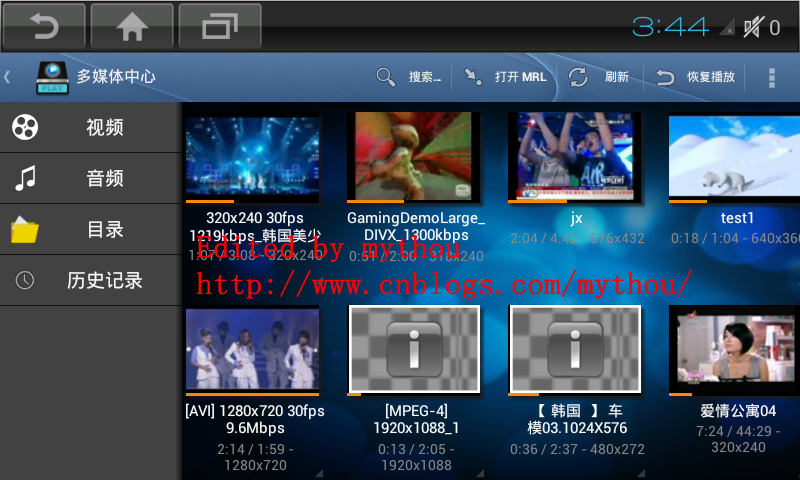 Android VLC 播放器二次開發:CPU 類型檢查與介面初始化
上一篇講了 VLC 整個程式的模組劃分與介面主要使用的技術,今天來分析 VLC 的初始化過程,重點是介面初始化與解碼庫加載。主要分析 org.videolan.vlc.g
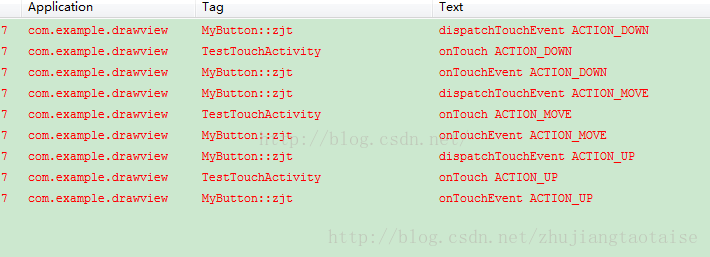 從實測日志理解 Android View 事件分發機制
起因是專案裡遇到一件怪事:一個水平 LinearLayout 裡放著 TextView 和 Button,對 LinearLayout 設定的點擊事件,點 TextVie