

編輯:關於 Android 程式設計
本文以一個「記住密碼」的登錄示例,講解如何把數據持久化保存到 ROM(內部存儲),以及如何通過文件權限控制實現跨應用的數據訪問。新建一個 Android 工程(這裡選 API 7),其餘按默認下一步即可。
這裡重點介紹 android:hint 屬性,它的作用是在輸入框中顯示提示信息,相當於 Web 項目中的 placeholder。
<LinearLayout xmlns:android="https://schemas.android.com/apk/res/android"
    xmlns:tools="https://schemas.android.com/tools"
    android:layout_width="fill_parent"
    android:layout_height="fill_parent"
    android:orientation="vertical"
    android:paddingBottom="@dimen/activity_vertical_margin"
    android:paddingLeft="@dimen/activity_horizontal_margin"
    android:paddingRight="@dimen/activity_horizontal_margin"
    android:paddingTop="@dimen/activity_vertical_margin"
    tools:context=".MainActivity" >
    <TextView
        android:layout_width="wrap_content"
        android:layout_height="wrap_content"
        android:text="@string/hello_info" />
    <EditText
        android:layout_width="fill_parent"
        android:layout_height="wrap_content"
        android:inputType="text|number"
        android:hint="@string/et_type_name"
        android:id="@+id/et_name" />
    <EditText
        android:layout_width="fill_parent"
        android:layout_height="wrap_content"
        android:inputType="textPassword"
        android:hint="@string/et_type_password"
        android:id="@+id/et_password" />
    <RelativeLayout
        android:layout_width="fill_parent"
        android:layout_height="wrap_content" >
        <Button
            android:id="@+id/bt_login"
            android:layout_width="wrap_content"
            android:layout_height="wrap_content"
            android:layout_alignParentLeft="true"
            android:layout_alignParentTop="true"
            android:layout_marginLeft="30dp"
            android:text="@string/bt_login" />
        <CheckBox
            android:layout_width="wrap_content"
            android:layout_height="wrap_content"
            android:layout_marginLeft="150dp"
            android:text="@string/cb_remember_password"
            android:id="@+id/cb_password" />
    </RelativeLayout>
</LinearLayout>
public class MainActivity extends Activity implements OnClickListener {
    EditText et_name;      // 用戶名
    EditText et_password;  // 密碼
    Button bt_login;       // 登錄按鈕
    CheckBox cb_password;  // 記住密碼單選框

    @Override
    protected void onCreate(Bundle savedInstanceState) {
        super.onCreate(savedInstanceState);
        setContentView(R.layout.activity_main);
        et_name = (EditText) this.findViewById(R.id.et_name);
        et_password = (EditText) this.findViewById(R.id.et_password);
        bt_login = (Button) this.findViewById(R.id.bt_login);
        cb_password = (CheckBox) this.findViewById(R.id.cb_password);
        bt_login.setOnClickListener(this);
    }

    @Override
    public void onClick(View v) {
        switch (v.getId()) {
            case R.id.bt_login:
                if (cb_password.isChecked()) {
                    // 保存數據到 rom
                    new savePasswordService(this).savePasswordToFile(
                            et_name.getText().toString(), et_password.getText().toString());
                    Toast.makeText(this, "保存數據成功!", Toast.LENGTH_SHORT).show();
                } else {
                    Toast.makeText(this, "沒有保存數據!", Toast.LENGTH_SHORT).show();
                }
                break;
        }
    }
}
這裡用 switch 語句來判斷點擊事件,能使代碼結構更清晰。
public class savePasswordService {
    private Context context;
    private String tag = "savePasswordService";

    public savePasswordService(Context context) {
        this.context = context;
    }

    public void savePasswordToFile(String name, String password) {
        String content = name + ":" + password;
        try {
            FileOutputStream fileOutput = context.openFileOutput("LoginTestConfig.txt",
                    Context.MODE_WORLD_READABLE | Context.MODE_WORLD_WRITEABLE);
            fileOutput.write(content.getBytes());
            fileOutput.flush();
            fileOutput.close();
        } catch (Exception e) {
            e.printStackTrace();
        }
    }
}
關鍵在於調用了 Context 的 openFileOutput() 方法。它的第二個參數控制文件權限,默認是私有的(其他應用不可讀);這裡設置了 MODE_WORLD_READABLE | MODE_WORLD_WRITEABLE,讓其他應用程序也能讀寫該文件。
新建一個工程 dataread,界面不變,直接以文件路徑 /data/data/com.amos.datasave/files/LoginTestConfig.txt 訪問剛才保存的文件並寫入數據,實驗證明可以成功寫入。如果要實現數據回顯,則可以讀取該文件並解析:
File file = new File("/data/data/com.amos.datasave/files/LoginTestConfig.txt");
try {
    FileInputStream fis = new FileInputStream(file);
    byte[] bytes = new byte[1024];
    ByteArrayOutputStream bos = new ByteArrayOutputStream();
    int len;
    while ((len = fis.read(bytes)) > 0) {
        bos.write(bytes, 0, len);
    }
    String result = new String(bos.toByteArray());
    String name = result.split(":")[0];
    String password = result.split(":")[1];
    et_name.setText(name);
    et_password.setText(password);
} catch (Exception e) {
    e.printStackTrace();
}
讀取時通過 FileInputStream 逐塊讀入,用 ByteArrayOutputStream 拼接成完整字符串,再以冒號分割出用戶名和密碼,回填到輸入框中,就實現了「記住密碼」的效果。由此可見,Android 的數據持久化本質上是通過文件 I/O 完成的,而 openFileOutput 的權限參數則決定了數據能否被其他應用訪問——在實際開發中,出於安全考慮,不建議輕易使用 MODE_WORLD_READABLE/WRITEABLE 這類開放權限。
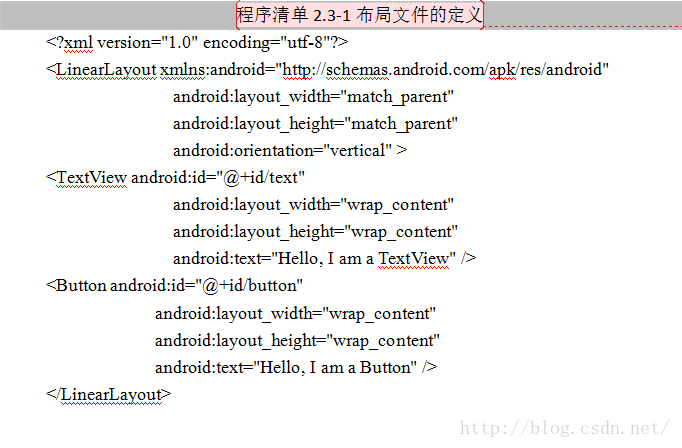 Android 介面編程:常見佈局元件(二)
2.3.1 佈局簡介佈局用於定義 Activity 中 UI 元素的排列結構。Android 提供了 LinearLayout(線性佈局)、RelativeLayout(
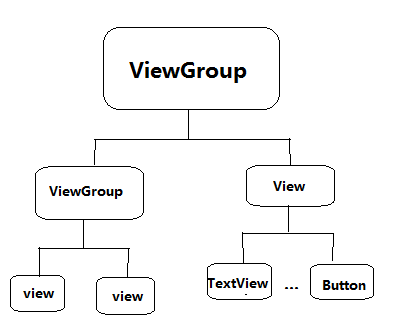 Android 自定義控件(四):繼承 ViewGroup 創建容器
在自定義控件的學習過程中,ViewGroup 是一個非常重要的主題。與單純繼承 View 不同,ViewGroup 更關注容器能力,也就是如何管理子控件、如何測量子控件,
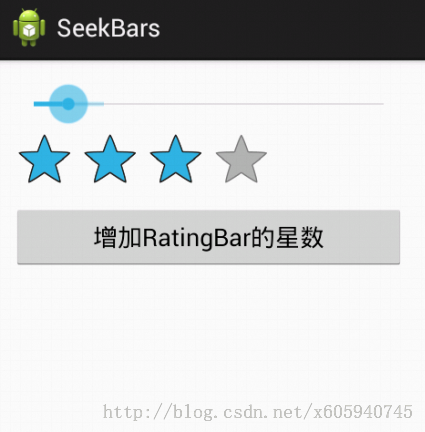 使用 RatingBar 實現 Android 星級打分功能教學
RatingBar 簡單介紹 RatingBar 是基於 SeekBar(拖動條)和 ProgressBar(狀態條)的擴展,用星形來顯示等級評定。使用默認 Rating
 Android 插件化初探:仿 QQ 一鍵換膚,思考比實作更重要
群裡有人點題,說想寫一篇關於插件化的文章。老實說我對插件化也算不上精通,於是想了個折衷辦法:先別急著上 DynamicLoadApk 那一類完整框架,而是從「換膚」這個最