

編輯:關於 Android 程式設計
RatingBar 簡單介紹
RatingBar 是基於 SeekBar(拖動條)和 ProgressBar(狀態條)的擴展,用星形來顯示等級評定。使用默認 RatingBar 時,使用者可以透過觸摸、拖動或按鍵(比如遙控器)來設定評分。RatingBar 自帶兩種模式:小風格 ratingBarStyleSmall,大風格 ratingBarStyleIndicator,其中大的只適合做指示,不適合與使用者互動。
一般情況下,系統自帶的 RatingBar 遠遠無法滿足開發需求,我們往往要根據圖片自訂一個 RatingBar。在開始實現之前,順帶說一下 res 目錄下圖片放置目錄的區別:
在 Android SDK 1.5 版本之前,res 目錄下只有一個 drawable 目錄;從 1.6 版本以後,就出现了 drawable-hdpi、drawable-ldpi、drawable-mdpi、drawable-xhdpi 幾個目錄:
(1) drawable-hdpi 存放高解析度圖片,如 WVGA (480x800)、FWVGA (480x854)
(2) drawable-mdpi 存放中等解析度圖片,如 HVGA (320x480)
(3) drawable-ldpi 存放低解析度圖片,如 QVGA (240x320)
(4) drawable-xhdpi 存放超大解析度圖片,至少 960dp x 720dp
由於我們自定義 RatingBar 用到的星形圖片解析度比較低,所以一般把圖片放到 drawable-mdpi 或 drawable-ldpi 裡。
自定義 RatingBar 的實現過程
首先,根據圖片自訂一個 RatingBar 的背景條,並和圖片放到同一個目錄下(比如 drawable-mdpi),room_rating_bar.xml:
<?xml version="1.0" encoding="utf-8"?> <layer-list xmlns:android="https://schemas.android.com/apk/res/android"> <item android:id="@+android:id/background" android:drawable="@drawable/star1"></item> <span></span> <item android:id="@+android:id/secondaryProgress" android:drawable="@drawable/star1"></item> <item android:id="@+android:id/progress" android:drawable="@drawable/star2"></item> </layer-list>
background:用來填充背景圖片,和進度條非常類似。當我們設定最高評分(android:numStars)時,系統會根據設定畫出以星星為單位的背景(假如 android:numStars="5",就會畫出 5 顆灰色的星星)。
progress:用來在背景圖片基礎上進行填充的指示屬性(和進度條類似,屬於第一進度位置)。
secondaryProgress:同 progress 一樣屬於第二進度位置。如果不定義它,進度條拖動時每次就只畫出一整顆亮星,第二進度(暗)沒有覆蓋掉第一進度之後的位置,從左往右就拖不出 N.5 顆星的效果,評分體驗就不完整。
其次,前面說過 RatingBar 的樣式是透過 style 來切換的。在 Android 中,我們可以在 styles.xml 裡設定 style 屬性,繼承我們需要的自定義控件類型,如下 styles.xml:
<?xml version="1.0" encoding="utf-8"?> <resources> <style name="roomRatingBar" parent="@android:style/Widget.RatingBar"> <item name="android:progressDrawable">@drawable/room_rating_bar</item> <item name="android:minHeight">16dp</item> <item name="android:maxHeight">16dp</item> </style> </resources>
透過 parent 屬性選擇繼承的父類,這裡我們繼承 RatingBar 類;重新定義 progressDrawable 屬性(RatingBar 的背景條,如前面所述);maxHeight 和 minHeight 可以根據圖片像素或其他參考值來設定。
最後,在我們需要用到 RatingBar 的 XML 配置檔裡加入 RatingBar 控件。main.xml:
<RatingBar android:id="@+id/room_ratingbar" android:layout_width="wrap_content" android:layout_height="wrap_content" android:numStars="5" android:rating="4" android:layout_marginLeft="10dp" > </RatingBar>
打分功能實例
使用 SeekBar 與 RatingBar 共同實現:
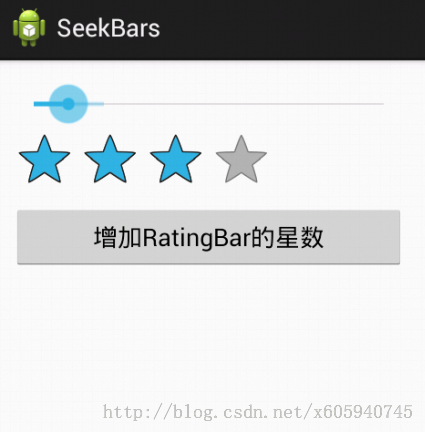
<RelativeLayout xmlns:android="https://schemas.android.com/apk/res/android" xmlns:tools="https://schemas.android.com/tools" android:layout_width="match_parent" android:layout_height="match_parent" android:paddingBottom="@dimen/activity_vertical_margin" android:paddingLeft="@dimen/activity_horizontal_margin" android:paddingRight="@dimen/activity_horizontal_margin" android:paddingTop="@dimen/activity_vertical_margin" tools:context=".MainActivity" > <SeekBar android:id="@+id/seekBar1" android:layout_width="match_parent" android:layout_height="wrap_content" /> <RatingBar android:id="@+id/ratingbar1" android:layout_height="wrap_content" android:layout_width="wrap_content" android:layout_below="@id/seekBar1" android:numStars="4" android:stepSize="0.5" /> <Button android:id="@+id/button1" android:layout_height="wrap_content" android:layout_width="match_parent" android:layout_below="@id/ratingbar1" android:text="增加RatingBar的星數"/> </RelativeLayout>
package com.android.xiong.seekbars; import android.os.Bundle; import android.app.Activity; import android.view.Menu; import android.view.View; import android.view.View.OnClickListener; import android.widget.Button; import android.widget.RatingBar; import android.widget.RatingBar.OnRatingBarChangeListener; import android.widget.SeekBar; import android.widget.SeekBar.OnSeekBarChangeListener; public class MainActivity extends Activity { private SeekBar seekBar1; private RatingBar ratingBar1; private Button button1; @Override protected void onCreate(Bundle savedInstanceState) { super.onCreate(savedInstanceState); setContentView(R.layout.activity_main); seekBar1=(SeekBar)findViewById(R.id.seekBar1); seekBar1.setMax(100); seekBar1.setSecondaryProgress(20); seekBar1.setProgress(10); SeekBarChangeListener seek=new SeekBarChangeListener(); seekBar1.setOnSeekBarChangeListener(seek); ratingBar1=(RatingBar)findViewById(R.id.ratingbar1); //設置RatingBar5顆星 ratingBar1.setNumStars(4); //設置當前的星數 ratingBar1.setRating(1.0f); //設置RatingBar 評分的步長 ratingBar1.setStepSize(0.5f); RatingBarChangeLister rat=new RatingBarChangeLister(); ratingBar1.setOnRatingBarChangeListener(rat); button1=(Button)findViewById(R.id.button1); BuutonClick bu=new BuutonClick(); button1.setOnClickListener(bu); } class SeekBarChangeListener implements OnSeekBarChangeListener { /** * seekBar 當前觸發的SeekBar控件 * progress 當前的進度 * fromUser 是否是用戶觸發 用戶觸發為true 否則為false */ @Override public void onProgressChanged(SeekBar seekBar, int progress, boolean fromUser) { // TODO Auto-generated method stub System.out.println("progress:"+progress+" fromUser:"+fromUser); } //此方法表示 開始拖動時觸發的方法 @Override public void onStartTrackingTouch(SeekBar seekBar) { // TODO Auto-generated method stub System.out.println(seekBar.getProgress()); } //拖動停止時觸發的方法 @Override public void onStopTrackingTouch(SeekBar seekBar) { // TODO Auto-generated method stub System.out.println(seekBar.getProgress()); } } class RatingBarChangeLister implements OnRatingBarChangeListener{ /** * rattingBar當前觸發的RatingBar控件 * rating 當前的星數 * fromUser 是否是用戶觸發 */ @Override public void onRatingChanged(RatingBar ratingBar, float rating, boolean fromUser) { // TODO Auto-generated method stub System.out.println("rating:"+ rating +" fromUser:"+fromUser); } } class BuutonClick implements OnClickListener{ @Override public void onClick(View arg0) { // TODO Auto-generated method stub ratingBar1.setRating(ratingBar1.getRating()+0.5f); } } @Override public boolean onCreateOptionsMenu(Menu menu) { // Inflate the menu; this adds items to the action bar if it is present. getMenuInflater().inflate(R.menu.main, menu); return true; } }
 Android Fragment 片段:打造自適應多螢幕的靈活 UI
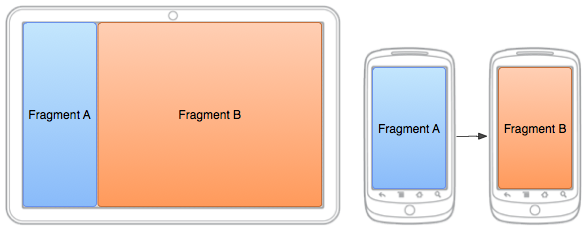
為什麼要用 Fragment 當應用需要支援多種螢幕尺寸時,可以在不同的版面配置中重複使用同一個 Fragment,依可用螢幕空間最佳化使用者體驗。 舉例來說,在手機上因
 Android 開發自學筆記(三):APP 布局入門上篇
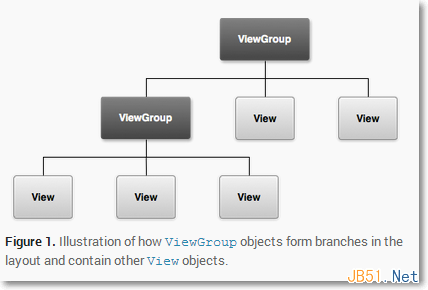
大家好,本文將帶你踏出開發一款美觀、有質感、人見人愛的 Android 應用程式的第一步。市面上有不少布局精美、在視覺上令人愛不釋手的應用,如果換作我們來著手開發,該從何
 徹底搞懂 Android 的 Touch 事件分發與消費機制
Activity 或 View 類別的 onTouchEvent() 回呼會接收 touch 事件。一個完整手勢從 ACTION_DOWN 開始,到 ACTION_UP
 Android 開源框架 Universal-Image-Loader 完全解析(一):基本介紹與使用
在開發 Android 應用時,非同步載入圖片幾乎是必備技能,而載入大量圖片時常伴隨圖片錯亂、OOM 等惱人問題。Universal-Image-Loader 正是為了解