

編輯:關於 Android 程式設計
行動裝置普及之後,多數商業軟體都需要支援 Android 平台。Android 的學習曲線其實不陡,控制項已經被封装得很完整,寫起來有點回到 VB 時代的感覺。
本文透過一個實作範例,說明如何在 Android 中呼叫遠端 Web Service。範例使用網路上現成的手機號碼歸屬地查詢服務,其 WSDL 為:
https://webservice.webxml.com.cn/WebServices/MobileCodeWS.asmx?wsdl
在 Android 呼叫 Web Service 需依賴第三方套件 ksoap2,這是一套 SOAP 用戶端開發包,主要針對資源受限的 Java 環境(Applets、J2ME 的 CLDC/CDC/MIDP)。而在 Android 上我們通常不直接使用 ksoap2,而是使用為 Android 優化過的 ksoap2-android——輕量、高效的 SOAP 開發包。
<?xml version="1.0" encoding="utf-8"?>
<LinearLayout xmlns:android="https://schemas.android.com/apk/res/android"
    android:layout_width="fill_parent"
    android:layout_height="fill_parent"
    android:orientation="vertical"
    android:paddingLeft="5dip"
    android:paddingRight="5dip"
    android:paddingTop="5dip">

    <TextView android:layout_width="fill_parent"
        android:layout_height="wrap_content"
        android:text="手機號碼(段):" />

    <EditText android:id="@+id/phone_sec"
        android:layout_width="fill_parent"
        android:layout_height="wrap_content"
        android:hint="例如:1398547"
        android:inputType="textPhonetic"
        android:singleLine="true" />

    <Button android:id="@+id/query_btn"
        android:layout_width="wrap_content"
        android:layout_height="wrap_content"
        android:layout_gravity="right"
        android:text="查詢" />

    <TextView android:id="@+id/result_text"
        android:layout_width="wrap_content"
        android:layout_height="wrap_content"
        android:layout_gravity="center_horizontal|center_vertical" />
</LinearLayout>
/**
 * Android 平台呼叫 WebService(手機號碼歸屬地查詢)
 */
public class MainActivity extends Activity {

    private EditText phoneSecEditText;
    private TextView resultView;
    private Button queryButton;

    @Override
    public void onCreate(Bundle savedInstanceState) {
        super.onCreate(savedInstanceState);
        setContentView(R.layout.main);

        phoneSecEditText = (EditText) findViewById(R.id.phone_sec);
        resultView = (TextView) findViewById(R.id.result_text);
        queryButton = (Button) findViewById(R.id.query_btn);

        queryButton.setOnClickListener(new OnClickListener() {
            @Override
            public void onClick(View v) {
                String phoneSec = phoneSecEditText.getText().toString().trim();
                if ("".equals(phoneSec) || phoneSec.length() < 7) {
                    phoneSecEditText.setError("您輸入的手機號碼(段)有誤!");
                    phoneSecEditText.requestFocus();
                    resultView.setText("");
                    return;
                }
                getRemoteInfo(phoneSec);
            }
        });
    }

    /**
     * 手機號段歸屬地查詢
     */
    public void getRemoteInfo(String phoneSec) {
        String nameSpace = "https://WebXml.com.cn/";
        String methodName = "getMobileCodeInfo";
        String endPoint = "https://webservice.webxml.com.cn/WebServices/MobileCodeWS.asmx";
        String soapAction = "https://WebXml.com.cn/getMobileCodeInfo";

        SoapObject rpc = new SoapObject(nameSpace, methodName);
        rpc.addProperty("mobileCode", phoneSec);
        rpc.addProperty("userId", "");

        SoapSerializationEnvelope envelope =
                new SoapSerializationEnvelope(SoapEnvelope.VER10);
        envelope.bodyOut = rpc;
        envelope.dotNet = true;   // 對方是以 .NET 實作的 WebService
        envelope.setOutputSoapObject(rpc);

        HttpTransportSE transport = new HttpTransportSE(endPoint);
        try {
            transport.call(soapAction, envelope);
        } catch (Exception e) {
            e.printStackTrace();
        }

        SoapObject object = (SoapObject) envelope.bodyIn;
        String result = object.getProperty(0).toString();
        resultView.setText(result);
    }
}
實務上,getRemoteInfo() 內的網路呼叫應移出/ui 執行緒,改用 AsyncTask 或工作執行緒處理,再將結果回傳更新介面,否則在較新版本的 Android 上會直接拋出 NetworkOnMainThreadException。
要點一:nameSpace、methodName、EndPoint 與 SOAP Action 這四項資訊,全部可以在 WSDL 中找到,不需要猜。
要點二:呼叫時傳入的參數名稱必須與 WSDL 中的定義完全一致。網路上有些說法認為只要參數順序與 WSDL 一致即可、名稱不必相同,但實測顯示大多數情況下並不可行。
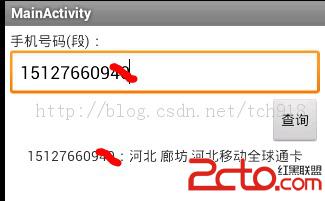
要點三:這個服務回傳的內容如下:
<?xml version="1.0" encoding="utf-8"?>
<string xmlns="https://WebXml.com.cn/">1398547:貴州 貴陽 貴州移動黔中游卡</string>
既然回傳的是 XML,為何不需要自行解析?因為 ksoap2 已能將回應轉為 SoapObject,我們直接以操作物件的方式取值即可:
SoapObject object = (SoapObject) envelope.bodyIn;
要點四:本例只回傳單一值。若某個 WebService 回傳多個值,取用方式完全相同,只是 object.getProperty(0) 拿到的可能仍是一個 SoapObject,此時持續呼叫 getProperty() 逐層深入,就能取得全部結果。
<manifest xmlns:android="https://schemas.android.com/apk/res/android"
    package="com.liufeng.ws.activity"
    android:versionCode="1"
    android:versionName="1.0">

    <uses-sdk android:minSdkVersion="4" />

    <!-- 存取網路的權限 -->
    <uses-permission android:name="android.permission.INTERNET" />
</manifest>
少了這一行權限,呼叫會在執行期直接失敗,是初學者最常忽略的一環。
原始碼下載:
https://download.csdn.net/detail/tcl_6666/7365311
 Android 單元測試入門實例分析
本文通過一個簡單實例,帶大家快速上手 Android 的單元測試。在實際開發中,Android 應用需要反覆測試,而 JUnit 是正規開發中的必備技術——它能獲取組件、
 百度地圖 3.5.0 實作教學:定位、覆蓋物與點擊事件一次搞懂
前言 最近在專案裡導入百度地圖 3.5.0 新版 SDK,剛好卡在「地圖覆蓋物(Overlay)」的繪製,以及「覆蓋物點擊事件」的掛載這兩個環節。翻遍網路發現相關教學多半
 ShareSDK 分享到第三方平台完整集成指南
本文記錄 ShareSDK 從下載、申請 AppKey、快速集成到自訂 UI 的完整流程,並附上各平台分享參數說明,方便查閱。 第一步:下載 SDK 下載網址:https
 Android 基礎再學習:Activity 的生命週期全解
關於 Activity 的生命週期,需要掌握的知識點有四項:1. 各個生命週期方法的執行順序;2. 每個方法應該做什麼樣的處理(每個方法保留的時間多久、哪個方法是活動阻塞