

編輯:關於 Android 程式設計
撰寫版面配置時,難免會遇到某些區塊在每個畫面都要重複出現,例如標題列或頁尾。最直白的做法当然是複製貼上,但這會讓後續維護變成噩夢——改一個地方要改十個檔案。
include 標籤就是為了解決這個問題,有 C/C++ 經驗的人一看就懂:把另一份版面配置檔合併進來即可。
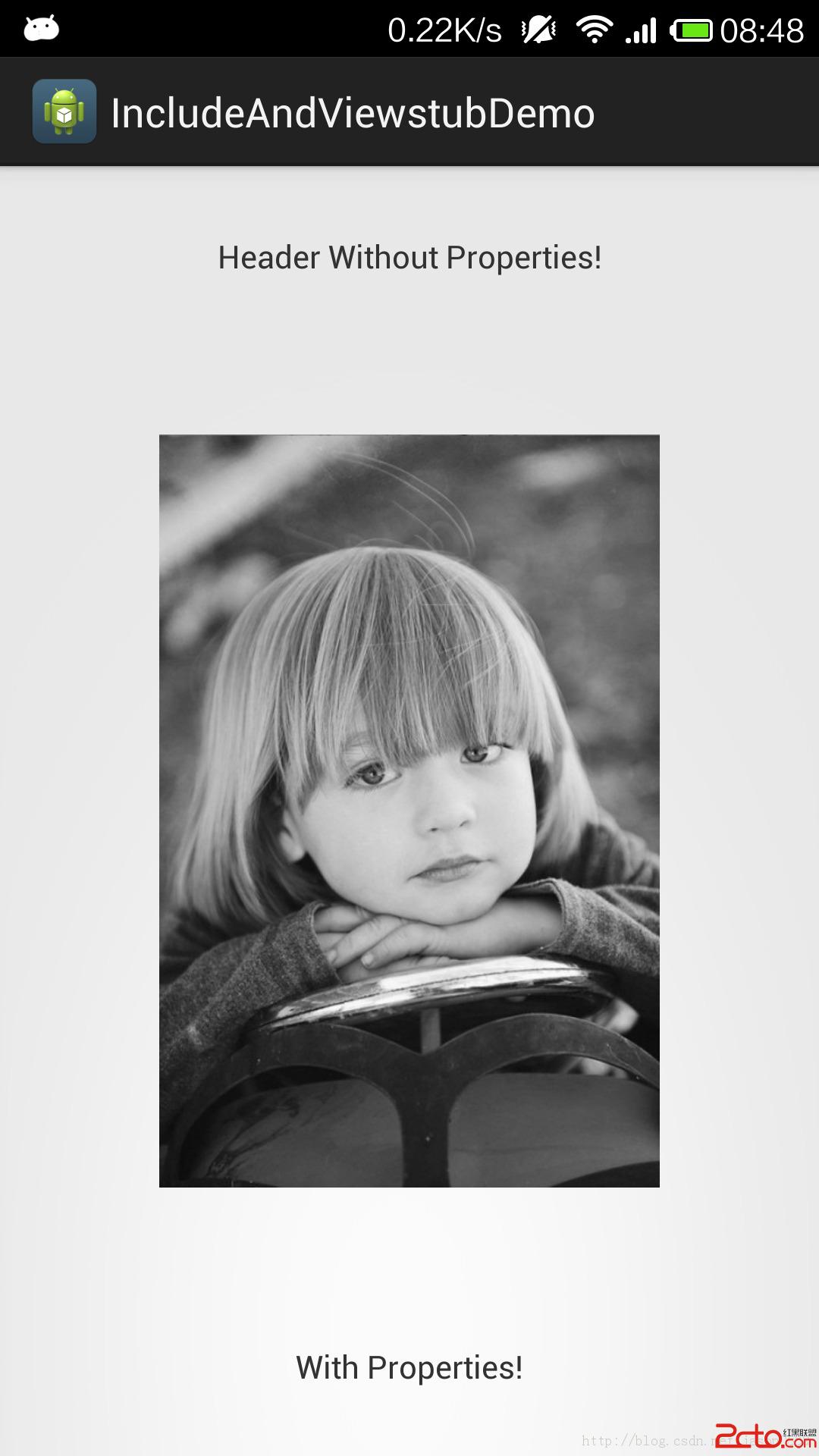
上圖中上下兩個文字區塊,就是分別以 include 引入的。
<RelativeLayout xmlns:android="https://schemas.android.com/apk/res/android"
    xmlns:tools="https://schemas.android.com/tools"
    android:layout_width="match_parent"
    android:layout_height="match_parent">

    <include android:layout_width="fill_parent"
        android:layout_height="wrap_content"
        android:layout_alignParentTop="true"
        android:layout_marginTop="30dp"
        layout="@layout/header" />

    <ViewStub android:id="@+id/pic_stub"
        android:layout_width="wrap_content"
        android:layout_height="wrap_content"
        android:layout_centerInParent="true"
        android:inflatedId="@+id/pic_view_id_after_inflate"
        layout="@layout/pic_view" />

    <include layout="@layout/footer" />
</RelativeLayout>
中間那個 ViewStub 留待下一篇說明,這裡先看兩個 include 的差異。
第一個 include 寫法較完整,直接設定了寬高與對齊屬性,讓它被放在版面頂端。
第二個 include 什麼屬性都沒設,位置卻正確地落在頁面底部。
這兩種寫法之所以都能運作,是因為 include 的屬性有兩個下場:一是在 include 標籤本身指定,二是寫在該版面配置檔的根節點上。前者會覆蓋後者。
<TextView xmlns:android="https://schemas.android.com/apk/res/android"
    android:layout_width="0dp"
    android:layout_height="0dp"
    android:gravity="center_horizontal"
    android:text="Header Without Properties!" />
這裡刻意把寬高都設為 0,就是為了示範「完全交由 include 標籤來決定版面屬性」的用法。
<TextView xmlns:android="https://schemas.android.com/apk/res/android"
    android:layout_width="fill_parent"
    android:layout_height="wrap_content"
    android:layout_alignParentBottom="true"
    android:layout_marginBottom="30dp"
    android:gravity="center_horizontal"
    android:text="With Properties!" />
這個的根節點屬性寫得很完整,所以呼叫端直接引用即可。
● 若需要取得被引入版面中的子元件 id,可以用 android:id 為 include 標籤本身指定一個 id,再以 findViewById 取得整個區塊,往下繼續查找子 View。若不指定,findViewById 仍可直接搜尋到子元件,但區塊本身無法被整體操作(例如整塊隱藏)。
● 被引入的版面配置檔,其根節點只能有一個。若原本有多個並列的根節點,需先用 LinearLayout 或 RelativeLayout 包起來。
● layout_width 與 layout_height 若要透過 include 覆寫,必須同時在 include 標籤上明確指定這兩個屬性,否則覆寫不會生效。
● include 有助於消除重複,但也別過度切割。若某個區塊只在一處使用且沒有重用價值,獨立成檔反而增加跳轉成本。
作者:jason0539
部落格:
https://blog.csdn.net/jason0539
 Android 自定義 View 實現圓形圖片效果
今天要講的是如何在 xml 文件中通過引用自定義的 View,實現 ImageView 的圓形圖片效果。首先在項目中新建一個類,我命名為 CircleImageView;
 SharedPreferences實戰:Android記住用戶名與密碼
「記住用戶名和密碼」的實現核心是 SharedPreferences 這套鍵值對存儲機制。做法是在登陸界面放一個 CheckBox,透過它的勾選狀態決定行為:勾選時把帳號
 靈活運用 ActionBar 與 ViewPager 切換頁面
ActionBar 與 ViewPager 是常見的頁面切換組合。ActionBar 提供頂部標籤,ViewPager 負責承載 Fragment,讓使用者能在不同頁面間
 仿 QQ 空間中央加號底部選單的實作拆解
網路上搜得到的「仿 QQ 空間底部選單」範例不少,但實際跑起來往往問題一堆,版面裡還塞滿了各種來歷不明的魔法數字。與其硬改別人的程式,不如自己從原理還原一遍。以下是我重新