

編輯:關於 Android 程式設計
在 Android 應用中,若需要發送多則短信並要求「上一則成功後才發下一則」,就必須攔截每則短信的發送結果。以下說明常見的錯誤寫法與正確解法。
需求是:待發短信共有 N 則,需逐條發送,且必須在上一則成功後才繼續。直覺上我們可能會寫成迴圈連續發送:
for (int i = 0; i < 3; i++) {
    sendSMS(10086, text1, i);
}
接著在 sendSMS 中透過 PendingIntent 與 BroadcastReceiver 接收發送結果:
private void sendSMS(String toAddress, String body, Long id) {
    SmsManager sms = SmsManager.getDefault();
    String SENT_SMS_ACTION = "SENT_SMS_ACTION";
    Intent sentIntent = new Intent(SENT_SMS_ACTION);
    sentIntent.putExtra("id", id);
    PendingIntent sentPI = PendingIntent.getBroadcast(
        ListOutgoingActivity.this, 0, sentIntent, PendingIntent.FLAG_UPDATE_CURRENT);

    // 若短信內容超過 70 個字元,拆成多則發送
    if (body.length() > 70) {
        ArrayList<String> msgs = sms.divideMessage(body);
        for (String msg : msgs) {
            sms.sendTextMessage(toAddress, null, msg, sentPI, null);
        }
    } else {
        sms.sendTextMessage(toAddress, null, body, sentPI, null);
    }

    BroadcastReceiver sendMessage = new BroadcastReceiver() {
        @Override
        public void onReceive(Context context, Intent intent) {
            switch (getResultCode()) {
                case Activity.RESULT_OK:
                    Long id = intent.getLongExtra("id", -12);
                    Toast.makeText(ListOutgoingActivity.this, id + " 發送成功", Toast.LENGTH_SHORT).show();
                    break;
                default:
                    Toast.makeText(ListOutgoingActivity.this, "發送失敗", Toast.LENGTH_LONG).show();
                    break;
            }
        }
    };
    registerReceiver(sendMessage, new IntentFilter(SENT_SMS_ACTION));
}
關鍵陷阱:當你同時發送多則短信時,會產生多個內容相同的 PendingIntent。由於使用了 FLAG_UPDATE_CURRENT,Android 會把 PendingIntent 的資料更新為最新值,導致所有回呼取到的 id 都變成最後一則,先前的資料遭到覆寫。
正確做法是「收到上一則的發送結果(成功或失敗)後,再觸發下一則發送」。也就是移除迴圈,改由回呼本身遞迴驅動流程:
int i = 0;
sendSMS(10086, test, i);
private void sendSMS(String toAddress, String body, Long id) {
    SmsManager sms = SmsManager.getDefault();
    String SENT_SMS_ACTION = "SENT_SMS_ACTION";
    Intent sentIntent = new Intent(SENT_SMS_ACTION);
    sentIntent.putExtra("id", id);
    PendingIntent sentPI = PendingIntent.getBroadcast(
        ListOutgoingActivity.this, 0, sentIntent, PendingIntent.FLAG_UPDATE_CURRENT);

    if (body.length() > 70) {
        ArrayList<String> msgs = sms.divideMessage(body);
        for (String msg : msgs) {
            sms.sendTextMessage(toAddress, null, msg, sentPI, null);
        }
    } else {
        sms.sendTextMessage(toAddress, null, body, sentPI, null);
    }

    BroadcastReceiver sendMessage = new BroadcastReceiver() {
        @Override
        public void onReceive(Context context, Intent intent) {
            switch (getResultCode()) {
                case Activity.RESULT_OK:
                    Long id = intent.getLongExtra("id", -12);
                    Toast.makeText(ListOutgoingActivity.this, id + " 發送成功", Toast.LENGTH_SHORT).show();
                    i++;
                    if (i < 3) {
                        sendSMS(10086, test, i);
                    }
                    break;
                default:
                    Toast.makeText(ListOutgoingActivity.this, "發送失敗", Toast.LENGTH_LONG).show();
                    break;
            }
        }
    };
    registerReceiver(sendMessage, new IntentFilter(SENT_SMS_ACTION));
}
透過這種「串行遞迴」的方式,就能確保每一則短信在確認結果後才發送下一則,徹底避免 PendingIntent 資料被覆寫的問題。
 模仿蘑菇街加入購物車動畫:Android Tween 動畫實作
蘑菇街的加入購物車動畫,是許多電商應用的常見互動。本文以 Tween 動畫實作類似效果,讓商品圖片在按下按鈕後放大、縮小,並搭配 PopupWindow 顯示提示。 實作
 由淺入深徹底搞懂 Android AIDL 與 Binder 機制
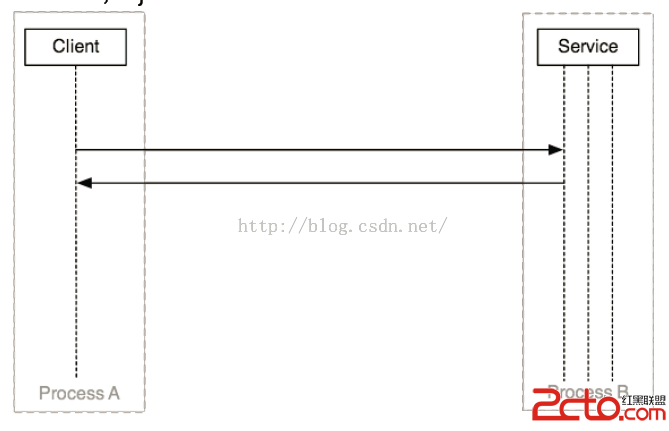
一、Binder 機制概覽 1.1 為什麼 Android 選擇 Binder 出於安全性、穩定性以及記憶體管理的多重考量,Android 將應用程式與系統服務分別運行在
 圖像類 App 如何將 Crash 率從 2.2% 降至 0.2%
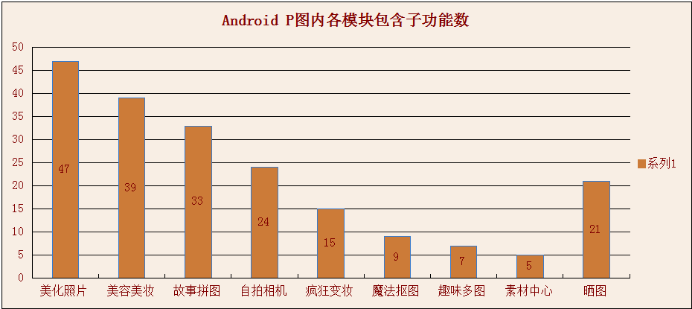
圖像處理類應用通常包含大量依賴 GPU、底層算法與內存資源的模塊,例如濾鏡、人臉檢測、美白、磨皮、美妝、拼圖與相機。這類應用一旦在多廠商 Android 設備上出現兼容性
 Android 消息推送方案解析:從輪詢到 Netty(一)
方案一:輪詢 最直白也最好理解的做法,是讓客戶端週期性地去伺服器拉資料。即時性要求越高,拉取頻率就得越高。觸發方式可以是使用者操作等事件,也可以是一個定時器反覆查詢。 缺