

編輯:關於 Android 程式設計
要在清單裡顯示影片預覽圖,Android 上大致有三條路:
ThumbnailUtilsMediaMetadataRetriever
public static Bitmap getVideoThumbnail(ContentResolver cr, String fileName) {
    Bitmap bitmap = null;
    BitmapFactory.Options options = new BitmapFactory.Options();
    options.inDither = false;
    options.inPreferredConfig = Bitmap.Config.ARGB_8888;

    // 以檔案路徑作為查詢條件
    String whereClause = MediaStore.Video.Media.DATA + " = '" + fileName + "'";
    Log.v(TAG, "where = " + whereClause);

    Cursor cursor = cr.query(MediaStore.Video.Media.EXTERNAL_CONTENT_URI,
            new String[] { MediaStore.Video.Media._ID },
            whereClause, null, null);
    Log.v(TAG, "cursor = " + cursor);

    if (cursor == null || cursor.getCount() == 0) {
        return null;
    }
    cursor.moveToFirst();

    String videoId = cursor.getString(cursor.getColumnIndex(MediaStore.Video.Media._ID));
    Log.v(TAG, "videoId = " + videoId);
    if (videoId == null) {
        return null;
    }
    cursor.close();

    long videoIdLong = Long.parseLong(videoId);

    // 以 ID 從縮圖表取出 MICRO_KIND 縮圖
    bitmap = MediaStore.Video.Thumbnails.getThumbnail(cr, videoIdLong,
            Images.Thumbnails.MICRO_KIND, options);
    Log.v(TAG, "bitmap = " + bitmap);
    return bitmap;
}
提醒:Cursor 記得關閉,建議改用 try/finally 或 use 之類的機制,避免例外時洩漏。
三個靜態方法就夠用:
// 1. 直接從影片檔產生縮圖
//    參數一為影片路徑,參數二為 MINI_KIND 或 MICRO_KIND,決定輸出品質
static Bitmap createVideoThumbnail(String filePath, int kind)

// 2. 對既有 Bitmap 做縮放,options 可傳 OPTIONS_RECYCLE_INPUT 以回收原始 Bitmap
static Bitmap extractThumbnail(Bitmap source, int width, int height, int options)

// 3. 同上,但沒有 options 參數
static Bitmap extractThumbnail(Bitmap source, int width, int height)
MediaMetadataRetriever 在 framework 中被標記為 @hide,一般應用拿不到。 theoretically 你可以改 AOSP 原始碼、把 frameworks 中 MediaMetadataRetriever.java 的 @hide 拿掉並重新編譯 framework,但這顯然不適合一般 App 開發。實務上更常見的做法是在專案裡自己寫一份同名的類別,透過 JNI 去呼叫系統既有的 native 實作。
開啟 SDK 的 Tools 目錄、執行 DDMS,在選單中選擇 Device → File Explorer,找到 /system/lib/libmedia_jni.so,點右上角把檔案 pull 出來。在 Eclipse 專案中建立 libs/armeabi 資料夾(新版工具為 src/main/jniLibs/armeabi),把 libmedia_jni.so 放進去。
public class MediaMetadataRetriever
{
    static {
        System.loadLibrary("media_jni");
        native_init();
    }

    // 供 native 方法存取
    @SuppressWarnings("unused")
    private int mNativeContext;

    public MediaMetadataRetriever() {
        native_setup();
    }

    /** 設定運作模式,只需在物件的生命週期一開始呼叫一次 */
    public native void setMode(int mode);
    public native int getMode();

    /** 設定資料來源(檔案路徑) */
    public native void setDataSource(String path) throws IllegalArgumentException;

    /** 設定資料來源(FileDescriptor + 範圍) */
    public native void setDataSource(FileDescriptor fd, long offset, long length)
            throws IllegalArgumentException;

    /** 設定資料來源(FileDescriptor) */
    public void setDataSource(FileDescriptor fd) throws IllegalArgumentException {
        // 刻意小於 LONG_MAX
        setDataSource(fd, 0, 0x7ffffffffffffffL);
    }

    /** 設定資料來源(Content Uri) */
    public void setDataSource(Context context, Uri uri)
            throws IllegalArgumentException, SecurityException {
        if (uri == null) {
            throw new IllegalArgumentException();
        }
        String scheme = uri.getScheme();
        if (scheme == null || scheme.equals("file")) {
            setDataSource(uri.getPath());
            return;
        }
        AssetFileDescriptor fd = null;
        try {
            ContentResolver resolver = context.getContentResolver();
            try {
                fd = resolver.openAssetFileDescriptor(uri, "r");
            } catch (FileNotFoundException e) {
                throw new IllegalArgumentException();
            }
            if (fd == null) {
                throw new IllegalArgumentException();
            }
            FileDescriptor descriptor = fd.getFileDescriptor();
            if (!descriptor.valid()) {
                throw new IllegalArgumentException();
            }
            if (fd.getDeclaredLength() < 0) {
                setDataSource(descriptor);
            } else {
                setDataSource(descriptor, fd.getStartOffset(), fd.getDeclaredLength());
            }
            return;
        } catch (SecurityException ex) {
        } finally {
            try {
                if (fd != null) {
                    fd.close();
                }
            } catch (IOException ioEx) {
            }
        }
        setDataSource(uri.toString());
    }

    /** 取得指定 key 的 metadata 值 */
    public native String extractMetadata(int keyCode);

    /** 擷取一個代表幀,最常用來產生縮圖 */
    public native Bitmap captureFrame();

    /** 取得嵌入的專輯封面或圖像 */
    public native byte[] extractAlbumArt();

    /** 使用完畢後釋放 native 配置 */
    public native void release();

    private native void native_setup();
    private static native void native_init();
    private native final void native_finalize();

    @Override
    protected void finalize() throws Throwable {
        try {
            native_finalize();
        } finally {
            super.finalize();
        }
    }

    public static final int MODE_GET_METADATA_ONLY  = 0x01;
    public static final int MODE_CAPTURE_FRAME_ONLY = 0x02;

    public static final int METADATA_KEY_CD_TRACK_NUMBER = 0;
    public static final int METADATA_KEY_ALBUM           = 1;
    public static final int METADATA_KEY_ARTIST          = 2;
    public static final int METADATA_KEY_AUTHOR          = 3;
    public static final int METADATA_KEY_COMPOSER        = 4;
    public static final int METADATA_KEY_DATE            = 5;
    public static final int METADATA_KEY_GENRE           = 6;
    public static final int METADATA_KEY_TITLE           = 7;
    public static final int METADATA_KEY_YEAR            = 8;
    public static final int METADATA_KEY_DURATION        = 9;
    public static final int METADATA_KEY_NUM_TRACKS      = 10;
    public static final int METADATA_KEY_IS_DRM_CRIPPLED = 11;
    public static final int METADATA_KEY_CODEC           = 12;
    public static final int METADATA_KEY_RATING          = 13;
    public static final int METADATA_KEY_COMMENT         = 14;
    public static final int METADATA_KEY_COPYRIGHT       = 15;
    public static final int METADATA_KEY_BIT_RATE        = 16;
    public static final int METADATA_KEY_FRAME_RATE      = 17;
    public static final int METADATA_KEY_VIDEO_FORMAT    = 18;
    public static final int METADATA_KEY_VIDEO_HEIGHT    = 19;
    public static final int METADATA_KEY_VIDEO_WIDTH     = 20;
    public static final int METADATA_KEY_WRITER          = 21;
    public static final int METADATA_KEY_MIMETYPE        = 22;
    public static final int METADATA_KEY_DISCNUMBER      = 23;
    public static final int METADATA_KEY_ALBUMARTIST     = 24;
    // 可再往下擴充
}
使用時,設定資料來源後呼叫 captureFrame() 就能拿到代表幀,別忘了最後要 release()。
補充一點時事:上面這套「自己搬 libmedia_jni.so」的技巧屬於早期 Android 的產物,依賴特定 ABI 的 so 檔,在 64 位元與後續版本上很容易出問題。Android 4.0(API 14)起,MediaMetadataRetriever 已成為公開 API,直接呼叫即可;Android 4.4(API 19)之後又補上了 getScaledFrameAtTime(),可以一次取得指定尺寸的縮圖,省去自己縮放的功夫。新專案沒有必要再走 JNI 這條路,只有在維護老專案時才會碰到。
 Android 動畫總結:屬性動畫、補間動畫與幀動畫
動畫分類 Android 中的動畫大致分為三類: TweenAnimation(補間動畫):包含 TranslateAnimation、ScaleAnimation、Ro
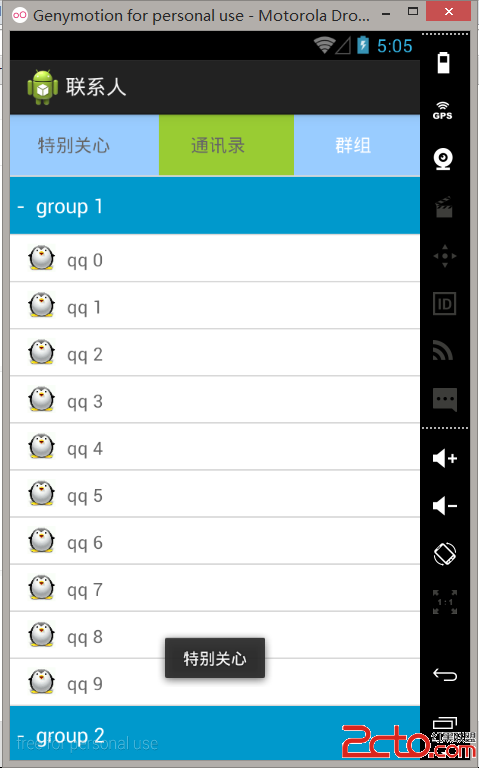 仿 QQ 好友列表:分組懸停、自定義 Header 與下拉刷新的結合
之前學習了 PullToRefresh 和 PinnedHeaderExpandableListView,但把它們結合起來卻頗為費勁,尤其是像 QQ 那樣的效果。它並非單
 自定義View仿淘寶物流時間軸:StaticLayout換行與多條目繪製
效果展示 本文將實作一個類似淘寶物流資訊的時間軸效果。整體畫面由物流描述、時間、垂直線與節點圓圈組成,最新節點通常會以較醒目的顏色呈現。 自定義View的基本思路 物
 Android TabHost 選項卡的基本使用方法
TabHost 的基本結構 TabHost 是 Android 早期常見的分頁容器,通常由 TabWidget 與 FrameLayout 組成。TabWidget 負責