

編輯:關於 Android 程式設計
日常開發中,撥打電話、讀寫聯繫人、操作短信、讀寫 SD 卡文件這些功能反覆出現。與其每次翻文檔重寫,不如把它們沉澱成一個工具類。下面這個 Util 類把常見操作做了統一封裝,可以直接複用到項目中。
/** 檢測 SDCard 是否正常 */
public static boolean checkSDcard() {
    return Environment.getExternalStorageState().equals(Environment.MEDIA_MOUNTED);
}

/** 從 SDCard 讀取文件內容 */
public static String readFileFromSDcard(String path, String filename) throws IOException {
    if (!checkSDcard()) return null;
    path = Environment.getExternalStorageDirectory().getAbsolutePath() + "/" + path;
    File dir = new File(path);
    if (!dir.exists()) dir.mkdirs();

    FileInputStream inStream = new FileInputStream(new File(dir, filename));
    ByteArrayOutputStream outStream = new ByteArrayOutputStream();
    byte[] buffer = new byte[1024];
    int len;
    while ((len = inStream.read(buffer)) != -1) {
        outStream.write(buffer, 0, len);
    }
    byte[] data = outStream.toByteArray();
    outStream.close();
    inStream.close();
    return new String(data);
}

/** 寫入文件到 SDCard */
public static boolean writeFileToSDcard(String path, String filename,
                                        String content, boolean append) throws IOException {
    byte[] buffer = content.getBytes();
    if (!checkSDcard()) return false;
    path = Environment.getExternalStorageDirectory().getAbsolutePath() + "/" + path;
    File dir = new File(path);
    if (!dir.exists()) dir.mkdirs();

    FileOutputStream out = new FileOutputStream(new File(dir, filename), append);
    out.write(buffer);
    out.flush();
    out.close();
    return true;
}
public static void callPhone(String number, Context context) {
    Intent intent = new Intent();
    intent.setAction(Intent.ACTION_CALL);
    intent.setData(Uri.parse("tel:" + number));
    context.startActivity(intent);
}
注意:ACTION_CALL 需要 CALL_PHONE 權限;若不想申請敏感權限,可改用 ACTION_DIAL,由系統打開撥號界面並自動填入號碼,需要用戶手動確認。
讀取所有聯繫人的姓名與電話,核心是先查 Contacts 表拿到 contactId,再根據 ID 查 Phone 表:
public static List<ContactsInfo> getAllContacts(Context context) {
    List<ContactsInfo> resultList = new ArrayList<>();
    ContentResolver cr = context.getContentResolver();
    Cursor cur = cr.query(ContactsContract.Contacts.CONTENT_URI, null, null, null, null);
    while (cur.moveToNext()) {
        String name = cur.getString(cur.getColumnIndex(ContactsContract.Contacts.DISPLAY_NAME));
        String contactId = cur.getString(cur.getColumnIndex(ContactsContract.Contacts._ID));
        Cursor phone = cr.query(
            ContactsContract.CommonDataKinds.Phone.CONTENT_URI, null,
            ContactsContract.CommonDataKinds.Phone.CONTACT_ID + " = " + contactId,
            null, null);
        while (phone.moveToNext()) {
            String number = phone.getString(phone.getColumnIndex(
                ContactsContract.CommonDataKinds.Phone.NUMBER));
            resultList.add(new ContactsInfo(name, number));
        }
    }
    return resultList;
}
插入聯繫人時,需先向 RawContacts.CONTENT_URI 插入一條空記錄取得 rawContactId,再分別向 Data 表寫入姓名(StructuredName)與電話(Phone)兩條數據。批量插入則推薦使用 ContentProviderOperation 組裝操作列表,最後一次性 applyBatch,性能遠優於循環單條插入。
public static boolean insertCallLog(List<CallLogModel> listDate, Context context) {
    for (CallLogModel info : listDate) {
        ContentValues values = new ContentValues();
        values.put(CallLog.Calls.NUMBER, info.getNumber());
        values.put(CallLog.Calls.DATE, info.getDate());
        values.put(CallLog.Calls.DURATION, info.getDuration());
        values.put(CallLog.Calls.TYPE, info.getType());
        values.put(CallLog.Calls.NEW, info.getRend());  // 0 已看,1 未看
        context.getContentResolver().insert(CallLog.Calls.CONTENT_URI, values);
    }
    return true;
}
讀取短信可透過 content://sms/ 這個 URI 查詢,projection 中指定 _id、address、person、body、date、type 等字段,按 date 倒序排列即可得到最新消息優先的列表。插入短信則向 content://sms/inbox 寫入 address、body、date、read、type 即可。
工具類依賴三個簡單的數據模型:
此外類中還提供了一個 getMD5 方法,用於對字符串做 MD5 摘要並返回大寫十六進制字符串,常用於接口簽名或數據校驗。
這些能力全部涉及用戶隱私,需要在 AndroidManifest.xml 中聲明 READ_CONTACTS、WRITE_CONTACTS、WRITE_CALL_LOG、READ_SMS、WRITE_SMS 等權限,並針對高版本系統處理運行時權限申請。此外,直接操作系統數據庫具備一定風險,不同 ROM 的實現可能存在差異,上線前務必在多款設備上驗證。
 Android 通知欄 Notification 詳解
Notification 是 Android 中常見的使用者提醒機制,可用於顯示新訊息、下載進度、背景服務狀態或系統提示。開發者可以透過 NotificationMana
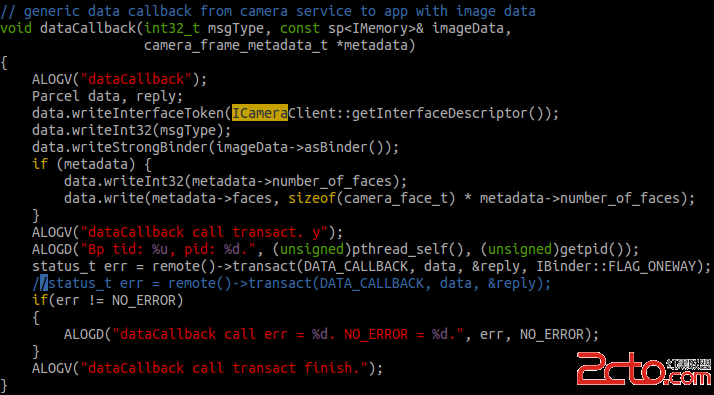 Android Native 層 Binder.transact() 呼叫 onTransact() 失敗分析
在 Native 層使用 Binder 進行跨進程溝通時,若 transact() 沒有如預期觸發對方的 onTransact(),通常不是單一 API 問題,而是 Bi
 Android自定義WebView在線視頻播放器:免SDK實現播放、全屏與生命周期管理
實現效果 需求背景 在很多業務場景中,應用需要在不依賴第三方播放器 SDK 的情況下,展示在線視頻並支持基本播放控制。以 YouTube 網頁播放為例,可以透過 Web
 自定義 View 進階指南:用 onMeasure、onDraw 讓你的 UI 更上一層
自己造 UI 組件有兩個天然好處:一是內容的呈現方式完全由你掌控;二是——也是更被低估的一點——你能把視圖層級壓平。一個精心設計的自定義 View,可以替掉好幾層嵌套的系