

編輯:關於 Android 程式設計
目前市場上 Android 機型繁多,如何讓自己的應用能夠更多地適配不同機型,是一個非常現實且必須處理的問題。Android 官方提供的解決文檔是從三個方向來分析處理的。
1.1 合理使用 wrap_content 與 match_parent;
1.2 盡可能使用 RelativeLayout;
1.3 針對不同機型使用不同的布局檔案(Use Size Qualifiers):
res/layout/main.xml
res/layout-large/main.xml
1.4 盡量使用點 9 圖片(Nine-patch Bitmaps)。
2.1 使用與密度無關的像素單位(Use Density-independent Pixels)——即 dp、sp:
<Button
    android:layout_width="wrap_content"
    android:layout_height="wrap_content"
    android:text="@string/clickme"
    android:layout_marginTop="20dp" />
<TextView
    android:layout_width="match_parent"
    android:layout_height="wrap_content"
    android:textSize="20sp" />
2.2 為不同設備提供可選擇的圖片(Provide Alternative Bitmaps)。不同解析度之間的比例關係為:
xhdpi: 2.0
hdpi: 1.5
mdpi: 1.0(baseline)
ldpi: 0.75
以 awesomeimage.png 為例,圖片的擺放位置如下:
MyProject/
res/
  drawable-xhdpi/
    awesomeimage.png
  drawable-hdpi/
    awesomeimage.png
  drawable-mdpi/
    awesomeimage.png
  drawable-ldpi/
    awesomeimage.png
3.1 識別目前的布局檔案是哪一個(Determine the Current Layout):主要採用標誌位的方式來取得目前使用的布局。
public class NewsReaderActivity extends FragmentActivity {
    boolean mIsDualPane;

    @Override
    public void onCreate(Bundle savedInstanceState) {
        super.onCreate(savedInstanceState);
        setContentView(R.layout.main_layout);
        View articleView = findViewById(R.id.article);
        mIsDualPane = articleView != null && articleView.getVisibility() == View.VISIBLE;
    }
}
針對目前布局中沒有的控件(例如 button),要判斷其是否為 null:
Button catButton = (Button) findViewById(R.id.categorybutton);
OnClickListener listener = /* create your listener here */;
if (catButton != null) {
    catButton.setOnClickListener(listener);
}
3.2 根據目前布局,使用不同的響應操作(React According to Current Layout):
public void onHeadlineSelected(int index) {
    mArtIndex = index;
    if (mIsDualPane) {
        /* display article on the right pane */
        mArticleFragment.displayArticle(mCurrentCat.getArticle(index));
    } else {
        /* start a separate activity */
        Intent intent = new Intent(this, ArticleActivity.class);
        intent.putExtra("catIndex", mCatIndex);
        intent.putExtra("artIndex", index);
        startActivity(intent);
    }
}
final String CATEGORIES[] = { "Top Stories", "Politics", "Economy", "Technology" };

public void onCreate(Bundle savedInstanceState) {
    ....
    if (mIsDualPane) {
        /* use tabs for navigation */
        actionBar.setNavigationMode(android.app.ActionBar.NAVIGATION_MODE_TABS);
        int i;
        for (i = 0; i < CATEGORIES.length; i++) {
            actionBar.addTab(actionBar.newTab().setText(CATEGORIES[i]).setTabListener(handler));
        }
        actionBar.setSelectedNavigationItem(selTab);
    } else {
        /* use list navigation (spinner) */
        actionBar.setNavigationMode(android.app.ActionBar.NAVIGATION_MODE_LIST);
        SpinnerAdapter adap = new ArrayAdapter(this, R.layout.headline_item, CATEGORIES);
        actionBar.setListNavigationCallbacks(adap, handler);
    }
}
3.3 在其他 Activity 中復用 Fragments(Reuse Fragments in Other Activities):Android 提供了一個解決「同一操作、不同響應」的方案,就是在父類中定義一個 interface,並在子類中實作,以實作不同操作:
public class HeadlinesFragment extends ListFragment {
    ...
    OnHeadlineSelectedListener mHeadlineSelectedListener = null;

    /* Must be implemented by host activity */
    public interface OnHeadlineSelectedListener {
        public void onHeadlineSelected(int index);
    }
    ...
    public void setOnHeadlineSelectedListener(OnHeadlineSelectedListener listener) {
        mHeadlineSelectedListener = listener;
    }
}
public class HeadlinesFragment extends ListFragment {
    ...
    @Override
    public void onItemClick(AdapterView<?> parent, View view, int position, long id) {
        if (null != mHeadlineSelectedListener) {
            mHeadlineSelectedListener.onHeadlineSelected(position);
        }
    }
    ...
}
1. Designing for Multiple Screens:
https://developer.android.com/training/multiscreen/index.html
2. Supporting Different Screen Sizes:
https://developer.android.com/training/multiscreen/screensizes.html
3. Supporting Different Screen Densities:
https://developer.android.com/training/multiscreen/screendensities.html
4. Implementing Adaptative UI Flows:
https://developer.android.com/training/multiscreen/adaptui.html
 仿新浪微博發布頁實作:文字校驗、多圖選擇與表情插入
本文示範一個完整的微博發布頁,涵蓋文字輸入與字數統計、圖片選擇與移除、表情面板調用,以及最終的發布請求。 對應的開放平台介面:純文字發布:https://open.we
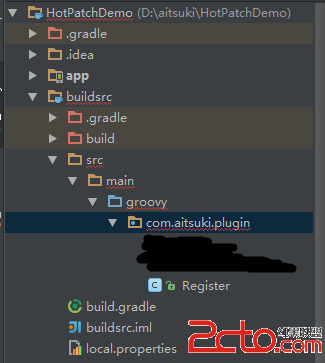 Android 熱補丁動態修復:使用 Javassist 注入字節碼
問題背景熱補丁修復常見問題之一是 CLASS_ISPREVERIFIED。若直接將補丁 dex 注入 ClassLoader,可能會遇到驗證失敗。解決方式之一是讓所有類別
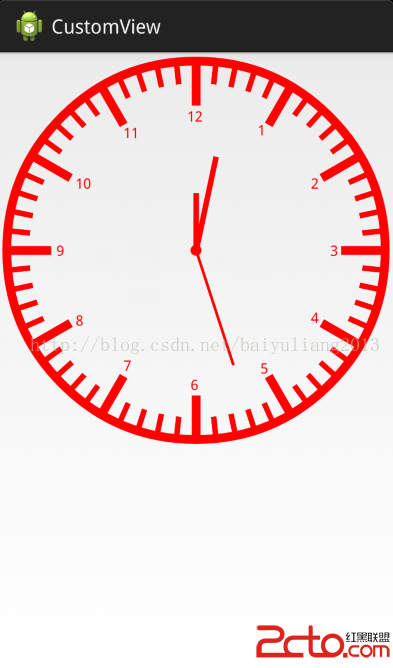 安卓自定義 View 打造經典指針鐘錶
以前做過 HTML5 版的鐘錶,HTML5 同樣有一塊叫 Canvas 的畫布,但相較於 Android 的 Canvas,HTML5 的功能要強大得多。就拿鐘錶的實現來
 Android 動態分析入門:Smali Instrumentation 插樁技巧
在 Android 安全研究中,Smali Instrumentation 是一種不需要 root 的動態分析思路。透過修改或插入 Smali 指令,可以在不改變原邏輯的