

編輯:關於 Android 程式設計
透過 Intent 可以輕鬆調用系統的郵件應用來發送文本郵件。程式碼如下:
import android.app.Activity;
import android.content.Intent;
import android.os.Bundle;
import android.view.View;
import android.view.View.OnClickListener;
import android.widget.Button;

public class MyIntentCaseDemo extends Activity {
    private Button mybut = null; // 按鈕組件

    @Override
    public void onCreate(Bundle savedInstanceState) {
        super.onCreate(savedInstanceState);
        super.setContentView(R.layout.main); // 默認布局管理器
        this.mybut = (Button) super.findViewById(R.id.mybut); // 取得組件
        this.mybut.setOnClickListener(new OnClickListenerImpl()); // 定義單擊事件
    }

    private class OnClickListenerImpl implements OnClickListener {
        @Override
        public void onClick(View view) {
            Intent emailIntent = new Intent(Intent.ACTION_SEND); // 實例化 Intent
            emailIntent.setType("plain/text"); // 設置類型
            String address[] = new String[]{"sdu@163.com"}; // 收件人的地址
            String subject = "山東大學軟件學院(SDU)"; // 郵件主題
            String content = "山東大學軟件學院(SDU)www.sdu.edu.cn"; // 郵件內容
            emailIntent.putExtra(Intent.EXTRA_EMAIL, address); // 設置收件人
            emailIntent.putExtra(Intent.EXTRA_SUBJECT, subject); // 設置主題
            emailIntent.putExtra(Intent.EXTRA_TEXT, content); // 設置內容
            MyIntentCaseDemo.this.startActivity(emailIntent); // 執行 Intent
        }
    }
}
所需權限:
<uses-permission android:name="android.permission.CALL_PHONE"/>
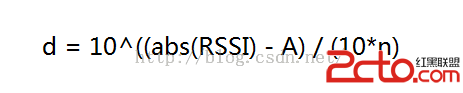 藍牙防丟器原理與 Android BLE 開發實踐
本文整理自一個已完成的藍牙防丟器專案,重點說明原理、產品實現,以及 Android 端的 BLE 介面編程方式。至於 BLE 協定本身與涉及 JNI 的內部源碼實現,留待
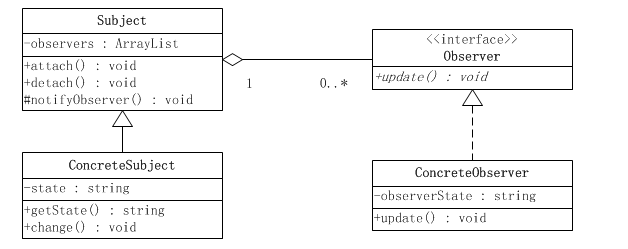 Android 源碼中的觀察者模式:以 Adapter 數據刷新為例
一、模式概述 定義 觀察者模式定義了對象之間的一種「一對多」依賴關係:當某一個對象的狀態發生改變時,所有依賴於它的對象都會收到通知,並被自動更新。 典型使用場景 關聯行
 Android 刮刮樂效果實作:用 Canvas 與触摸事件模擬橡皮擦
刮刮樂的核心原理刮刮樂效果本質上是「擦除遮罩」。可以用自定義 View 搭配 Bitmap、Canvas 與 Paint,在手指移動時繪出透明路徑,模擬橡皮擦。橡皮擦實作
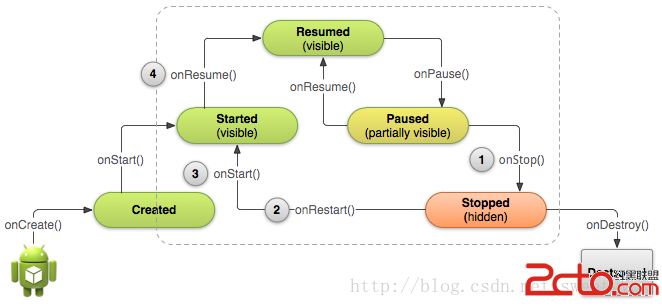 Android 學習路線(十四):Activity 生命週期之停止與重啟
正確處理停止與重啟,是 Activity 生命週期中相當關鍵的一環——它決定了使用者是否感覺到「這個 App 一直都在」,以及切換回來時進度有沒有遺失。 有幾個典型場景