

編輯:關於 Android 程式設計
在 Android 中,Activity 與 Fragment 之間傳遞物件,可以把物件序列化後存入 Bundle 或 Intent,也可以轉成 JSON 字串再傳。序列化可使用 Java 的 Serializable 介面或 Parcelable 介面;轉 JSON 則可以借助 Gson 等函式庫。
一、Serializable
public class Author implements Serializable{ private int id; private String name; //... }
public class Book implements Serializable{ private String title; private Author author; //... }
傳遞資料
Book book=new Book(); book.setTitle("Java編程思想"); Author author=new Author(); author.setId(1); author.setName("Bruce Eckel"); book.setAuthor(author); Intent intent=new Intent(this,SecondActivity.class); intent.putExtra("book",book); startActivity(intent);
接收資料
Book book= (Book) getIntent().getSerializableExtra("book"); Log.d(TAG,"book title->"+book.getTitle()); Log.d(TAG,"book author name->"+book.getAuthor().getName());
二、轉為 JSON 字串
public class Author{ private int id; private String name; //... }
public class Book{ private String title; private Author author; //... }
傳遞資料
Book book=new Book(); book.setTitle("Java編程思想"); Author author=new Author(); author.setId(1); author.setName("Bruce Eckel"); book.setAuthor(author); Intent intent=new Intent(this,SecondActivity.class); intent.putExtra("book",new Gson().toJson(book)); startActivity(intent);
接收資料
String bookJson=getIntent().getStringExtra("book"); Book book=new Gson().fromJson(bookJson,Book.class); Log.d(TAG,"book title->"+book.getTitle()); Log.d(TAG,"book author name->"+book.getAuthor().getName());
這種做法的優點是 model 類別完全不需要改動,缺點則是序列化與反序列化的開銷最大。
三、使用 Parcelable
實作 Parcelable 介面需要完成兩個方法:
除了這兩個方法,還必須建立一個 Parcelable.Creator 介面的實例,用來從 Parcel 容器中讀回資料。
public class Author implements Parcelable{ private int id; private String name; //setter & getter... @Override public int describeContents() { return 0; } @Override public void writeToParcel(Parcel dest, int flags) { //該方法將類的數據寫入外部提供的Parcel中.即打包需要傳遞的數據到Parcel容器保存, // 以便從parcel容器獲取數據 dest.writeString(name); dest.writeInt(id); } public static final Creator<Author> CREATOR=new Creator<Author>() { @Override public Author createFromParcel(Parcel source) { //從Parcel容器中讀取傳遞數據值,封裝成Parcelable對象返回邏輯層。 Author author=new Author(); author.setName(source.readString()); author.setId(source.readInt()); return author; } @Override public Author[] newArray(int size) { //創建一個類型為T,長度為size的數組,僅一句話(return new T[size])即可。方法是供外部類反序列化本類數組使用。 return new Author[size]; } }; }
public class Book implements Parcelable{ private String title; private Author author; //setter & getter... @Override public int describeContents() { return 0; } @Override public void writeToParcel(Parcel dest, int flags) { dest.writeString(title); dest.writeParcelable(author,flags); } public static final Creator<Book> CREATOR=new Creator<Book>() { @Override public Book createFromParcel(Parcel source) { Book book=new Book(); book.setTitle(source.readString()); book.setAuthor(source.<Author>readParcelable(Author.class.getClassLoader())); return book; } @Override public Book[] newArray(int size) { return new Book[0]; } }; }
傳遞資料
Book book=new Book(); book.setTitle("Java編程思想"); Author author=new Author(); author.setId(1); author.setName("Bruce Eckel"); book.setAuthor(author); Intent intent=new Intent(this,SecondActivity.class); intent.putExtra("book",book); startActivity(intent);
接收資料
Book book=getIntent().getParcelableExtra("book"); Log.d(TAG,"book title->"+book.getTitle()); Log.d(TAG,"book author name->"+book.getAuthor().getName());
四、效能分析
實測結果如下:
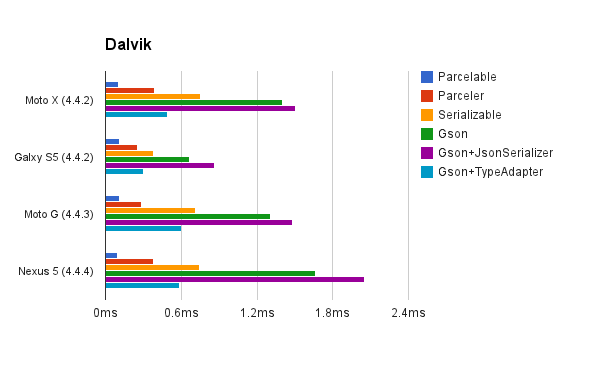
可以看到,轉字串的方式最慢,Serializable 次之,而 Parcelable 比 Serializable 快約十倍。因此從效能角度出發,應優先選擇 Parcelable。但 Parcelable 有大量重複的樣板程式碼,如何簡化這些操作,正是下一節的主題。
五、簡化 Parcelable 操作
若使用 Android Studio,可以安裝 android-parcelable-intellij-plugin 外掛,或自行設定 Live Template 來加速撰寫。
5.1 Parceler
除了上述做法,社群也有許多第三方函式庫可以簡化 Parcelable 操作,當然引入這些庫有可能略微降低效能,Parceler 就是其中之一。
Parceler 使用非常簡單:定義 Model 時加上 @Parcel 註解,傳遞時用 Parcels.wrap 包裝成 Parcelable 物件,接收時用 Parcels.unwrap 還原。
@Parcel public class Author { int id; String name; //setter & getter... }
@Parcel public class Book { String title; Author author; //setter & getter }
傳遞物件
Book book=new Book(); book.setTitle("Java編程思想"); Author author=new Author(); author.setId(1); author.setName("Bruce Eckel"); book.setAuthor(author); Intent intent=new Intent(this,SecondActivity.class); intent.putExtra("book", Parcels.wrap(book)); startActivity(intent);
接收物件
Book book= Parcels.unwrap(getIntent().getParcelableExtra("book")); Log.d(TAG,"book title->"+book.getTitle()); Log.d(TAG,"book author name->"+book.getAuthor().getName());
除了 Parceler,還有 auto-parcel、ParcelableCodeGenerator、ParcelableGenerator 等第三方庫可以達到類似效果,這裡不再逐一展開,有興趣的朋友可以自行研究。
以上就是本文的全部內容,希望對你的學習有所幫助。
 Android 入門教程 8.3.15:Paint API 最終篇——Typeface 字型設定
本節引言 這是 Paint API 系列的最後一個成員:Typeface(字型)。顧名思義,它負責決定文字長什麼樣——用哪一套字體、要不要加粗、要不要斜體。用法非常簡單,
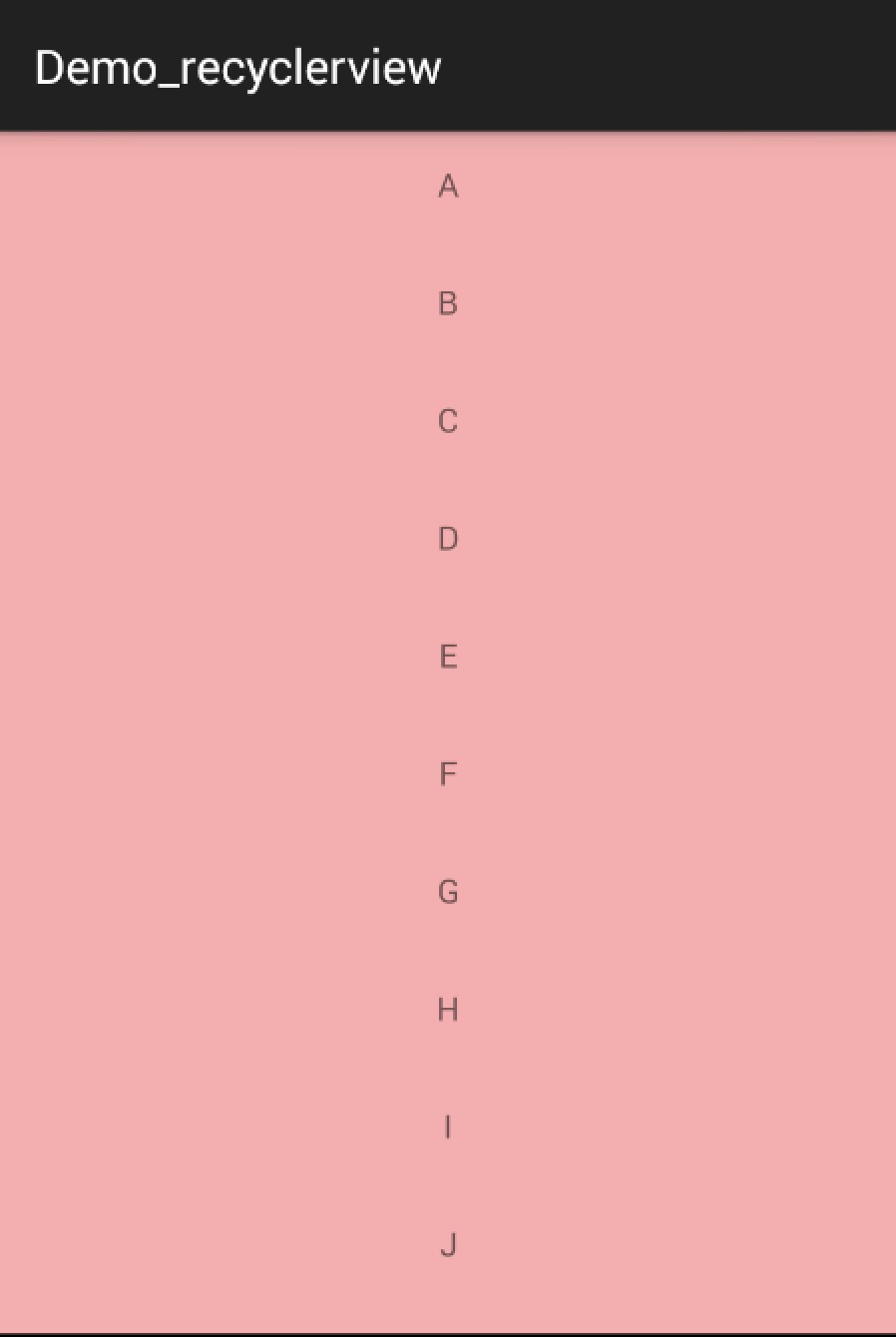 RecyclerView 完全解析:用插拔式架構一次搞定 ListView、GridView 與瀑布流
RecyclerView 推出已經有一段時間,只要引入 support-v7 依賴就能使用,多數 Android 開發者對它都不算陌生。官方對它的定位是「在有限的視窗中展
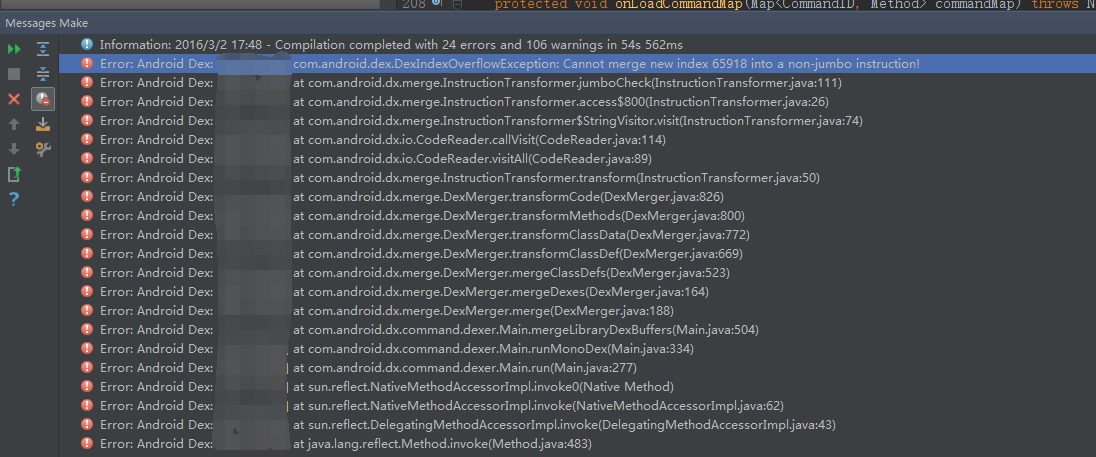 解決 Android Dex 方法數溢位錯誤 DexIndexOverflowException
在 Android 專案規模不斷增大時,常會遇到類似下面的錯誤: Error:AndroidDex: com.Android.dex.DexIndexOverflowEx
 Android View 事件分發機制源碼解析(上)
一直想寫事件分發機制,那就老老實實把源碼讀一遍,再寫下心得。本篇先從一個可打印日誌的簡單案例出發,逐步追進原始碼。 一、案例準備 自訂一個 MyButton 繼承 Bu