

編輯:關於 Android 程式設計
本文整理自一個已完成的藍牙防丟器專案,重點說明原理、產品實現,以及 Android 端的 BLE 介面編程方式。至於 BLE 協定本身與涉及 JNI 的內部源碼實現,留待後續再深入剖析。閱讀本文前,建議你對 BLE 協定已有基本認識,例如 GAP、GATT profile 的角色,以及 Service、Characteristic 的使用方式。
藍牙防丟器的核心原理,是依據接收到的訊號強度(RSSI)來估算距離,公式為:
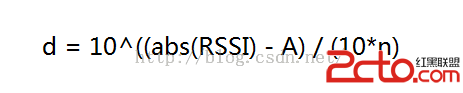
其中 d 為估算距離,RSSI 為訊號強度,A 是發射端與接收端相距 1 公尺時的訊號強度,n 為環境衰減因子。
要注意的是,不同藍牙裝置的 A 與 n 並不相同;同一裝置在不同發射功率下,A 也會改變;而 n 顯然與環境相關。因此只有在發射功率確定的前提下,A 與 n 對同一款裝置而言才能視為經驗值。
實際的防丟器產品通常具備兩項功能:
1. 手機(接收端)偵測到與發射端的距離超過門檻時發出告警,裝置依告警級別給出對應提示,例如不同頻率的提示音或閃燈。
2. 發射端發現與手機的連結已斷開(代表距離超出連結範圍)時,自動發出某種形式的警告。
以業界功耗相對出色的藍牙單晶片 Dialog DA14580 為例。Dialog 提供的 SDK 中即含有所謂 Proximity(防丟)profile,它針對上述需求提供了以下 Characteristic:
1. TX Power Characteristic:裝置端透過主機控制介面 HCI 取得發射功率參數,並以 read 屬性開放給 master 讀取。
2. IAS(Immediate Alert Service):write 屬性,供 master 寫入告警級別。master 寫入新值時,裝置端會收到 write 回呼,並依級別觸發對應告警。
3. LLS(Link Loss Service):write/read 屬性,供 master 設定連結斷開時的預設告警級別。
RSSI 由接收端介面取得,不需裝置端提供對應 service。以上 Characteristic 都透過 GATT profile 提供服務,在協定層面上每個 Characteristic 都對應一個 UUID。
BLE 相關 API 自 Android 4.3 起提供。
getPackageManager().hasSystemFeature(PackageManager.FEATURE_BLUETOOTH_LE)
回傳 true 代表支援。
所有 BLE API 都透過統一的 BluetoothAdapter 使用。先取得藍牙管理器,再取得配接器單例:
BluetoothManager bluetoothManager = (BluetoothManager) getSystemService(Context.BLUETOOTH_SERVICE);
BluetoothAdapter mBluetoothAdapter = bluetoothManager.getAdapter();
mBluetoothAdapter.enable();
BluetoothAdapter.startLeScan(BluetoothAdapter.LeScanCallback callback)
callback 是掃描到裝置時的回呼介面,需實作 onLeScan:
@Override
public void onLeScan(final BluetoothDevice device, int rssi, byte[] scanRecord)
其中 device 代表掃描到的裝置,可取得 MAC 位址、裝置名稱等;rssi 是未連線狀態下的訊號強度;scanRecord 是掃描回應的廣播內容,iBeacon 正是從這裡解析資料。
String bluetoothAddress = device.getAddress(); // 取得 48 位元 MAC 位址
先由 MAC 位址取得代表裝置的 BluetoothDevice,再發起 GATT 連接:
BluetoothDevice device = mBluetoothAdapter.getRemoteDevice(bluetoothAddress);
BluetoothGatt mBluetoothGatt = device.connectGatt(context, boolean autoConnect, BluetoothGattCallback callback);
callback 是連線之後所有資料交互的回呼入口,主要包含五類:
(1)服務發現
@Override
public void onServicesDiscovered(BluetoothGatt gatt, int status)
mBluetoothGatt.getServices() 回傳服務集合。對每個 service 可用 getUuid() 取得 UUID,getCharacteristics() 取得該服務下的 Characteristic 集合;再對每個 Characteristic 用 getUuid()、getPermissions()、getValue() 分別取得 UUID、權限與值。實務上只需從中挑出感興趣的三個 Characteristic(TX Power、IAS、LLS),電池、裝置資訊等其餘 UUID 可以忽略。
gattCharacteristic_char5_TXP = gattCharacteristic;
(2)連接狀態改變
@Override
public void onConnectionStateChange(BluetoothGatt gatt, int status, int newState)
狀態有 BluetoothProfile.STATE_CONNECTED(已連接)與 BluetoothProfile.STATE_DISCONNECTED(已斷開)兩種。
(3)讀取回呼
@Override
public void onCharacteristicRead(BluetoothGatt gatt, BluetoothGattCharacteristic characteristic, int status)
對應手機發出讀取請求後收到裝置資料的時機,例如呼叫 mBluetoothGatt.readCharacteristic(gattCharacteristic_char5_TXP) 之後。
(4)裝置端資料變化回呼
當 Characteristic 的屬性為 notify 或 indication 時,等同手機訂閱了該值的變更通知,裝置端數值改變時會主動推送。
@Override
public void onCharacteristicChanged(BluetoothGatt gatt, BluetoothGattCharacteristic characteristic)
新值可透過 characteristic.getValue() 取得。
(5)取得 RSSI 的回呼
掃描階段可由掃描回呼取得 RSSI,但連線之後必須週期性呼叫 mBluetoothGatt.readRemoteRssi() 向底層驅動請求讀取,底層取得新值後會回呼:
@Override
public void onReadRemoteRssi(BluetoothGatt gatt, int rssi, int status)
參數 rssi 即為新的訊號強度。
連線後手機與裝置的距離持續變化,因此必須不斷讀取 RSSI 並即時換算距離,防丟功能才能真正成立。
 Android 開發核心知識:Activity 與 Fragment 完整解析
Activity 與 Fragment 是 Android 介面開發的兩根支柱。本文從生命週期、通訊方式、資料傳遞到 Fragment 的動態操作,做一次系統性梳理。
 用 PopupWindow 實作點擊頂部按鈕彈出下拉選單
這個效果技術門檻不高,核心就是 PopupWindow:點一下按鈕,彈出一個自訂的 View,View 內部可以自由佈置,最常見的應用是放一個 ListView 當選單。
 Android 開發:用 SQLite 實作一個記事本(寫日記)
這次要示範如何使用資料庫來儲存資料,做一個簡單的寫日記小程式。 執行效果如下: 一、列表無資料時的提示 當 ListView 沒有資料可顯示時,我們需要給使用者一個提
 Android UI 進階:活用 SlidingDrawer 抽屜控制項
最近在開發一個應用時,有個想法:把設定頁面和應用頁面放在一起,讓使用者能即時看到自己調整設定後對 UI 的影響,這樣操作起來會更方便。琢磨了好一陣子,最後發現 Slidi