

編輯:關於 Android 程式設計
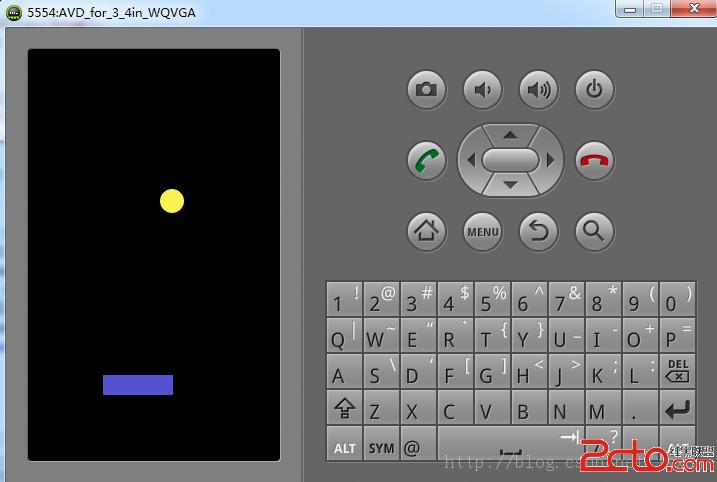
這個小遊戲示範了幾個 2D 遊戲必備的基礎機制:以 Timer 驅動的遊戲迴圈、邊界碰撞反彈、鍵盤操控挡板,以及判斷失敗條件後停止迴圈。
import java.util.Random;
import java.util.Timer;
import java.util.TimerTask;
import android.app.Activity;
import android.content.Context;
import android.graphics.Canvas;
import android.graphics.Color;
import android.graphics.Paint;
import android.os.Bundle;
import android.os.Handler;
import android.os.Message;
import android.util.DisplayMetrics;
import android.view.Display;
import android.view.KeyEvent;
import android.view.View;
import android.view.View.OnKeyListener;
import android.view.Window;
import android.view.WindowManager;

public class PinBall extends Activity {
    private int tableWidth;    // 桌面寬度
    private int tableHeight;   // 桌面高度
    private int racketY;       // 球拍的垂直位置

    private final int RACKET_HEIGHT = 20;   // 球拍高度
    private final int RACKET_WIDTH = 70;    // 球拍寬度
    private final int BALL_SIZE = 12;       // 小球直徑

    private int ySpeed = 10;    // 小球縱向速度
    Random rand = new Random();

    // 回傳 -0.5~0.5 的比率,用於控制小球的横向方向
    private double xyRate = rand.nextDouble() - 0.5;
    private int xSpeed = (int) (ySpeed * xyRate * 2);   // 小球横向速度

    private int ballX = rand.nextInt(200) + 20;   // 小球 X 座標
    private int ballY = rand.nextInt(10) + 20;    // 小球 Y 座標
    private int racketX = rand.nextInt(200);      // 球拍水平位置
    private boolean isLose = false;               // 遊戲結束旗標

    @Override
    public void onCreate(Bundle savedInstanceState) {
        super.onCreate(savedInstanceState);
        requestWindowFeature(Window.FEATURE_NO_TITLE);   // 隱藏標題列
        getWindow().setFlags(WindowManager.LayoutParams.FLAG_FULLSCREEN,
                WindowManager.LayoutParams.FLAG_FULLSCREEN);   // 全螢幕

        final GameView gameView = new GameView(this);
        setContentView(gameView);

        // 取得螢幕寬高
        WindowManager windowManager = getWindowManager();
        Display display = windowManager.getDefaultDisplay();
        DisplayMetrics metrics = new DisplayMetrics();
        display.getMetrics(metrics);
        tableWidth = metrics.widthPixels;
        tableHeight = metrics.heightPixels;
        racketY = tableHeight - 80;

        final Handler handler = new Handler() {
            public void handleMessage(Message msg) {
                if (msg.what == 0x123) {
                    gameView.invalidate();
                }
            }
        };

        // 鍵盤控制球拍
        gameView.setOnKeyListener(new OnKeyListener() {
            @Override
            public boolean onKey(View source, int keyCode, KeyEvent event) {
                switch (event.getKeyCode()) {
                case KeyEvent.KEYCODE_A:    // A 鍵左移
                    if (racketX > 0) racketX -= 10;
                    break;
                case KeyEvent.KEYCODE_D:    // D 鍵右移
                    if (racketX < tableWidth - RACKET_WIDTH) racketX += 10;
                    break;
                }
                gameView.invalidate();
                return true;
            }
        });

        // 遊戲迴圈:每 100ms 更新一次座標
        final Timer timer = new Timer();
        timer.schedule(new TimerTask() {
            @Override
            public void run() {
                // 碰到左右邊界則反向
                if (ballX <= 0 || ballX >= tableWidth - BALL_SIZE) {
                    xSpeed = -xSpeed;
                }
                // 越過球拍位置且横向不在球拍範圍內 —— 遊戲結束
                if (ballY >= racketY - BALL_SIZE
                        && (ballX < racketX || ballX > racketX + RACKET_WIDTH)) {
                    timer.cancel();
                    isLose = true;
                }
                // 碰到頂部,或落到球拍上 —— 反彈
                else if (ballY <= 0
                        || (ballY >= racketY - BALL_SIZE
                            && ballX > racketX && ballX <= racketX + RACKET_WIDTH)) {
                    ySpeed = -ySpeed;
                }
                ballY += ySpeed;
                ballX += xSpeed;
                handler.sendEmptyMessage(0x123);   // 通知重繪
            }
        }, 0, 100);
    }

    class GameView extends View {
        Paint paint = new Paint();

        public GameView(Context context) {
            super(context);
            setFocusable(true);   // 必須可取得焦點才能收到按鍵事件
        }

        @Override
        public void onDraw(Canvas canvas) {
            paint.setStyle(Paint.Style.FILL);
            paint.setAntiAlias(true);   // 去鋸齒

            if (isLose) {
                paint.setColor(Color.RED);
                paint.setTextSize(30);
                canvas.drawText("遊戲已結束", 50, 200, paint);
            } else {
                // 小球
                paint.setColor(Color.rgb(240, 240, 80));
                canvas.drawCircle(ballX, ballY, BALL_SIZE, paint);
                // 球拍
                paint.setColor(Color.rgb(80, 80, 200));
                canvas.drawRect(racketX, racketY,
                        racketX + RACKET_WIDTH, racketY + RACKET_HEIGHT, paint);
            }
        }
    }
}
碰撞判斷的精度。目前只用「座標是否越界」來判斷,當速度較快時可能會出現穿透。實務上會把每次位移拆成小步(sub-stepping),或改用「前一幀座標與當前座標是否跨越邊界」的線段相交判斷。
時間基準。用固定 100ms 的 Timer 在效能不同的裝置上會有速度差異,比較穩定的做法是記錄 SystemClock.uptimeMillis() 的差值,用「這幀過了幾毫秒」去乘速度,讓球速與裝置效能脫鉤。
操作方式。實機上更直覺的做法是改用觸控:onTouchEvent 中把 racketX 設為 event.getX() - RACKET_WIDTH / 2,並夾在合法範圍內。若要保留鍵盤操作,實體按鍵的機型也越來越少,可以考慮同時提供兩種輸入。
生命週期。記得在 onPause() 中 timer.cancel()、onResume() 中重啟,否則切到背景後計時器仍在跑,既耗電又會在回來時看到球瞬移。
 Android 遊戲開發:主角移動與地圖平滑滾動,含卡馬克地圖緩衝演算法
RPG 的地圖通常遠大於手機螢幕,因此「角色走到哪裡、畫面就跟到哪裡」是必解的題目。本篇說明地圖滾動的原理與實作,並進一步介紹卡馬克(Carmack)地圖緩衝演算法——一
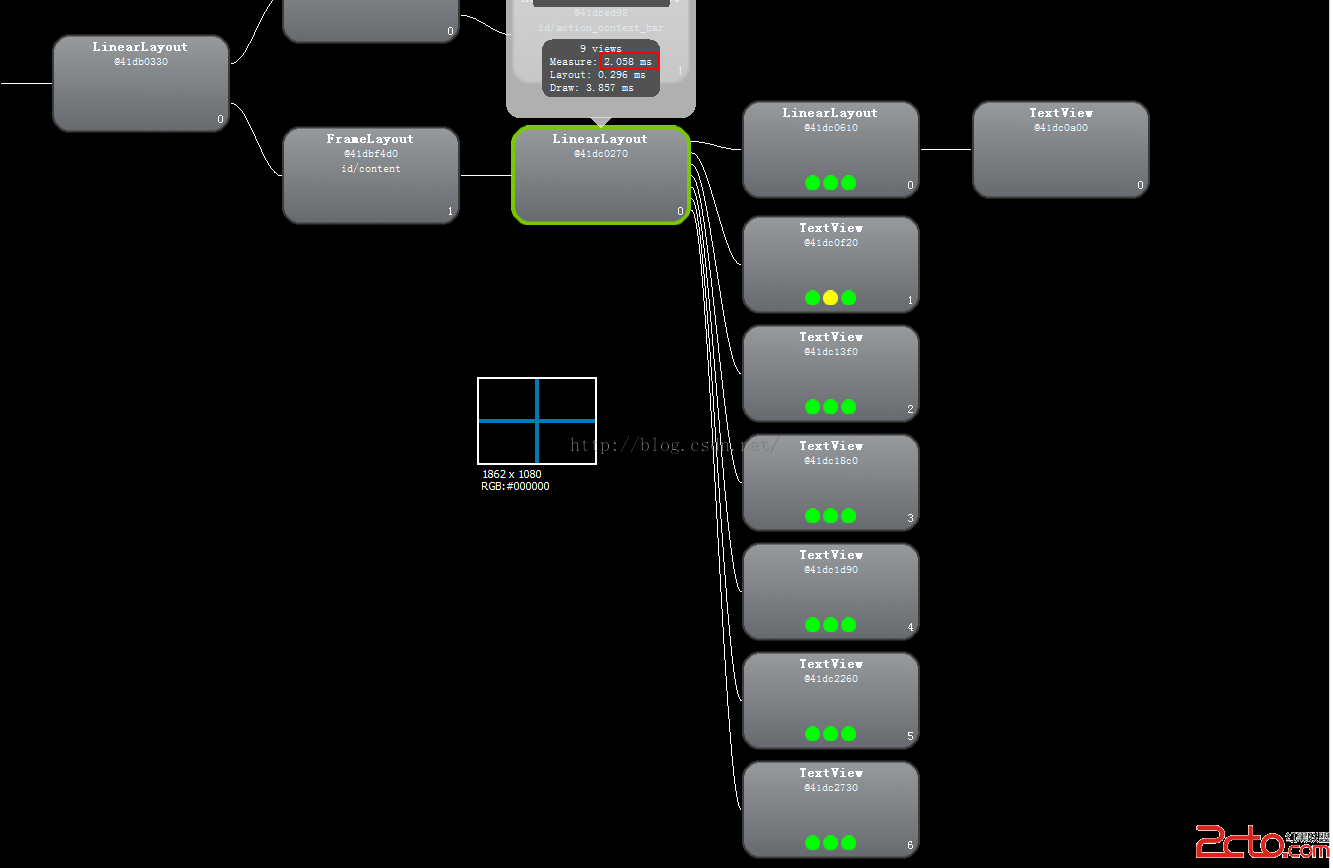 RelativeLayout、LinearLayout、FrameLayout 效能實戰對比
「這個頁面進來怎麼這麼慢?看看競品,秒開。你去優化一下。」幾乎每個 Android 工程師都聽過這句話。功能明明都做了,可一進頁面就要 inflate 一大堆 View,
 自定義 Dialog:一套元件搞定單按鈕、雙按鈕、三按鈕風格對話框
Android 提供的元件不少,但直接用系統預設樣式,總覺得和自家 App 的調性對不上。專案裡最常見的莫過於彈出對話框,按按鈕數量大致可分為一顆、兩顆、三顆三類(當然你
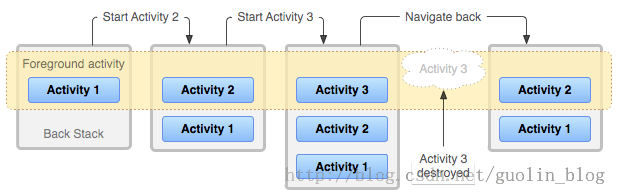 Android 觀念筆記:任務與返回堆疊、Activity 狀態保存、啟動模式全解
任務與返回堆疊 一個應用通常包含多個 Activity,每個 Activity 都該設計成職責單一、可獨立操作的元件,彼此之間又能互相啟動。例如郵件應用裡,一個 Acti