

編輯:關於 Android 程式設計
系統自帶的 SeekBar 樣式是水平的,若需要垂直方向的效果就得自訂了。原理很簡單:定義一個類繼承於 SeekBar,並在 onDraw 方法中將視圖旋轉一下即可。
程式碼如下:
package android.widget;
import android.content.Context;
import android.graphics.Canvas;
import android.util.AttributeSet;
import android.util.Log;
import android.view.MotionEvent;
public class VerticalSeekBar extends SeekBar {
    public VerticalSeekBar(Context context) {
        super(context);
    }
    public VerticalSeekBar(Context context, AttributeSet attrs, int defStyle) {
        super(context, attrs, defStyle);
    }
    public VerticalSeekBar(Context context, AttributeSet attrs) {
        super(context, attrs);
    }
    protected void onSizeChanged(int w, int h, int oldw, int oldh) {
        super.onSizeChanged(h, w, oldh, oldw);
    }
    @Override
    protected synchronized void onMeasure(int widthMeasureSpec, int heightMeasureSpec) {
        super.onMeasure(heightMeasureSpec, widthMeasureSpec);
        setMeasuredDimension(getMeasuredHeight(), getMeasuredWidth());
    }
    protected void onDraw(Canvas c) {
        c.rotate(-90); // 將 SeekBar 旋轉 90 度
        c.translate(-getHeight(), 0); // 將旋轉後的視圖移動回來
        super.onDraw(c);
    }
    @Override
    public boolean onTouchEvent(MotionEvent event) {
        if (!isEnabled()) {
            return false;
        }
        switch (event.getAction()) {
            case MotionEvent.ACTION_DOWN:
            case MotionEvent.ACTION_MOVE:
            case MotionEvent.ACTION_UP:
                // 獲取滑動的距離並設置進度
                int i = getMax() - (int) (getMax() * event.getY() / getHeight());
                setProgress(i);
                break;
            case MotionEvent.ACTION_CANCEL:
                break;
        }
        return true;
    }
}
xml 佈局檔:
<?xml version="1.0" encoding="utf-8"?>
<RelativeLayout xmlns:android="https://schemas.android.com/apk/res/android"
    android:layout_width="fill_parent"
    android:layout_height="fill_parent"
    android:gravity="center"
    android:background="@android:color/white"
    android:orientation="horizontal" >
    <TextView
        android:id="@+id/reverse_sb_progresstext"
        android:layout_width="wrap_content"
        android:layout_height="wrap_content"
        android:layout_below="@+id/seekbar_reverse"
        android:gravity="center" />
    <TextView
        android:id="@+id/vertical_sb_progresstext"
        android:layout_width="wrap_content"
        android:layout_height="wrap_content"
        android:layout_below="@+id/vertical_Seekbar"
        android:layout_toRightOf="@+id/seekbar_reverse"
        android:gravity="center" />
</RelativeLayout>
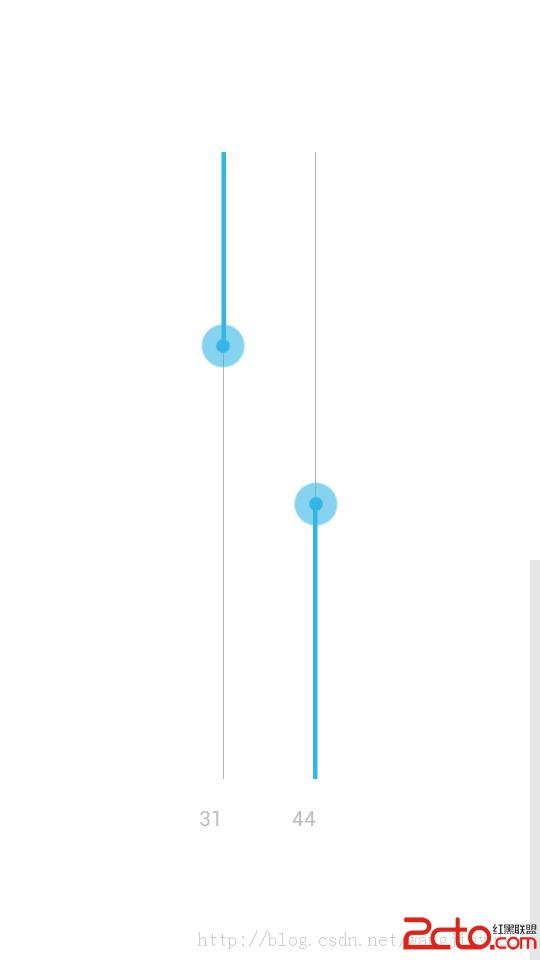
關鍵在於 onDraw 中利用 Canvas 的 rotate() 與 translate() 兩個方法,先將畫布旋轉 -90 度,再將坐標平移回來,即可讓水平的 SeekBar 呈現垂直效果;onMeasure 與 onTouchEvent 也需相應調整寬高與觸摸坐標的計算。
 Android 側滑菜單 DrawerLayout 的使用
現在側滑菜單的應用非常普遍,過去大多透過第三方庫 SlidingMenu 實現;如今也可以直接用官方提供的 DrawerLayout 完成。 一、建立抽屜布局 frag
 Android 開發筆記:Splash 的兩種實作方式與取捨
什麼是 Splash Splash 指的是應用程式主畫面出現之前,先顯示一張簡短的開場畫面:廠商資訊、LOGO、名稱、版本號,通常就是一張圖,停留幾秒後自動消失,然後進入
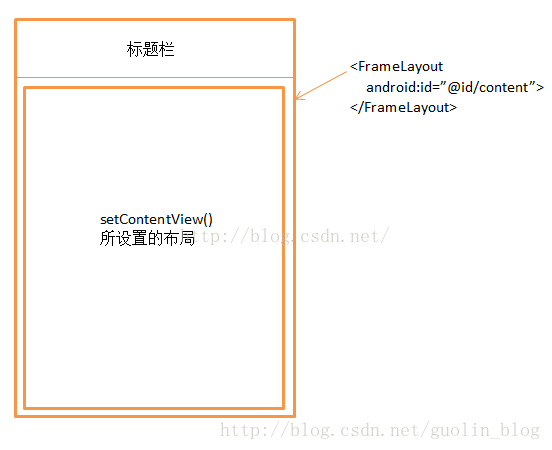 Android 源碼解析:從 setContentView 看 Activity 佈局載入機制
從 setContentView 開始Activity 初始化時,常會呼叫 setContentView 來載入 XML 佈局。這一行程式看似簡單,實際上會經過 Acti
 Android 毛玻璃效果側滑菜單實作
實現目標 毛玻璃效果(也稱高斯模糊)的原理是:把背後的畫面模糊化並降低不透明度,看起來就像隔著一層磨砂玻璃。效果圖如下: 它本質上是「透明 + 背景高斯模糊」。這套做法