

編輯:關於 Android 程式設計
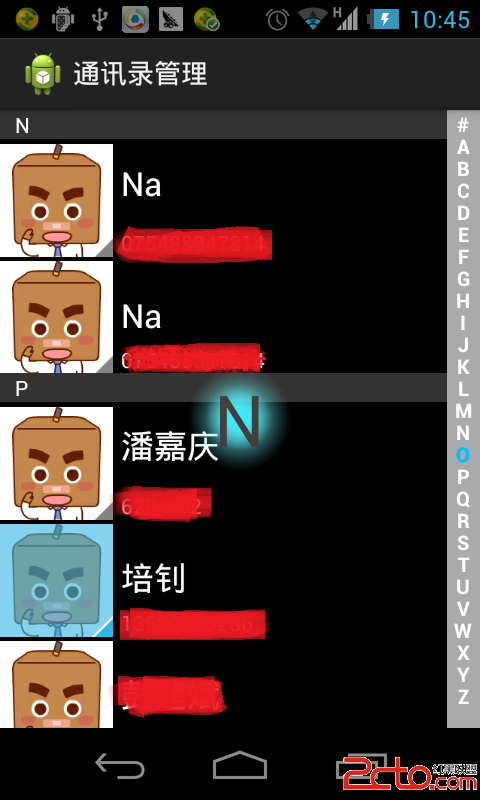
本系列文章將分三篇講解如何在 Android 中取得聯絡人、通話記錄與簡訊。本篇聚焦於聯絡人列表的異步查詢與顯示,包含分組顯示與快速索引條。相關內容是從一個開源專案簡化而來,方便讀者清楚理解 Android 資料庫操作與異步查詢的實作。
<!-- 讀聯絡人權限 -->
<uses-permission android:name="android.permission.READ_CONTACTS" />
<!-- 寫聯絡人權限 -->
<uses-permission android:name="android.permission.WRITE_CONTACTS" />
<!-- 撥號權限 -->
<uses-permission android:name="android.permission.CALL_PHONE" />
<!-- 讀簡訊權限 -->
<uses-permission android:name="android.permission.READ_SMS" />
contact_list_view.xml 使用自訂的 SlidingLinearLayout 包住 ListView,右側加上自訂的 QuickAlphabeticBar 快速索引條:
<RelativeLayout xmlns:android="https://schemas.android.com/apk/res/android"
    android:id="@+id/contact_list_view"
    android:layout_width="match_parent"
    android:layout_height="match_parent"
    android:background="#000000" >

    <com.suntek.contact.view.SlidingLinearLayout
        android:id="@+id/slidingview"
        android:layout_width="match_parent"
        android:layout_height="match_parent"
        android:layout_alignParentTop="true" >
        <ListView
            android:id="@+id/contact_list"
            android:layout_width="match_parent"
            android:layout_height="match_parent"
            android:cacheColorHint="#000000"
            android:divider="#00000000"
            android:fadingEdge="none"
            android:scrollbars="none"
            android:scrollingCache="false"
            android:visibility="visible" />
    </com.suntek.contact.view.SlidingLinearLayout>

    <com.suntek.contact.view.QuickAlphabeticBar
        android:id="@+id/fast_scroller"
        android:layout_width="22dp"
        android:layout_height="match_parent"
        android:layout_alignParentRight="true"
        android:background="@null" />
</RelativeLayout>
用來保存聯絡人資訊(姓名、電話、排序鍵、相片 id、查詢鍵、拼音等):
public class ContactBean {
    private int contactId;        // id
    private String desplayName;   // 姓名
    private String phoneNum;      // 電話號碼
    private String sortKey;       // 排序用的
    private Long photoId;         // 圖片 id
    private String lookUpKey;
    private int selected = 0;
    private String formattedNumber;
    private String pinyin;        // 姓名拼音
    // getter / setter 省略
}
Activity 中透過繼承 AsyncQueryHandler 的 MyAsyncQueryHandler 進行異步查詢,避免阻塞 UI 主執行緒;查詢完成後於 onQueryComplete 中組裝資料並設定 Adapter:
private class MyAsyncQueryHandler extends AsyncQueryHandler {
    public MyAsyncQueryHandler(ContentResolver cr) {
        super(cr);
    }

    @Override
    protected void onQueryComplete(int token, Object cookie, Cursor cursor) {
        if (cursor != null && cursor.getCount() > 0) {
            contactIdMap = new HashMap<Integer, ContactBean>();
            list = new ArrayList<ContactBean>();
            cursor.moveToFirst();
            for (int i = 0; i < cursor.getCount(); i++) {
                cursor.moveToPosition(i);
                String name = cursor.getString(1);
                String number = cursor.getString(2);
                String sortKey = cursor.getString(3);
                int contactId = cursor.getInt(4);
                Long photoId = cursor.getLong(5);
                String lookUpKey = cursor.getString(6);
                if (!contactIdMap.containsKey(contactId)) {
                    ContactBean contact = new ContactBean();
                    contact.setDesplayName(name);
                    contact.setPhoneNum(number);
                    contact.setSortKey(sortKey);
                    contact.setPhotoId(photoId);
                    contact.setLookUpKey(lookUpKey);
                    list.add(contact);
                    contactIdMap.put(contactId, contact);
                }
            }
            if (list.size() > 0) {
                setAdapter(list);
            }
        }
        super.onQueryComplete(token, cookie, cursor);
    }
}
查詢時透過 ContactsContract.CommonDataKinds.Phone.CONTENT_URI 取得聯絡人 Uri,並以 sort_key COLLATE LOCALIZED asc 排序,讓後續能按首字母分組。Adapter 中會計算每筆資料的首字母並建立 alphaIndexer 索引表,供 QuickAlphabeticBar 快速定位;QuickAlphabeticBar 則是繼承 ImageButton 的自訂元件,透過 onTouchEvent 計算手指位置對應的字母段,呼叫 mList.setSelectionFromTop(...) 讓列表跳到對應位置,並在中间顯示當前字母。
 Android BottomNavigationView底部導航效果實現
BottomNavigationView其實早在Material Design中就出現了,但直到Android Support Library 25才正式加入這個控件。也
 OpenCV 常用基本數據結構梳理與示例
Mat 大概是人們對 OpenCV 最熟悉的類型,但工程中真正高頻出現的還有幾個更輕量的結構。這裡把它們集中梳理一遍: Vec、Scalar、Point、Size、Rec
 Android 如何修改 APK 打包後的預設檔名
用 Android Studio 打包時,輸出的檔案預設就叫 app-release.apk(已簽名)或 app-debug.apk(測試版)。當專案要交付給多個客戶或需
 Android 中涉及的經典設計模式
組合模式 Android 對組合模式的應用可謂隨處可見,最典型的就是 View 和 ViewGroup 類的使用。在 Android UI 設計中,幾乎所有的 widge