

編輯:關於 Android 程式設計
用 ViewPager 搭配 Fragment 做選項卡,是早期 Android 開發中相當經典的一種寫法。以下逐步拆解。
效果圖:
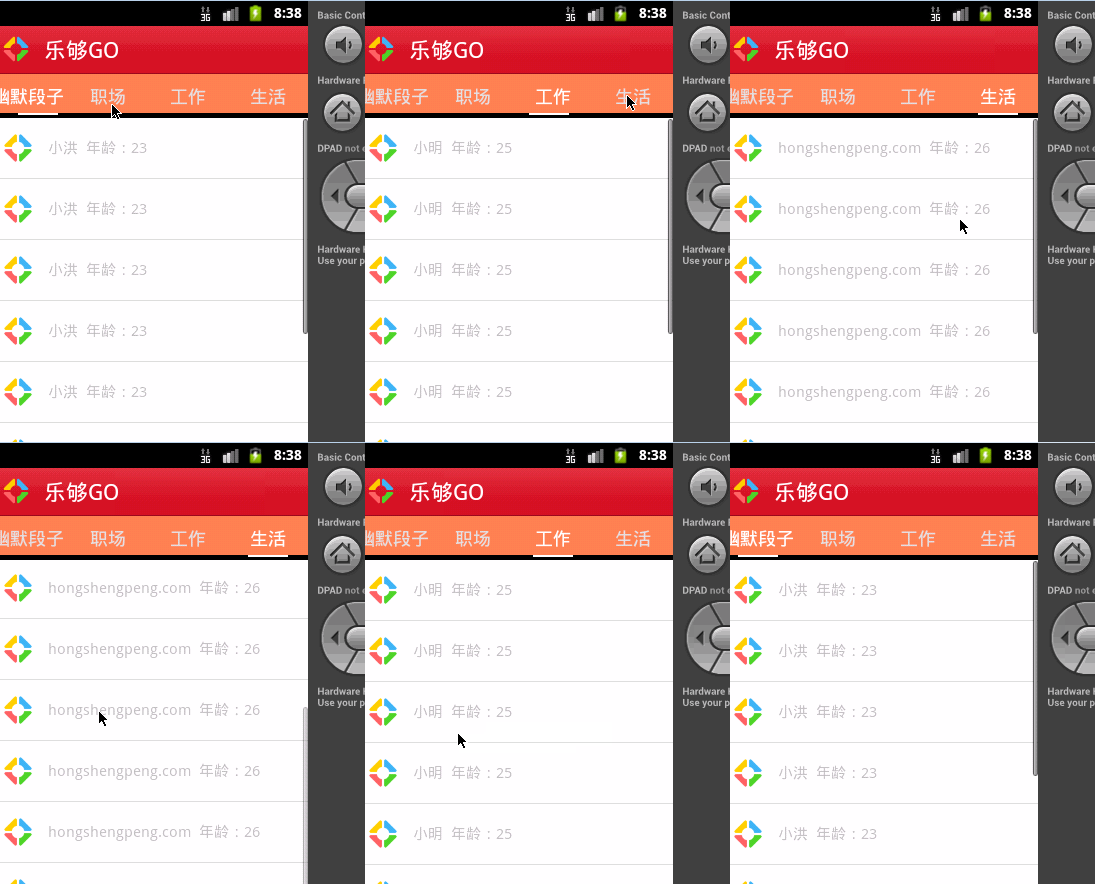
這個 Fragment 透過 newInstance() 接收參數,並在 onCreateView 中把資料填進列表。
public class TestFragment extends Fragment {

    private static final String TAG = "TestFragment";
    private String hello;
    private String defaultHello = "default value";
    private Map<String, Object> maplist;

    static TestFragment newInstance(String s, Map<String, Object> map) {
        TestFragment newFragment = new TestFragment();

        // 早期寫法:直接傳字串
        // Bundle bundle = new Bundle();
        // bundle.putString("hello", s);
        // newFragment.setArguments(bundle);

        // 現在改為傳 Map,需要先包成可序列化物件
        final SerializableMap myMap = new SerializableMap();
        myMap.setMap(map);

        Bundle bundle = new Bundle();
        bundle.putSerializable("map", myMap);
        newFragment.setArguments(bundle);
        return newFragment;
    }

    @Override
    public void onCreate(Bundle savedInstanceState) {
        super.onCreate(savedInstanceState);
        Log.d(TAG, "TestFragment-----onCreate");

        Bundle bundle = getArguments();
        SerializableMap serializableMap = (SerializableMap) bundle.get("map");
        maplist = serializableMap.getMap();
    }

    @Override
    public View onCreateView(LayoutInflater inflater, ViewGroup container,
                             Bundle savedInstanceState) {
        Log.d(TAG, "TestFragment-----onCreateView");
        View view = inflater.inflate(R.layout.lay1, container, false);

        ListView lv = (ListView) view.findViewById(R.id.listView3);
        ContactAdapter hc = new ContactAdapter(
                getActivity().getApplicationContext(), getContact());
        lv.setAdapter(hc);
        lv.setCacheColorHint(0);
        return view;
    }

    private ArrayList<Contact> getContact() {
        ArrayList<Contact> hcList = new ArrayList<Contact>();
        for (int i = 0; i < 10; i++) {
            Contact c0 = new Contact();
            c0.setTxPath(R.drawable.more_game + "");
            c0.setName(maplist.get("userid") + " 年齡:" + maplist.get("age"));
            hcList.add(c0);
        }
        return hcList;
    }

    @Override
    public void onDestroy() {
        super.onDestroy();
        Log.d(TAG, "TestFragment-----onDestroy");
    }
}
這裡有個實務上的重點:Fragment 要接收的參數必須透過 setArguments(Bundle) 傳入,而不能依賴建構子。原因是當系統因記憶體回收或旋轉螢幕而重建 Fragment 時,它會呼叫無參數的建構子,自訂建構子傳入的資料就會全部遺失。而 Bundle 只能放基本型別與可序列化物件,所以 Map 需要先包裝成 SerializableMap 才能傳遞。
public class MyFragmentPagerAdapter extends FragmentPagerAdapter {

    private ArrayList<Fragment> fragmentsList;

    public MyFragmentPagerAdapter(FragmentManager fm) {
        super(fm);
    }

    public MyFragmentPagerAdapter(FragmentManager fm,
                                  ArrayList<Fragment> fragments) {
        super(fm);
        this.fragmentsList = fragments;
    }

    @Override
    public int getCount() {
        return fragmentsList.size();
    }

    @Override
    public Fragment getItem(int arg0) {
        return fragmentsList.get(arg0);
    }

    @Override
    public int getItemPosition(Object object) {
        return super.getItemPosition(object);
    }
}
public class MainActivity extends FragmentActivity {

    private static final String TAG = "MainActivity";

    private ViewPager mPager;
    private ArrayList<Fragment> fragmentsList;
    private ImageView ivBottomLine;
    private TextView tvTabActivity, tvTabGroups, tvTabFriends, tvTabChat;

    private int currIndex = 0;
    private int bottomLineWidth;
    private int offset = 0;
    private int position_one;
    private int position_two;
    private int position_three;
    private Resources resources;

    @Override
    public void onCreate(Bundle savedInstanceState) {
        super.onCreate(savedInstanceState);
        requestWindowFeature(Window.FEATURE_NO_TITLE);
        setContentView(R.layout.main);

        resources = getResources();
        InitWidth();
        InitTextView();
        InitViewPager();
    }

    private void InitTextView() {
        tvTabActivity = (TextView) findViewById(R.id.tv_tab_activity);
        tvTabGroups = (TextView) findViewById(R.id.tv_tab_groups);
        tvTabFriends = (TextView) findViewById(R.id.tv_tab_friends);
        tvTabChat = (TextView) findViewById(R.id.tv_tab_chat);

        tvTabActivity.setOnClickListener(new MyOnClickListener(0));
        tvTabGroups.setOnClickListener(new MyOnClickListener(1));
        tvTabFriends.setOnClickListener(new MyOnClickListener(2));
        tvTabChat.setOnClickListener(new MyOnClickListener(3));
    }

    private void InitViewPager() {
        mPager = (ViewPager) findViewById(R.id.vPager);
        fragmentsList = new ArrayList<Fragment>();

        Map<String, Object> paramMap = new HashMap<String, Object>();
        paramMap.put("userid", "小洪");
        paramMap.put("age", 23);

        Map<String, Object> paramMap2 = new HashMap<String, Object>();
        paramMap2.put("userid", "vatty");
        paramMap2.put("age", 24);

        Map<String, Object> paramMap3 = new HashMap<String, Object>();
        paramMap3.put("userid", "小明");
        paramMap3.put("age", 25);

        Map<String, Object> paramMap4 = new HashMap<String, Object>();
        paramMap4.put("userid", "hongshengpeng.com");
        paramMap4.put("age", 26);

        Fragment activityfragment = TestFragment.newInstance("Hello Activity.", paramMap);
        Fragment groupFragment = TestFragment.newInstance("Hello Group.", paramMap2);
        Fragment friendsFragment = TestFragment.newInstance("Hello Friends.", paramMap3);
        Fragment chatFragment = TestFragment.newInstance("Hello Chat.", paramMap4);

        fragmentsList.add(activityfragment);
        fragmentsList.add(groupFragment);
        fragmentsList.add(friendsFragment);
        fragmentsList.add(chatFragment);

        mPager.setAdapter(new MyFragmentPagerAdapter(
                getSupportFragmentManager(), fragmentsList));
        mPager.setCurrentItem(0);
        mPager.setOnPageChangeListener(new MyOnPageChangeListener());
    }

    private void InitWidth() {
        ivBottomLine = (ImageView) findViewById(R.id.iv_bottom_line);
        bottomLineWidth = ivBottomLine.getLayoutParams().width;
        Log.d(TAG, "cursor imageview width=" + bottomLineWidth);

        DisplayMetrics dm = new DisplayMetrics();
        getWindowManager().getDefaultDisplay().getMetrics(dm);
        int screenW = dm.widthPixels;

        // 計算下劃線需要偏移的距離,讓它能對齊每個 tab 的中心
        offset = (int) ((screenW / 4.0 - bottomLineWidth) / 2);
        Log.i("MainActivity", "offset=" + offset);

        position_one = (int) (screenW / 4.0);
        position_two = position_one * 2;
        position_three = position_one * 3;
    }

    public class MyOnClickListener implements View.OnClickListener {
        private int index = 0;

        public MyOnClickListener(int i) {
            index = i;
        }

        @Override
        public void onClick(View v) {
            mPager.setCurrentItem(index);
        }
    }

    public class MyOnPageChangeListener implements OnPageChangeListener {
        @Override
        public void onPageSelected(int arg0) {
            Animation animation = null;

            switch (arg0) {
                case 0:
                    if (currIndex == 1) {
                        animation = new TranslateAnimation(position_one, 0, 0, 0);
                        tvTabGroups.setTextColor(resources.getColor(R.color.lightwhite));
                    } else if (currIndex == 2) {
                        animation = new TranslateAnimation(position_two, 0, 0, 0);
                        tvTabFriends.setTextColor(resources.getColor(R.color.lightwhite));
                    } else if (currIndex == 3) {
                        animation = new TranslateAnimation(position_three, 0, 0, 0);
                        tvTabChat.setTextColor(resources.getColor(R.color.lightwhite));
                    }
                    tvTabActivity.setTextColor(resources.getColor(R.color.white));
                    break;

                case 1:
                    if (currIndex == 0) {
                        animation = new TranslateAnimation(0, position_one, 0, 0);
                        tvTabActivity.setTextColor(resources.getColor(R.color.lightwhite));
                    } else if (currIndex == 2) {
                        animation = new TranslateAnimation(position_two, position_one, 0, 0);
                        tvTabFriends.setTextColor(resources.getColor(R.color.lightwhite));
                    } else if (currIndex == 3) {
                        animation = new TranslateAnimation(position_three, position_one, 0, 0);
                        tvTabChat.setTextColor(resources.getColor(R.color.lightwhite));
                    }
                    tvTabGroups.setTextColor(resources.getColor(R.color.white));
                    break;

                case 2:
                    if (currIndex == 0) {
                        animation = new TranslateAnimation(0, position_two, 0, 0);
                        tvTabActivity.setTextColor(resources.getColor(R.color.lightwhite));
                    } else if (currIndex == 1) {
                        animation = new TranslateAnimation(position_one, position_two, 0, 0);
                        tvTabGroups.setTextColor(resources.getColor(R.color.lightwhite));
                    } else if (currIndex == 3) {
                        animation = new TranslateAnimation(position_three, position_two, 0, 0);
                        tvTabChat.setTextColor(resources.getColor(R.color.lightwhite));
                    }
                    tvTabFriends.setTextColor(resources.getColor(R.color.white));
                    break;

                case 3:
                    if (currIndex == 0) {
                        animation = new TranslateAnimation(0, position_three, 0, 0);
                        tvTabActivity.setTextColor(resources.getColor(R.color.lightwhite));
                    } else if (currIndex == 1) {
                        animation = new TranslateAnimation(position_one, position_three, 0, 0);
                        tvTabGroups.setTextColor(resources.getColor(R.color.lightwhite));
                    } else if (currIndex == 2) {
                        animation = new TranslateAnimation(position_two, position_three, 0, 0);
                        tvTabFriends.setTextColor(resources.getColor(R.color.lightwhite));
                    }
                    tvTabChat.setTextColor(resources.getColor(R.color.white));
                    break;
            }

            currIndex = arg0;
            animation.setFillAfter(true);
            animation.setDuration(300);
            ivBottomLine.startAnimation(animation);
        }

        @Override
        public void onPageScrolled(int arg0, float arg1, int arg2) { }

        @Override
        public void onPageScrollStateChanged(int arg0) { }
    }
}
這裡的核心思路是:底部那條下劃線用 TranslateAnimation 在幾個固定位置之間平移,而每個位置由螢幕寬度除以 4 推算而來。切換時同步改變文字顏色,就能做出「選中態」的視覺回饋。
lay1.xml(含列表)
<?xml version="1.0" encoding="utf-8"?>
<LinearLayout xmlns:android="https://schemas.android.com/apk/res/android"
    android:layout_width="fill_parent"
    android:layout_height="fill_parent"
    android:background="#fff"
    android:orientation="vertical" >

    <TextView
        android:id="@+id/tv_hello"
        android:layout_width="wrap_content"
        android:layout_height="wrap_content"
        android:text="TextView"
        android:visibility="gone" />

    <ListView
        android:id="@+id/listView3"
        android:layout_width="match_parent"
        android:layout_height="wrap_content"
        android:cacheColorHint="@android:color/transparent"
        android:divider="@drawable/reader_item_divider"
        android:listSelector="@android:color/transparent" >
    </ListView>
</LinearLayout>
lay2.xml
<?xml version="1.0" encoding="utf-8"?>
<LinearLayout xmlns:android="https://schemas.android.com/apk/res/android"
    android:layout_width="fill_parent"
    android:layout_height="fill_parent"
    android:orientation="vertical"
    android:background="#FF8684" >
</LinearLayout>
lay3.xml 與 lay2.xml 結構相同,僅背景色不同:
<?xml version="1.0" encoding="utf-8"?>
<LinearLayout xmlns:android="https://schemas.android.com/apk/res/android"
    android:layout_width="fill_parent"
    android:layout_height="fill_parent"
    android:orientation="vertical"
    android:background="#1586FF" >
</LinearLayout>
<?xml version="1.0" encoding="utf-8"?>
<LinearLayout xmlns:android="https://schemas.android.com/apk/res/android"
    android:layout_width="fill_parent"
    android:layout_height="fill_parent"
    android:orientation="vertical" >

    <LinearLayout
        android:layout_width="match_parent"
        android:layout_height="wrap_content"
        android:orientation="vertical" >

        <LinearLayout
            android:layout_width="match_parent"
            android:layout_height="48dip"
            android:background="@drawable/android_title_bg" >

            <ImageView
                android:id="@+id/imageView1"
                android:layout_width="36dip"
                android:layout_height="36dip"
                android:layout_gravity="center_vertical"
                android:layout_marginLeft="10dip"
                android:src="@drawable/more_game" />

            <TextView
                android:id="@+id/textView1"
                android:layout_width="wrap_content"
                android:layout_height="wrap_content"
                android:layout_gravity="center_vertical"
                android:layout_marginLeft="10dip"
                android:text="樂夠GO"
                android:textAppearance="?android:attr/textAppearanceLarge" />
        </LinearLayout>

        <LinearLayout
            android:id="@+id/linearLayout1"
            android:layout_width="fill_parent"
            android:layout_height="wrap_content"
            android:background="@color/coral"
            android:paddingBottom="5dip"
            android:paddingTop="10dip" >

            <TextView
                android:id="@+id/tv_tab_activity"
                android:layout_width="fill_parent"
                android:layout_height="fill_parent"
                android:layout_weight="1.0"
                android:gravity="center"
                android:text="@string/tab_1"
                android:textColor="@color/white"
                android:textSize="18sp" />

            <TextView
                android:id="@+id/tv_tab_groups"
                android:layout_width="fill_parent"
                android:layout_height="fill_parent"
                android:layout_weight="1.0"
                android:gravity="center"
                android:text="@string/tab_2"
                android:textColor="@color/lightwhite"
                android:textSize="18sp" />

            <TextView
                android:id="@+id/tv_tab_friends"
                android:layout_width="fill_parent"
                android:layout_height="fill_parent"
                android:layout_weight="1.0"
                android:gravity="center"
                android:text="@string/tab_3"
                android:textColor="@color/lightwhite"
                android:textSize="18sp" />

            <TextView
                android:id="@+id/tv_tab_chat"
                android:layout_width="fill_parent"
                android:layout_height="fill_parent"
                android:layout_weight="1.0"
                android:gravity="center"
                android:text="@string/tab_4"
                android:textColor="@color/lightwhite"
                android:textSize="18sp" />
        </LinearLayout>

        <LinearLayout
            android:layout_width="match_parent"
            android:layout_height="wrap_content"
            android:layout_gravity="bottom"
            android:orientation="vertical"
            android:paddingBottom="3dip" >

            <ImageView
                android:id="@+id/iv_bottom_line"
                android:layout_width="40dip"
                android:layout_height="2dip"
                android:layout_marginLeft="20dip"
                android:scaleType="matrix"
                android:src="#fff" />
        </LinearLayout>
    </LinearLayout>
</LinearLayout>
最後提醒一個容易忽略的細節:ViewPager 在 main.xml 中也要記得宣告(id 為 vPager),並放在 tab 選單下方,否則 InitViewPager() 會拿到 null。
源碼程式下載。
 Android Banner 輪播實作:打造可自動播放、可手動滑動的廣告循環效果
前言:很多 app 的頂部 Banner 都能自動循環播放多張廣告圖,還支援手指滑動且首尾相接。原本以為單靠 ViewPager 就能搞定,結果 ViewPager 並不
 Android Activity切換與數據回傳完整解析
在Android開發中,Activity之間切換與資料傳遞是非常基礎但重要的能力。若要從主頁面開啟另一個頁面,並在對方完成操作後把結果帶回來,通常會使用Intent搭配s
 Activity 跳轉動畫:從介面某位置「裂開拉伸」的炫酷過場
需求:Activity(或 Fragment)跳轉時,當前界面從某個位置裂開,上下各自拉出手機螢幕,之後跳轉到目標 Activity。整體效果如下圖。 思路: 1、在
 手機看NBA直播用什麼App?三個可用的體育轉播選擇
出門在外遇上比賽時間,手機就是唯一的電視。以下整理幾款能用手機收看 NBA 與其他體育賽事的應用,各有側重,依需求挑就好。Dopool 手機電視畫面流暢度與畫質表現不錯,