

編輯:關於 Android 程式設計
再仔細測試,App 上線後仍會在使用者五花八門的機型與操作下遇到意料之外的崩潰。與其等負評出現,不如讓 App 自己在崩潰時把堆疊資訊收集起來,引導使用者寄回給開發者。本文示範完整流程,並說明為何某些「強制關閉 App」的直覺寫法會失效。
整體效果:崩潰後跳出回報畫面,使用者點擊即以 Email 送出錯誤資訊。
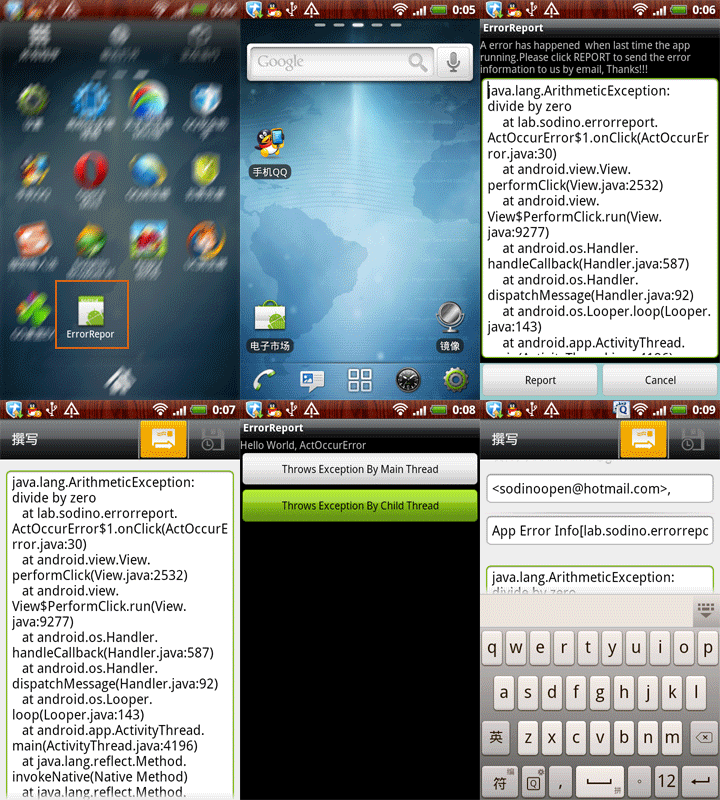
主執行緒(UI 執行緒)拋出的未捕捉例外,先把資訊寫入檔案並結束整個應用,下次啟動時進入回報畫面;非 UI 執行緒拋出的例外則立即喚起回報畫面。之所以要分兩路處理,是因為主執行緒崩潰後畫面已凍結,直接跳轉會出現 ANR,只能先落盤再重啟。
Application.onCreate() 是整個程式的入口,在這裡註冊自訂的異常處理器即可攔下所有未捕捉例外:
ueHandler = new UEHandler(this); // 設置異常處理實例
Thread.setDefaultUncaughtExceptionHandler(ueHandler);
UEHandler 實作 Thread.UncaughtExceptionHandler,在 uncaughtException() 中把 Throwable 的堆疊寫進 ByteArrayOutputStream 再轉字串:
// fetch Exception Info
String info = null;
ByteArrayOutputStream baos = null;
PrintStream printStream = null;
try {
    baos = new ByteArrayOutputStream();
    printStream = new PrintStream(baos);
    ex.printStackTrace(printStream);
    byte[] data = baos.toByteArray();
    info = new String(data);
    data = null;
} catch (Exception e) {
    e.printStackTrace();
} finally {
    try {
        if (printStream != null) {
            printStream.close();
        }
        if (baos != null) {
            baos.close();
        }
    } catch (Exception e) {
        e.printStackTrace();
    }
}
直覺上會想用下面三種方式之一,但它們在這個時機全都無效:
// 3.1
android.os.Process.killProcess(android.os.Process.myPid());

// 3.2
ActivityManager am = (ActivityManager) getSystemService(ACTIVITY_SERVICE);
am.restartPackage("lab.sodino.errorreport");

// 3.3
System.exit(0);
原因在於 uncaughtException 返回後,系統還會接手處理這個例外並顯示「應用無回應/已停止」的系統對話框,你在其中做的任何結束動作都會被覆蓋。
可行的替代做法是「軟性退出」:在 Application 中宣告一個 need2Exit 旗標,啟動時設為 false,崩潰處理時設為 true。每個 Activity 在 onStart 中檢查這個旗標,若為 true 就自行 finish(),於是整串 Activity 會依生命週期序序退場,達到完整退出的效果。這個做法同時解決了「已開啟多個 Activity 時如何一次全部關閉」的問題。
package lab.sodino.errorreport;

import java.io.File;
import android.app.Application;

public class SoftApplication extends Application {
    /** "/data/data/<app_package>/files/error.log" */
    public static final String PATH_ERROR_LOG = File.separator + "data" + File.separator + "data"
            + File.separator + "lab.sodino.errorreport" + File.separator + "files"
            + File.separator + "error.log";

    /** 標識是否需要退出。為 true 時表示當前的 Activity 要執行 finish()。 */
    private boolean need2Exit;

    private UEHandler ueHandler;

    public void onCreate() {
        need2Exit = false;
        ueHandler = new UEHandler(this);
        Thread.setDefaultUncaughtExceptionHandler(ueHandler);
    }

    public void setNeed2Exit(boolean bool) {
        need2Exit = bool;
    }

    public boolean need2Exit() {
        return need2Exit;
    }
}
package lab.sodino.errorreport;

import java.io.File;
import java.io.FileInputStream;
import android.app.Activity;
import android.content.Intent;
import android.os.Bundle;
import android.util.Log;
import android.view.View;
import android.widget.Button;

public class ActOccurError extends Activity {
    private SoftApplication softApplication;

    @Override
    public void onCreate(Bundle savedInstanceState) {
        super.onCreate(savedInstanceState);
        setContentView(R.layout.main);
        softApplication = (SoftApplication) getApplication();
        // 一開始進入程序恢復為 need2Exit=false
        softApplication.setNeed2Exit(false);
        Log.d("ANDROID_LAB", "ActOccurError.onCreate()");

        Button btnMain = (Button) findViewById(R.id.btnThrowMain);
        btnMain.setOnClickListener(new Button.OnClickListener() {
            public void onClick(View v) {
                Log.d("ANDROID_LAB", "Thread.main.run()");
                int i = 0;
                i = 100 / i; // 故意製造例外
            }
        });

        Button btnChild = (Button) findViewById(R.id.btnThrowChild);
        btnChild.setOnClickListener(new Button.OnClickListener() {
            public void onClick(View v) {
                new Thread() {
                    public void run() {
                        Log.d("ANDROID_LAB", "Thread.child.run()");
                        int i = 0;
                        i = 100 / i;
                    }
                }.start();
            }
        });

        // 處理記錄於 error.log 中的異常
        String errorContent = getErrorLog();
        if (errorContent != null) {
            Intent intent = new Intent(this, ActErrorReport.class);
            intent.setFlags(Intent.FLAG_ACTIVITY_NEW_TASK);
            intent.putExtra("error", errorContent);
            intent.putExtra("by", "error.log");
            startActivity(intent);
        }
    }

    public void onStart() {
        super.onStart();
        if (softApplication.need2Exit()) {
            Log.d("ANDROID_LAB", "ActOccurError.finish()");
            ActOccurError.this.finish();
        }
    }

    /** 讀取是否有未處理的報錯信息,每次讀取後都會清空 error.log */
    private String getErrorLog() {
        File fileErrorLog = new File(SoftApplication.PATH_ERROR_LOG);
        String content = null;
        FileInputStream fis = null;
        try {
            if (fileErrorLog.exists()) {
                byte[] data = new byte[(int) fileErrorLog.length()];
                fis = new FileInputStream(fileErrorLog);
                fis.read(data);
                content = new String(data);
                data = null;
            }
        } catch (Exception e) {
            e.printStackTrace();
        } finally {
            try {
                if (fis != null) {
                    fis.close();
                }
                if (fileErrorLog.exists()) {
                    fileErrorLog.delete();
                }
            } catch (Exception e) {
                e.printStackTrace();
            }
        }
        return content;
    }
}
package lab.sodino.errorreport;

import android.app.Activity;
import android.content.Intent;
import android.os.Bundle;
import android.util.Log;
import android.view.View;
import android.widget.Button;
import android.widget.EditText;
import android.widget.TextView;

public class ActErrorReport extends Activity {
    private SoftApplication softApplication;
    private String info;

    /** 標識來處 */
    private String by;

    private Button btnReport;
    private Button btnCancel;
    private BtnListener btnListener;

    public void onCreate(Bundle savedInstanceState) {
        super.onCreate(savedInstanceState);
        setContentView(R.layout.report);
        softApplication = (SoftApplication) getApplication();
        by = getIntent().getStringExtra("by");
        info = getIntent().getStringExtra("error");

        TextView txtHint = (TextView) findViewById(R.id.txtErrorHint);
        txtHint.setText(getErrorHint(by));

        EditText editError = (EditText) findViewById(R.id.editErrorContent);
        editError.setText(info);

        btnListener = new BtnListener();
        btnReport = (Button) findViewById(R.id.btnREPORT);
        btnCancel = (Button) findViewById(R.id.btnCANCEL);
        btnReport.setOnClickListener(btnListener);
        btnCancel.setOnClickListener(btnListener);
    }

    private String getErrorHint(String by) {
        String append = "";
        if ("uehandler".equals(by)) {
            append = " when the app running";
        } else if ("error.log".equals(by)) {
            append = " when last time the app running";
        }
        return String.format(getResources().getString(R.string.errorHint), append, 1);
    }

    public void onStart() {
        super.onStart();
        if (softApplication.need2Exit()) {
            Log.d("ANDROID_LAB", "ActErrorReport.finish()");
            ActErrorReport.this.finish();
        }
    }

    class BtnListener implements Button.OnClickListener {
        @Override
        public void onClick(View v) {
            if (v == btnReport) {
                // 需要 android.permission.SEND 權限
                Intent mailIntent = new Intent(Intent.ACTION_SEND);
                mailIntent.setType("plain/text");
                String[] arrReceiver = { "sodinoopen@hotmail.com" };
                String mailSubject = "App Error Info[" + getPackageName() + "]";
                mailIntent.putExtra(Intent.EXTRA_EMAIL, arrReceiver);
                mailIntent.putExtra(Intent.EXTRA_SUBJECT, mailSubject);
                mailIntent.putExtra(Intent.EXTRA_TEXT, info);
                startActivity(Intent.createChooser(mailIntent, "Mail Sending..."));
                ActErrorReport.this.finish();
            } else if (v == btnCancel) {
                ActErrorReport.this.finish();
            }
        }
    }

    public void finish() {
        super.finish();
        if ("uehandler".equals(by)) {
            // 以下三種直覺寫法在這個時機都會失效:
            // android.os.Process.killProcess(android.os.Process.myPid());
            // am.restartPackage("lab.sodino.errorreport");
            // System.exit(0);
            // 改為軟性退出:讓後續 Activity 在 onStart 自行 finish
            softApplication.setNeed2Exit(true);
        }
    }
}
package lab.sodino.uncaughtexception;

import java.io.ByteArrayOutputStream;
import java.io.File;
import java.io.FileOutputStream;
import java.io.PrintStream;
import android.content.Intent;
import android.util.Log;

public class UEHandler implements Thread.UncaughtExceptionHandler {
    private SoftApplication softApp;
    private File fileErrorLog;

    public UEHandler(SoftApplication app) {
        softApp = app;
        fileErrorLog = new File(SoftApplication.PATH_ERROR_LOG);
    }

    @Override
    public void uncaughtException(Thread thread, Throwable ex) {
        // 取得例外資訊
        String info = null;
        ByteArrayOutputStream baos = null;
        PrintStream printStream = null;
        try {
            baos = new ByteArrayOutputStream();
            printStream = new PrintStream(baos);
            ex.printStackTrace(printStream);
            byte[] data = baos.toByteArray();
            info = new String(data);
            data = null;
        } catch (Exception e) {
            e.printStackTrace();
        } finally {
            try {
                if (printStream != null) {
                    printStream.close();
                }
                if (baos != null) {
                    baos.close();
                }
            } catch (Exception e) {
                e.printStackTrace();
            }
        }

        long threadId = thread.getId();
        Log.d("ANDROID_LAB", "Thread.getName()=" + thread.getName()
                + " id=" + threadId + " state=" + thread.getState());
        Log.d("ANDROID_LAB", "Error[" + info + "]");

        if (threadId != 1) {
            // 子執行緒拋出:畫面尚未凍結,可直接跳到回報界面
            Intent intent = new Intent(softApp, ActErrorReport.class);
            intent.setFlags(Intent.FLAG_ACTIVITY_NEW_TASK);
            intent.putExtra("error", info);
            intent.putExtra("by", "uehandler");
            softApp.startActivity(intent);
        } else {
            // 主執行緒拋出:畫面已凍結,先重啟並落盤
            Intent intent = new Intent(softApp, ActOccurError.class);
            intent.setFlags(Intent.FLAG_ACTIVITY_NEW_TASK);
            softApp.startActivity(intent);
            write2ErrorLog(fileErrorLog, info);
            android.os.Process.killProcess(android.os.Process.myPid());
        }
    }

    private void write2ErrorLog(File file, String content) {
        FileOutputStream fos = null;
        try {
            if (file.exists()) {
                file.delete(); // 清空之前的記錄
            } else {
                file.getParentFile().mkdirs();
            }
            file.createNewFile();
            fos = new FileOutputStream(file);
            fos.write(content.getBytes());
        } catch (Exception e) {
            e.printStackTrace();
        } finally {
            try {
                if (fos != null) {
                    fos.close();
                }
            } catch (Exception e) {
                e.printStackTrace();
            }
        }
    }
}
res/layout/main.xml:
<?xml version="1.0" encoding="utf-8"?>
<LinearLayout xmlns:android="https://schemas.android.com/apk/res/android"
    android:orientation="vertical"
    android:layout_width="fill_parent"
    android:layout_height="fill_parent" >
    <TextView
        android:layout_width="fill_parent"
        android:layout_height="wrap_content"
        android:text="@string/hello" />
    <Button
        android:layout_width="fill_parent"
        android:layout_height="wrap_content"
        android:text="Throws Exception By Main Thread"
        android:id="@+id/btnThrowMain" ></Button>
    <Button
        android:layout_width="fill_parent"
        android:layout_height="wrap_content"
        android:text="Throws Exception By Child Thread"
        android:id="@+id/btnThrowChild" ></Button>
</LinearLayout>
res/layout/report.xml:
<?xml version="1.0" encoding="utf-8"?>
<LinearLayout xmlns:android="https://schemas.android.com/apk/res/android"
    android:orientation="vertical"
    android:layout_width="fill_parent"
    android:layout_height="fill_parent">
    <TextView
        android:layout_width="fill_parent"
        android:layout_height="wrap_content"
        android:text="@string/errorHint"
        android:id="@+id/txtErrorHint" />
    <EditText
        android:layout_width="fill_parent"
        android:layout_height="wrap_content"
        android:id="@+id/editErrorContent"
        android:editable="false"
        android:layout_weight="1"></EditText>
    <LinearLayout
        android:layout_width="fill_parent"
        android:layout_height="wrap_content"
        android:background="#96cdcd"
        android:gravity="center"
        android:orientation="horizontal">
        <Button
            android:layout_width="fill_parent"
            android:layout_height="wrap_content"
            android:text="Report"
            android:id="@+id/btnREPORT"
            android:layout_weight="1"></Button>
        <Button
            android:layout_width="fill_parent"
            android:layout_height="wrap_content"
            android:text="Cancel"
            android:id="@+id/btnCANCEL"
            android:layout_weight="1"></Button>
    </LinearLayout>
</LinearLayout>
strings.xml 中的提示文字:
<string name="errorHint">A error has happened %1$s. Please click <i><b>"REPORT"</b></i> to send the error information to us by email, Thanks!!!</string>
最後別忘了在 AndroidManifest.xml 中對 application 節點設定 android:name=".SoftApplication",否則整套機制不會啟動。
這套自行攔截的做法觀念完全正確,但實務上有兩個必須修正的地方。第一,把例外寫到 data/data 底下的檔案在 Android 6.0 之後需要處理 App 私有目錄權限,建議改用 getFilesDir() 取得路徑,而非寫死絕對路徑。第二,用 Intent.ACTION_SEND 寄送堆疊要求使用者手動寄信,轉換率極低。
目前的標準解法是接入 Crashlytics 或 Sentry 這類崩潰管理平台:它同樣是透過 UncaughtExceptionHandler 攔截,但會自動附上機型、系統版本、記憶體與操作軌跡,並在下次啟動時上傳,完全不需要使用者介入,也能在後台按版本與裝置聚合分析。自製版本適合當作理解原理的練習,上線請直接用成熟方案。
 自定義柱狀圖:帶生長動畫與點擊彈窗提示
專案裡要用到各種圖表。原本打算直接用 MPAndroidChart——這個庫確實強大,接入也快,但最終發現和設計稿差異太大,改起來還不如自己寫。於是就有了這份柱狀圖 de
 ContentProvider 完全指南:跨應用資料分享、UriMatcher 與單元測試實作
一、ContentProvider 基本概念 為了讓不同應用之間能安全地交換資料,Android 提供了 ContentProvider。它是跨應用資料交換的標準 API
 Android Studio 實務:代碼混淆、多管道打包與反編譯檢查
混淆設定在 Android Studio 中,可在 build.gradle 的 buildTypes 裡開啟 minifyEnabled,並指定 proguard-ru
 Android 設計模式之適配器模式(Adapter Pattern)
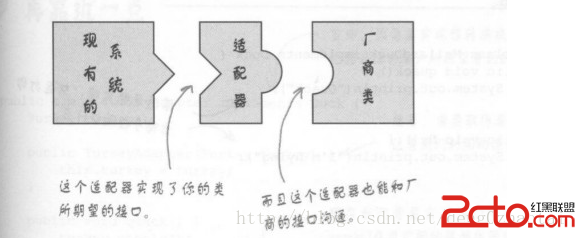
定義 適配器模式的定義是:將一個類的介面,轉換成客戶期望的另一個介面。適配器讓原本介面不相容的類可以協同運作。看下面兩張圖會更清楚: 適配器的另一個價值在於解耦:若日