

編輯:關於 Android 程式設計
佈局檔能搞定的情況是常態,但難免遇到要依資料動態決定視圖結構的場景,這時就得靠 LayoutInflater 在程式碼裡把 XML 變成 View 物件。
顧名思義,Inflate 就是「充氣、撐開」,把一份 XML 描述展開成真正的 View 樹。它和 findViewById() 常被拿來對比,但兩者層次不同:LayoutInflater 拿到的是整份佈局檔對應的 View 物件,而 findViewById() 是在既有 View 樹裡按 id 找某個具體控制項。前者造樹,後者摘葉。
最常見的使用場合是 BaseAdapter.getView():清單項的佈局不可能寫死在 Activity 裡,必須由 Adapter 為每一列即時 inflate 出來。
public class LayoutInflaterActivity extends Activity {
    private EditText et;
    private Button btn;

    @Override
    public void onCreate(Bundle savedInstanceState) {
        super.onCreate(savedInstanceState);

        // 第一種:LayoutInflater.from(this)
        LayoutInflater inflater = LayoutInflater.from(this);
        View layout = inflater.inflate(R.layout.main, null);

        // 第二種:Activity.getLayoutInflater()
        // LayoutInflater inflater = getLayoutInflater();
        // View layout = inflater.inflate(R.layout.main, null);

        // 第三種:直接從系統服務取
        // LayoutInflater inflater =
        //     (LayoutInflater) getSystemService(LAYOUT_INFLATER_SERVICE);
        // View layout = inflater.inflate(R.layout.main, null);

        // 拿到整份佈局後,就能自行組裝、客製控制項
        et = (EditText) layout.findViewById(R.id.edittext);
        et.setBackgroundColor(Color.YELLOW);

        btn = (Button) layout.findViewById(R.id.btn);
        btn.setBackgroundColor(Color.CYAN);

        setContentView(layout);
    }
}
三種寫法最終都指向同一個物件,本質上第一種就是第三種的語法糖:from() 內部呼叫的是 Context 的 getSystemService(LAYOUT_INFLATER_SERVICE),第二種則是 Activity 為自己封裝好的便捷方法。日常開發用第一種最直觀。
getSystemService 是 Context 上的方法,依傳入的名稱常數回傳對應的系統服務物件,這些常數都定義在 Context 類別中:
| 傳入名稱 | 回傳物件 | 用途 |
|---|---|---|
| WINDOW_SERVICE | WindowManager | 管理已開啟的視窗 |
| LAYOUT_INFLATER_SERVICE | LayoutInflater | 取得 XML 定義的 View |
| ACTIVITY_SERVICE | ActivityManager | 管理應用程式的系統狀態 |
| POWER_SERVICE | PowerManager | 電源相關服務 |
| ALARM_SERVICE | AlarmManager | 鬧鐘與定時任務 |
| NOTIFICATION_SERVICE | NotificationManager | 狀態列通知 |
| KEYGUARD_SERVICE | KeyguardManager | 鍵盤鎖/螢幕鎖 |
| LOCATION_SERVICE | LocationManager | 定位服務,如 GPS |
| SEARCH_SERVICE | SearchManager | 搜尋服務 |
| VIBRATOR_SERVICE | Vibrator | 手機震動 |
| CONNECTIVITY_SERVICE | ConnectivityManager | 網路連線狀態 |
| WIFI_SERVICE | WifiManager | Wi-Fi 管理 |
| TELEPHONY_SERVICE | TelephonyManager | 電話相關服務 |
 2.3.1 存儲數據到 data 目錄中
當應用安裝到 Android 後,系統會根據每個應用的包名創建一個 /data/data/包名/ 的文件夾。訪問自己包名下的目錄不需要權限,而且 Android 已經提供
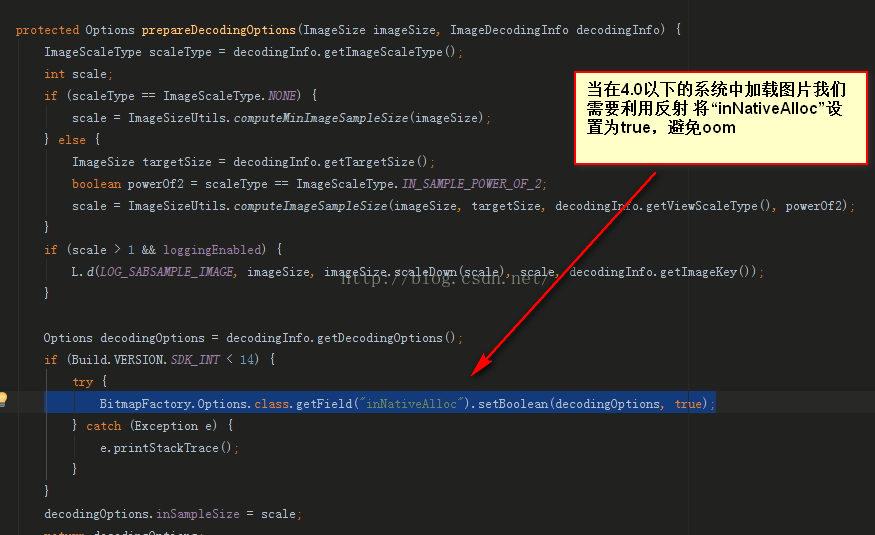 Android 開發解決加載圖片 OOM 問題(兼顧 4.0 以下系統)
我們項目中經常會加載圖片,有時候如果加載圖片過多的話,小則導致程序很卡,重則 OOM 導致 App 掛了。今天翻譯 Android 官方培訓文檔的加載大位圖一章,學習 G
 Android 注解(Annotation)完全解析:元數據的妙用
之前介紹 xUtils 時提過注解,不過只是蜻蜓點水。今天我們就來詳細解剖一下 Android 中注解的使用。 Java 注解是附加在程式碼中的一些元資訊,供某些工具在
 Android ViewPager 翻頁動畫實作:JazzyViewPager 上手
想讓 ViewPager 的切頁效果不只是死板的平移,可以參考這個開源專案:JazzyViewPager。 https://github.com/jfeinstein10